 Chord Lens
AI Bass Stem Splitter
AI Bass Stem Splitter: the bass on its own
Isolate the bass in any song: solo it to hear the line the mix buries, or remove it and play the part yourself over the band. On a YouTube video with the Chrome extension, or by uploading your own audio in the Studio with the chords in time. Free to try: Free splits a 2-minute part.
Last updated
The short version
At a
glance.
hear it, then play it
Chord Lens splits a song into six stems, one of them the bass, so you can listen to the line alone or take it out and play it yourself. Everything else on this page is the detail.
- The bass stemone of six from every split
- Solo itthe line, note by note
- Mute itplay the part over the band
- Chords in timethe root is usually your note
- Slow it downthe pitch stays put
- Loop the rununtil your hands have it
- Change the keythe stems move with it
- YouTube or your own filesextension on YouTube, upload in the Studio
- Free to trya 2-minute part on Free
01 / 10 · What it is
The bass.
On its own.
A bass line is the part most people feel and fewest can hear: it sits under the kick, the guitars cover its top, and small speakers drop its low notes. Hearing it alone is the fastest way to learn it.
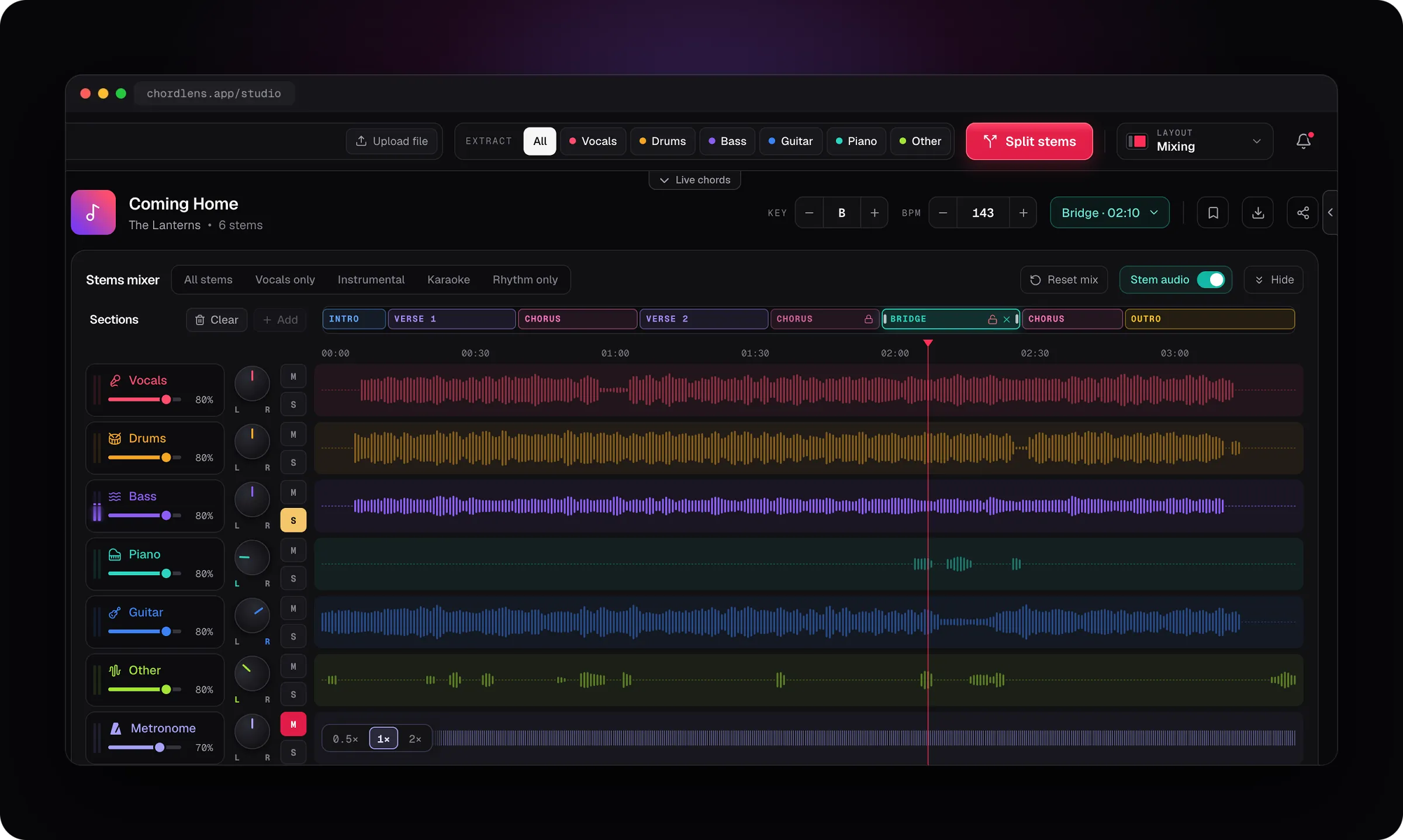
Chord Lens splits the song into six stems, vocals, drums, bass, piano, guitar and the rest, and the bass gets its own fader, solo and mute, with the chords in time on screen so you can see the root under each change.
Remove the bass and the band plays on without it, so you can play the line yourself. Use the Chrome extension on the YouTube video, or upload your own audio in the Studio.
Have the song as a file? The Studio splits MP3, WAV and M4A the same way.
Upload-a-file splitters
Want the song as a file first, then hand back the bass as a file to load somewhere else.
Split where you play
Splits the song you’re watching and keeps the bass, the chords and the loop in one place.
02 / 10 · How to
Remove the bass
in four steps.
a few presses
Open the song
Add Chord Lens to Chrome and open the YouTube video, or upload your own MP3, WAV or M4A in the Studio.
Split the song
Press Split. On Free, pick the 2 minutes you want.
Solo the bass
Press S on Bass to hear the line alone.
Or mute it and play
Press M and play the line over the band, chords on screen.
On a Mac? The Chord Lens app runs the same Studio, with the split on your own computer.
Get the Mac app03 / 10 · The six stems
Six stems.
The bass is one.
Every split gives you the same six stems. The bass is its own, so you can solo it, mute it or set it under the rest.
- Bass
- Vocals
- Drums
- Piano
- Guitar
- Other
Solo it
Hear the line note by note.
Mute it
Play the line over the rest of the band.
Turn it down
Keep a little as a guide while you play.
Rhythm only, one of the mixer’s five mixes, plays the bass and drums together, so you can hear how the line locks to the kick. A metronome sits under the six with a fader of its own, clicking on the song’s beat.
04 / 10 · Practise it
Loop it.
Slow it. Move it.
the bass follows
- Loop
- A–B
- Loop the run and play it until it sits.
- Speed
- 0.75×
- Slow the bass down to hear a fast run note by note; the pitch stays put.
- Key
- −2
- Move the song to a key you can reach, up to 12 semitones in the Studio or 6 in the extension.
The chart keeps running while the bass plays alone: the chord on the beat lights up and the next one waits beside it. The bass usually plays the chord’s root, so the chart tells you where the line is going.
To slow a whole song down without the split, see slow down songs.
05 / 10 · On your computer
Split on your
own computer.
The split runs in your browser on your own computer, not in a queue somewhere. The first time, the Studio sets the splitting engine up: it downloads once, about 140 MB. After that a song splits while you watch the progress, and the engine stays ready for the next one.
Splitting needs a computer, in Chrome or Edge. Phones and tablets don’t give a web page enough memory to split a song, so on a phone you still get the chords, the words and the sections, but not the split.
06 / 10 · How clean
Usually clean.
Honest about the rest.
The bass usually comes out clean enough to learn note by note: little else in a band lives that low.
On small speakers and laptops the low notes are quiet, so the stem can sound thin: turn it up, or use headphones, and the notes are there. A synth bass can split between Bass and Other, and a kick drum tuned close to the bass can leave a thump. It’s a practice tool, not a studio stem.
We don’t print a quality score, because no single number is true of every song. The honest test is your own: split a verse, solo the bass and listen.
Bass sounding thin?
- Turn it up, or use headphones: small speakers drop the lows.
- Solo Bass and Other together for a synth bass.
- Slow it down to hear each note.
- Try a studio version: live takes split less cleanly.
07 / 10 · Compared
Chord Lens vs
other ways to remove bass.
Three ways to hear the bass alone, or the song without it, from a song you heard on YouTube.
| Upload-a-file splitters | Bassless track uploads | By ear | Chord Lens | |
|---|---|---|---|---|
| Works on the YouTube video you watch | No, a file | Only songs uploaded | Yes | Yes |
| The original bass | Yes | Taken out | Yes | Yes |
| Chords in time | No | Rarely | — | Built in |
| Loop and slow | Another app | The player | — | Built in |
| Works on phones | No | Yes | Yes | Chords yes, split no |
| Cost | Per file | Free | Your time | Free to try |
Working a line out by ear is still the best training there is. Chord Lens is for when the mix buries it: you heard the song, and you want the bass alone, or the band without it, with the chords there while you play.
08 / 10 · How players use it
Four ways
players use it.
Learn a bass line
Solo the bass, loop the bar, slow it to 0.75×.
Play the part
Mute the bass and play the line over the band.
Lock with the drums
Pick Rhythm only to hear how the line sits on the kick.
Find the root
Solo the bass under a chord you can’t name: its note is usually the root.
Bassists use it to learn a set before rehearsal, one line at a time. Worship teams use it to learn a new song in the key they play it in, with the stems moved to match.
09 / 10 · What it won’t do
What it
won’t do.
so you know before you split
Not for sharing or publishing
On Free the stems play in Chord Lens. Premium downloads them as MP3 and Pro adds WAV, for your own personal study and practice, not to share or publish.
No split on phones
Splitting needs a computer. On a phone you still get the chords.
No tab
It gives you the bass audio and the chords, not tablature or sheet music.
Synth bass can wander
A synth bass can split between Bass and Other.
Chord Lens is for practising and studying a song yourself: learning it, working out a part, playing along. That kind of personal use is broadly considered fair use under US copyright law, with similar rules elsewhere. Stem downloads on Premium and Pro are for that same personal study, not to share, sell or publish. To publish a cover, use the original audio under YouTube’s licensing, or get a sync license.
10 / 10 · Plans
Free to try.
Free splits a 2-minute part of a song, the part you choose, a few times a day. Premium splits up to 8 minutes of a song and Pro up to 12, which is the whole of most songs, and both download the stems for your own study: MP3 on Premium, WAV on Pro. Chords and the lyrics a song already has stay free on every plan, with no ads. Key and speed are free in Chrome and, once you sign in, in the Studio, for the whole song up to your plan’s song-length limit.
See plans and prices01How do I remove the bass from a song?
Open the video with the Chord Lens extension in Chrome, or upload your own audio in the Studio, press Split, then M on the Bass stem. The band plays on without the bass, with the chords in time.
02Can I hear just the bass?
Yes. Press S on Bass and the line plays alone. Pick Rhythm only to hear the bass and drums together.
03How clean is the bass stem?
Usually clean: little else in a band plays that low. A synth bass can split between Bass and Other, and a low kick drum can leave a thump.
04Why does the bass sound thin?
Small speakers and laptops drop the low notes. Turn the bass up or use headphones, and the notes are there.
05Can I slow the bass down?
Yes. Play from half speed to double with the pitch left where it is, and loop the bars you’re learning. Every stem follows the speed.
06Does it show the notes?
It shows the chords in time, and the bass usually plays each chord’s root. It doesn’t show tab or a bass staff.
07Can I change the key?
Yes. Move the song up or down, up to 12 semitones in the Studio or 6 in the extension, and the bass and every other stem move with it.
08Is it free?
Yes, to try. Free splits a 2-minute part of a song, the part you choose, a few times a day. Chords are free on every plan. Key and speed are free in Chrome and, once you sign in, in the Studio, for the whole song up to your plan’s song-length limit.
09How much of a song can I split on Free?
Free splits 2 minutes of a song, placed where you want it. Premium splits up to 8 minutes and Pro up to 12, which is the whole of most songs.
10Can I do it on my phone?
No. Splitting needs a computer, in Chrome or Edge, because phones don’t give a web page enough memory. On a phone you still get the chords and the words.
11Can I download the bass track?
On Premium you can download the stems as MP3 from the Studio, and Pro adds WAV. Downloads are for your own personal study, not to share or publish; to publish a cover, use YouTube’s licensing or get a sync license. On Free the stems play in Chord Lens.
12Can I use Chord Lens on my own files, or only YouTube?
Both. The Chrome extension works right on the YouTube video you’re watching, listening to the song as it plays. To split stems, upload your own audio in the Studio (MP3, WAV or M4A, up to 50 MB). Premium exports stems as MP3 and Pro adds WAV, for your own study and practice.
13Does it give me bass tabs?
No. It gives you the bass audio on its own and the chords in time, not tablature or sheet music.
14Can I keep a little of the bass?
Yes. Pull the Bass fader down instead of muting it, and keep just enough to follow while you play.
15Is this different from the stem splitter?
It’s the same split. The YouTube stem splitter page is about all six stems; this page is about the bass. Both open in the same Studio.
In short
The whole page
in four lines.
The bass stem.
One of six from every split.
Solo or mute.
Hear the line alone, or play it yourself.
Chords in time.
Loop, slow, change the key.
Free to try.
A 2-minute part on Free; the whole of most songs on Premium and Pro.
Keep going
More from Chord Lens.
All toolsYouTube Stem Splitter
All six stems from your own audio.
YouTube to Chords
The chords of a song, in time.
All Chord Lens tools
Chords, stems, practice and singing.
Learning another part? The same split has a page for each: the guitar stem splitter, drum stem splitter or piano stem splitter.