 Chord Lens
AI chord finder
AI chord finder for your files: drop in a song, get the chords
Find the chords of any song you have as a file: a demo, a voice memo, a band rehearsal, a track you bought. Drop an MP3, WAV or M4A into the Chord Lens Studio and get the chords in time, the key, the tempo and the sections, with the shapes for your instrument. Sign in free to start.
Last updated
The short version
At a
glance.
your file, its chords
Chord Lens listens to an audio file you upload and writes its chords in time, with the key, the tempo and the song’s sections. Everything else on this page is the detail.
- MP3, WAV or M4Adrop it into the Studio
- Chords in timelit as the song plays
- Key and tempofound with the chords
- Sectionsverse, chorus, bridge, marked
- Five instrumentsguitar, bass, ukulele, mandolin, piano
- Change the keythe chart re-spells itself
- Split it toosix stems from your own file
- Signed in, freeuploads need an account
- Free to startnew analyses each month on Free
01 / 10 · What it is
Your file in.
The chords out.
Most chord finders want a song someone has already posted. The song you actually need, a demo from your band, a voice memo of a riff, an old recording, isn’t on any chord site.
Chord Lens analyses the file itself. Drop it into the Studio and it writes the chords in time with the music, finds the key and the tempo, marks the sections and shows the shape to play on your instrument.
Want chords for a YouTube song instead? That’s YouTube to Chords.
Chord sites
Have the songs someone already transcribed, by hand, for the version they heard.
Any file you have
Analyses your recording itself, in time, with the key and sections.
02 / 10 · How to
Find the chords
in four steps.
nothing to install
Open the Studio
Go to chordlens.app/studio on a computer and sign in with Google.
Drop your file
MP3, WAV or M4A. Long files take longer; the Studio shows its progress.
Read the chords
The chords come in time with the song, with the key, the tempo and the sections.
Play along
Pick your instrument, change the key, loop a part, slow it down.
On the Mac? The Chord Lens app runs the same Studio.
Get the Mac app03 / 10 · What you get
Chords, key, tempo
and the sections.
One upload gives you the chart: every chord in time, the key and the tempo, and the song’s sections, ready to read along as it plays.
- Chords
- Key
- Tempo
- Sections
- Shapes
The chart
Chords in time, lit as the song plays.
The key and the tempo
Shown with the chart, before you press play.
The sections
Verse, chorus and bridge, marked on the song.
04 / 10 · Play it
Your instrument.
Your key.
the chart follows
- Shapes
- Guitar
- Guitar, bass, ukulele, mandolin or piano, with a simpler shape when you want one.
- Key
- −2
- Move the song and the chords are re-spelled in the new key.
- Loop
- Bars 9–12
- Loop the part you’re learning and slow it down.
05 / 10 · Your file
Your song
stays yours.
Your file goes to Chord Lens to be analysed and comes back as a chart in your Studio. Each upload is a new analysis, so it counts toward your plan’s analyses and is held to its song length.
The file itself plays from your own browser tab, and the chart is kept on your computer, so the song opens again with its chords. Split it into stems and the split runs on your computer too.
06 / 10 · How accurate
Right on most songs.
Honest about the rest.
Songs with a clear band and steady chords come out right most of the time, in time with the music.
Busy jazz voicings, very quiet or noisy recordings and songs with no clear harmony are harder: a chord can come out simpler than what’s played, or land a beat late. Check it by ear and play along.
A chord looks wrong?
- Turn on Simplify to read the basic chord under it.
- Try a cleaner recording of the same song.
- Loop the bar and listen at a slower speed.
- Check the key: a chart in the wrong key reads strangely.
07 / 10 · Compared
Chord Lens vs
other chord finders.
Three ways to get the chords of a song you have as a file, and where they differ.
| Chord sites | Chord apps | By ear | Chord Lens | |
|---|---|---|---|---|
| Works on your own file | No | Some | Yes | Yes |
| Chords in time | No | Some | In your head | Yes |
| Key, tempo, sections | Sometimes | Some | — | Built in |
| Shapes for your instrument | Guitar | Some | — | Five instruments |
| Stems too | No | Rarely | No | Yes |
| Cost | Free, with ads | Per app | Your time | Free to start |
08 / 10 · How players use it
Four ways
players use it.
Chart a band demo
Drop the rehearsal recording and share the chords with the band.
Finish a song idea
Record the riff on your phone, upload it, see what you played.
Learn a rare track
A song no chord site has: the file is enough.
Teach a student
Upload the song, loop the hard bar, slow it down.
09 / 10 · What it won’t do
What it
won’t do.
so you know before you upload
No uploads signed out
Uploading needs a free account.
Made for a computer
Upload from a computer, in the Studio or the Mac app. Splitting stems needs a computer too.
No perfect charts
It’s right most of the time, not every time. Check it by ear.
Not sheet music
It writes chords, not the notes of every part.
10 / 10 · Plans
Free to start.
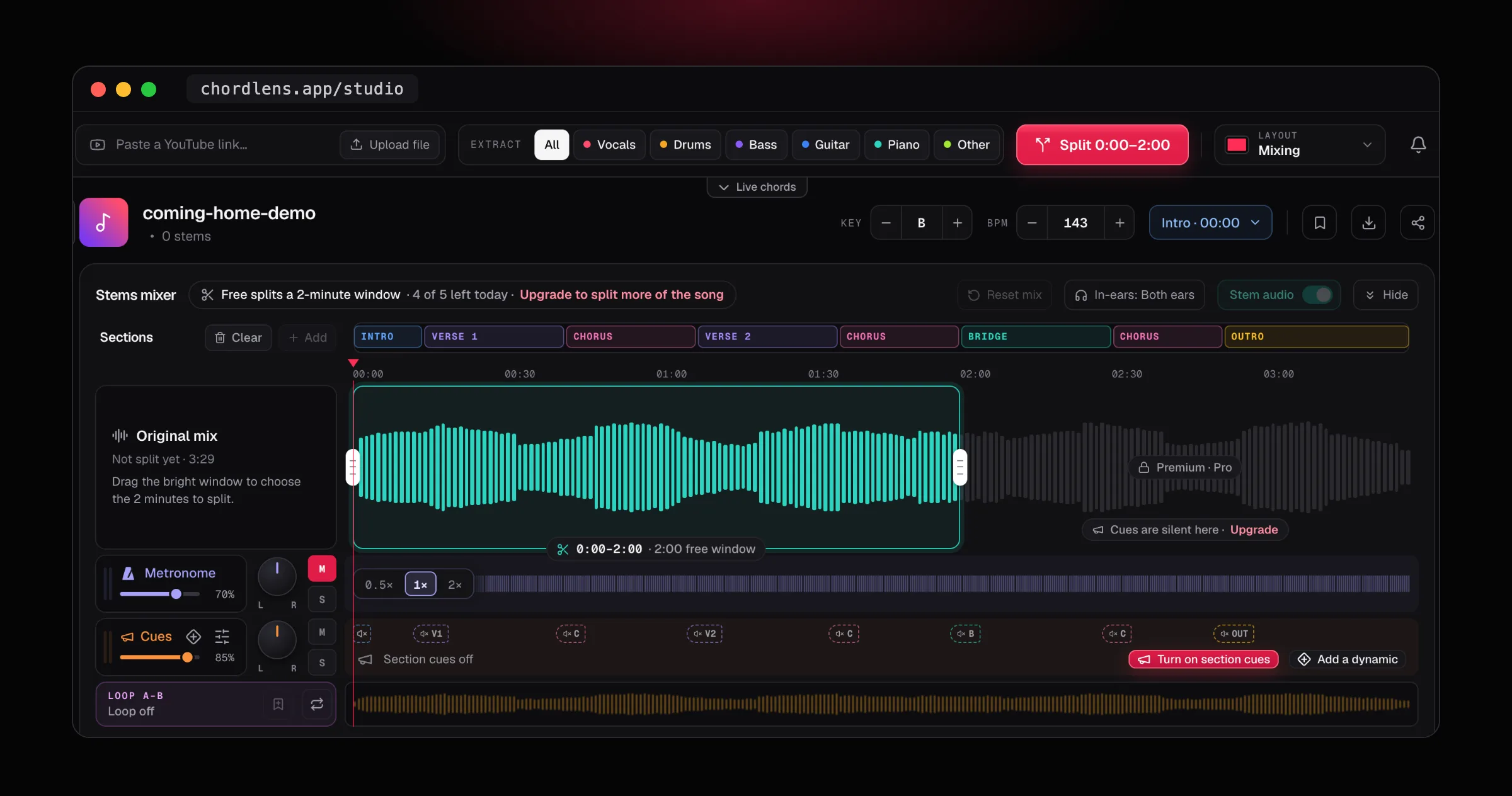
Uploading needs a free account. Free includes a number of new analyses each month, and every upload is a new one; Premium and Pro lift the monthly limit and take longer songs. Reading your charts stays free. To split the file into stems, Free splits a 2-minute window you choose, counted toward the day’s splits; Premium and Pro split more of the song.
See plans and prices01How do I find the chords of an MP3?
Open the Chord Lens Studio, sign in, and drop the MP3 in. It analyses the file and shows the chords in time with the music, with the key, the tempo and the sections.
02Which files can I upload?
MP3, WAV or M4A, in the Studio or the Chord Lens app for Mac. Drop the file anywhere on the Studio, or press Upload file.
03Does it find the key and the tempo?
Yes. The key and the tempo in BPM come with the chords, and show beside the song’s name before you press play.
04Does it mark the verse and chorus?
Yes. The song’s sections, such as intro, verse, chorus and bridge, are marked along the song, so you can jump to one or loop it.
05How accurate is it?
Songs with a clear band and steady chords come out right most of the time. Busy jazz voicings, noisy recordings and songs with no clear harmony are harder, so check it by ear.
06Which instruments does it show shapes for?
Guitar, bass, ukulele, mandolin and piano. Turn on Simplify for an easier version of each chord.
07Do I need an account?
Yes, to upload. Sign in free with Google; signed out, the Studio says “Sign in to upload”.
08Is it free?
Yes, to start. Free includes a number of new analyses each month, and reading your charts stays free. Premium and Pro lift the monthly limit, take longer songs and split more of a song into stems.
09Does every upload count?
Yes. Every upload is a new analysis, so it counts toward your plan’s analyses for the month. A file already charted on this computer opens with its kept chart instead.
10How long a file can I upload?
Each upload is held to your plan’s song length, and Premium and Pro take longer songs. The Studio reads files up to 25 minutes; a long file takes a few minutes to analyse, and the Studio shows its progress.
11Can I upload from my phone?
Upload from a computer, in the Studio or the Mac app. Splitting a song into stems needs a computer too.
12Can I change the key of the chart?
Yes. Move the key up or down and every chord on the chart is re-spelled, with the file playing in the new key.
13Can I split my file into stems too?
Yes, into six stems on your own computer. Free splits a 2-minute window of the file that you choose, counted toward the day’s splits; Premium and Pro split more of the song.
14Can I loop and slow it down?
Yes. Loop the bars you’re learning and step the tempo down; the chords stay in time and the key stays where it is.
15Is this different from YouTube to Chords?
Yes. This page is for songs you have as a file. For a song on YouTube, use YouTube to Chords instead: it works on the video you’re watching.
In short
The whole page
in four lines.
Your file.
MP3, WAV or M4A, dropped into the Studio.
Its chords.
In time, with the key, tempo and sections.
Your instrument.
Shapes for five, in any key.
Free to start.
Sign in; Free includes monthly analyses.