 Chord Lens
Lyrics and chords
Lyrics and chords: the words in time, the chords on top
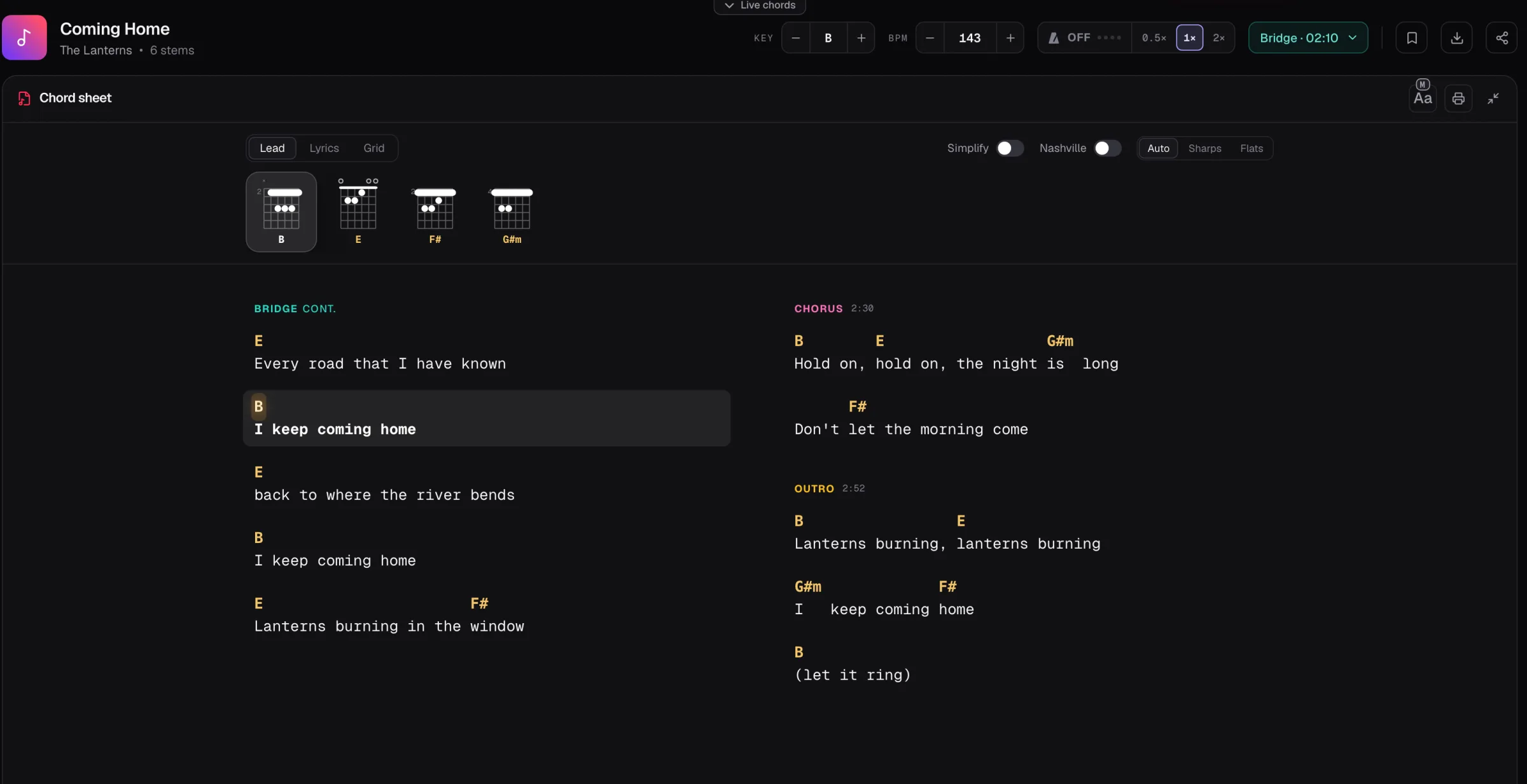
Open a song on YouTube with the Chrome extension and Chord Lens shows the song’s lyrics with the chords over the words, and lights the line being sung as the song plays.
Last updated
The short version
At a
glance.
words, chords, in time
Chord Lens puts a song’s lyrics under its chords, line by line, in time with the recording. Read it as a lead sheet, as lyrics alone or as a bar grid, and follow the lit line as you play or sing.
- Chords over wordsa lead sheet of the song
- In timethe sung line lit as it plays
- Three viewsLead, Lyrics or Grid
- Sectionsverse, chorus and bridge marked
- Your keymove it; the chords re-spell
- Your instrumentshapes above the sheet
- Play alongthis line and the next, large
- In Chrome toobeside the video on YouTube
- Free to readlyrics come with the chart
01 / 10 · What it is
The words. The chords.
In time.
A lyrics site gives you the words. A chord site gives you chord names over the words, typed by someone for the version they heard. Neither moves with the song.
Chord Lens hears the chords in the recording and lines them up with the lyrics, line by line, so the sheet follows the song: the line being sung is lit, and the page scrolls with it.
Want the singer out so you can sing over it? That’s the YouTube karaoke maker.
Lyrics and chord sites
Words and chord names on a still page, for someone else’s version.
This recording, in time
The chords it hears, over the words, lit as each line is sung.
02 / 10 · How to
Read along
in four steps.
nothing to install
Open the Studio
Go to chordlens.app/studio and sign in with Google.
Open a song on YouTube
Lyrics come with YouTube songs that have them.
Open the chord sheet
Pick Lead for chords over the words, or Lyrics for the words alone.
Play
The line being sung lights up and the sheet follows it.
Watching on YouTube? The Chrome extension shows the same sheet beside the video.
Get the extension03 / 10 · Three views
Lead, Lyrics
or Grid.
The chord sheet reads three ways, and each one follows the song.
- Lead
- Lyrics
- Grid
- Simplify
- Nashville
- Sharps · Flats
Lead
Chords over the words, line by line.
Lyrics
The words alone, with the sung line lit.
Grid
The chords in bars, when you want the form.
04 / 10 · Sing and play
Your key.
Your instrument.
the words stay put
- Key
- −2
- Move the key to fit your voice; the chords over the words re-spell.
- Shapes
- Guitar
- Chord shapes for your instrument, above the sheet.
- Play along
- This line, next
- The line being sung and the next one, large, under the chord now.
05 / 10 · Where lyrics come from
Where the
lyrics come from.
Lyrics come with YouTube songs that have published, timed lyrics, and they’re timed by the line. When a YouTube song has none, Premium can generate them. Files you upload get chords, but no lyrics.
06 / 10 · How accurate
Right on most songs.
Honest about the rest.
Lyrics are lined up with the chart line by line, so the lit line follows the singer through most songs.
Because the timing is per line, not per word, a chord can sit a word early or late. Not every song has lyrics, and the words are only as right as their source.
A line looks off?
- Turn on Follow playback to keep the sung line in view.
- Switch to Lyrics to read the words alone.
- Loop the line and listen at a slower speed.
- Check the key: a chart in the wrong key reads strangely.
07 / 10 · Compared
Chord Lens vs
lyrics and chord sites.
Three ways to read a song’s words with its chords, and where they differ.
| Lyrics sites | Chord sites | Karaoke apps | Chord Lens | |
|---|---|---|---|---|
| Lyrics | Yes | Yes | Yes | When the song has them |
| Chords over the words | No | Typed by hand | No | Heard from the song |
| In time with the song | Some | No | Yes | By the line |
| Your key | No | Some | Some | Yes |
| Shapes for your instrument | No | Guitar, some | No | Five instruments |
| Cost | Free, with ads | Free, with ads | Per app | Free to start |
08 / 10 · How players use it
Four ways
players use it.
Sing and play
Read each word with the chord above it.
Lead worship
Follow the lit line with the band.
Learn the words
Loop a verse until you know it.
Teach a song
Put the sheet on screen, then play it in time.
09 / 10 · What it won’t do
What it
won’t do.
so you know before you start
Line by line, not word by word
The sung line is lit, not each word.
Not every song
Lyrics come only when the song has them.
No lyrics for uploads
Your own files get chords, not words.
Generating needs Premium
Free reads the lyrics a song has; making new ones needs Premium.
10 / 10 · Plans
Free to start.
Reading the lyrics is free with every chart that has them. Generating lyrics for a YouTube song that has none needs Premium. Signing in is free; Free has a set number of new songs each month. Key and speed are free in Chrome and, once you sign in, in the Studio, for the whole song up to your plan’s song-length limit.
See plans and prices01How do I see a song’s lyrics with the chords?
Open a song on YouTube with the Chord Lens extension and open the chord sheet in Lead view. The chords sit over the words, and the line being sung lights up.
02Are the lyrics in time with the song?
Yes, line by line. Each line is timed to the recording, so the line being sung lights up as the song plays.
03Does it highlight each word?
No. Lyrics are timed by the line, not by the word, so the whole line being sung lights up.
04Does every song have lyrics?
No. Lyrics come with YouTube songs that have published, timed lyrics. When a YouTube song has none, Premium and Pro can generate them; the chords come either way.
05Can I get lyrics for my own files?
No. Files you upload get the chords, but no lyrics. Lyrics come only with YouTube songs.
06What does Generate lyrics do?
For a YouTube song with no lyrics, Generate lyrics asks for timed lyrics to be made, and they show on the sheet when they’re ready. Generating lyrics is Premium; reading lyrics is Free.
07Can I see only the lyrics?
Yes. Switch the chord sheet to Lyrics for the words alone, with the line being sung lit.
08Can I change the key?
Yes. Move the key up or down and the chords over the words are re-spelled in the new key; the words stay put. Key and speed are free in Chrome and, once you sign in, in the Studio, for the whole song up to your plan’s song-length limit.
09Does it show chord shapes too?
Yes. Pick guitar, bass, ukulele, mandolin or piano, and the shapes for the song’s chords sit above the sheet.
10Does it work in the Chrome extension?
Yes. On YouTube, the extension shows the lyrics beside the video, and its chord sheet has the same Lead and Lyrics views.
11Is it free?
Yes, to start. Reading lyrics is Free, with every chart that has them; generating lyrics for a song that has none is Premium. Signing in is free, and Free has a set number of new songs each month.
12Can I print the lyrics and chords?
Yes, on Premium and Pro. Print prints the chord sheet in the view you have open: Lead, Lyrics or Grid.
13Does it scroll with the song?
Yes. With Follow playback on, the sheet keeps the line being sung in view as the song plays.
14Can I loop a verse?
Yes. Loop the verse and the sheet lights each line again on every pass, so you can learn the words a line at a time.
15Is this different from the YouTube karaoke maker?
Yes. This page is for reading the words with the chords. The YouTube karaoke maker takes the singer out of the song so you can sing over it, with the same lyrics on screen.
In short
The whole page
in four lines.
Any YouTube song.
With lyrics, when it has them.
Chords over words.
In time, the sung line lit.
Your key.
And shapes for your instrument.
Free to read.
Generate lyrics on Premium.