 Chord Lens
Song key changer
Change the song’s key. and the capo follows
Move any song on YouTube up or down to a key you can sing or play, at the same speed, with every chord re-spelled in the new key. Set a capo and the shapes follow. Free for the whole song under the video with the Chrome extension; in the Studio, once you sign in, the stems move too.
Last updated
The short version
At a
glance.
your key, your capo
Chord Lens shifts the song you’re playing into another key, keeps its speed, and rewrites the chords so what you read is what you hear. Everything else on this page is the detail.
- Up or down by semitones6 each way in Chrome, 12 in the Studio
- Speed stays puthigher is never faster
- Chords re-spelledsharps or flats to suit the new key
- Capo shapespick a fret, play the shapes it shows
- Stems move toosplit the song, every part shifts
- Slow it as wellany key at any speed
- Five instrumentsguitar, bass, ukulele, mandolin, piano
- YouTube or your own filesthe video you watch, or an MP3, WAV or M4A upload in the Studio
- Free in Chromethe whole song, on any plan
01 / 10 · What it is
Your key.
Same song.
A song in the wrong key is the most common reason you can’t sing along or play it the way you know: the chorus sits too high, or the chords land on shapes you haven’t learned. Musicians have always moved songs to a key that suits them.
Chord Lens does it to the recording itself. Pick how many semitones to move, and the music, the chords on the chart and the shapes for your instrument all move together, at the speed the song already had.
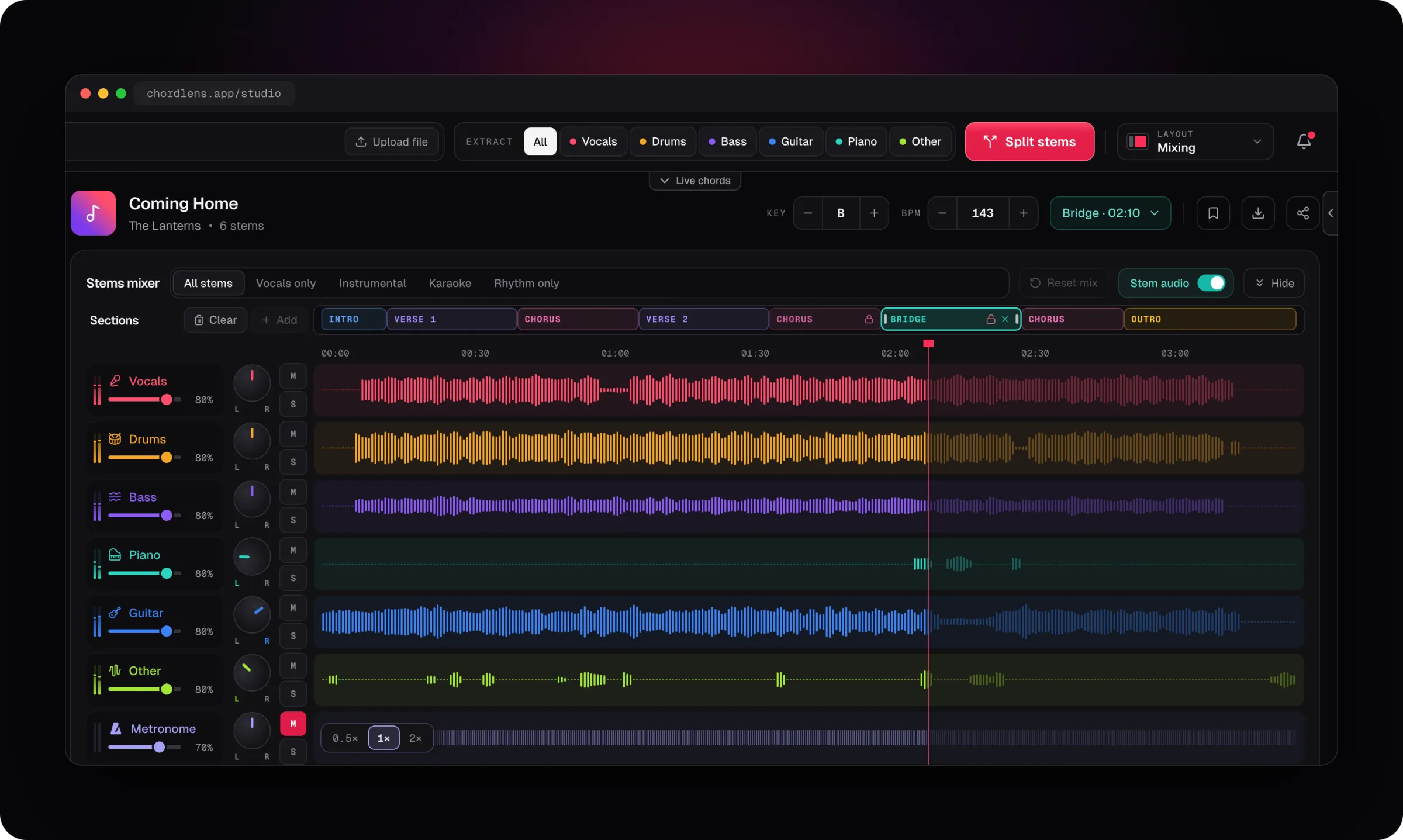
It happens where you already are. Under a YouTube video, the Chrome extension puts the key beside the chords and moves the song up to 6 semitones either way, so there’s no second app to load it into. In the Studio, the Key stepper sits next to the BPM and goes 12 semitones each way, and the chart, the words and the stems all follow it.
It suits a singer whose range sits a tone lower than the record, a guitarist who would rather play G shapes than A♭, a worship leader setting a song for a congregation, and a pianist matching a band that plays it somewhere else. Each of them gets the same song in their own key, at the speed of the record.
Have the song as a file? The Studio changes the key of MP3, WAV and M4A the same way. Not sure what key it’s in? The song key finder tells you, with its BPM.
Transposer charts
Move the chord names on a page, but the recording you play along with stays in the old key.
The song moves too
Shifts the recording and the chart together, so you play along in the key you picked.
02 / 10 · How to
Change a song’s key
in four steps.
just open the song
Open the song
Add Chord Lens to Chrome and open any YouTube video, or upload an MP3, WAV or M4A file in the Studio (up to 50 MB).
Press Key + or −
Each press moves the song a semitone, and the key shows where you’ve moved it to.
Set a capo
Choose a fret and the chart shows the shapes to play with the capo on.
Play along
Sing or play in your key. Go back to the record’s key with one click.
On the Mac? The Chord Lens app runs the same Studio.
Get the Mac appThe key is yours from the first note: there’s nothing to split or wait for before a YouTube video plays in another key under the extension. In the Studio, the key and the tempo move together, and every step is instant.
03 / 10 · The chords
Every chord
re-spelled.
When the song moves, the chart moves with it, spelled the way the new key is written: sharps in G, D and A, flats in F, B♭ and E♭, never A♯ in one bar and B♭ in the next.
- −2
- −1
- 0
- +1
- +2
- +3
Sing it
Drop a song a tone or two to bring the chorus into your range.
Play it
Move it to a key with shapes you already know.
Match it
Put it in the key your band already plays.
Slash chords move whole, so D/F♯ two semitones up is E/G♯, and the key named above the chart moves with them. Rather read every chord with sharps, or every chord with flats? Pick it in the chord notation setting and the chart follows, whatever key the song is in.
04 / 10 · The capo
Capo on.
Shapes you know.
the chart does the sums
- Key
- +2
- The song moves up a tone; the chords on the chart move with it.
- Capo
- Fret 2
- Pick a fret and the chart shows the shapes to play with the capo there.
- Shapes
- G → A
- Play the G shape, hear an A: the chart shows the shape, the song is in its key.
The key moves the recording and the capo moves the shapes under your fingers, and the chart adds the two up for you. Under the video the capo goes up to fret 12; in the Studio, up to fret 9. It’s there for guitar, ukulele and mandolin. A piano has no strings to capo and a bassist reads the notes as they sound, so those two charts show the song in its key.
05 / 10 · Why speed stays
Higher
is never faster.
Moving a recording up the plain way speeds it up too. Chord Lens shifts the pitch and holds the tempo, so a song up two semitones keeps its groove and its length, and the beat on the chart stays on the beat in your ears.
That’s why the key and the speed are two separate controls. Move the key and the speed stays put; move the speed and the key stays put. Want the song a step down and a little slower for a rehearsal? Set both. To slow a song without changing its key, see Slow Down Songs.
06 / 10 · How it sounds
Natural a few steps away.
Honest further out.
A semitone or two either way sounds like the band played it there: voices and guitars keep their sound.
Further out you hear the shift: voices sound thinner going up and heavier going down, and cymbals get a sheen. The notes are right and in time; it just won’t sound like the record.
Sounds odd after a big move?
- Try a capo for part of the move instead of shifting the whole way.
- Go the other way: in the Studio, +5 and −7 land on the same key.
- Mute the vocal stem if the voice sounds strange.
- Stay within a few semitones for singing along.
07 / 10 · Compared
Chord Lens vs
other key changers.
Three ways to change the key of a song you heard on YouTube, and where they differ.
| Pitch apps | Chord transposers | By ear | Chord Lens | |
|---|---|---|---|---|
| Works on the YouTube video you’re watching | No, a file | Paste the chart | Yes | Yes |
| Recording moves | Yes | No | No | Yes |
| Chords move | No | Yes | In your head | Re-spelled |
| Capo shapes | No | Some | — | Built in |
| Speed stays the same | Usually | — | — | Yes |
| Cost | Per app | Free | Your time | Free in Chrome |
A chord transposer is fine when all you need is the names on a page, and a pitch app earns its place when you already have the file. Chord Lens is for the moment you want to play along: the song in your key, at its own speed, with the chords and the capo shapes there in time while you do.
08 / 10 · How players use it
Four ways
players use it.
Sing in your range
Drop the song until the chorus sits, and read the words in time.
Easier shapes
Capo on 2 and play G shapes for a song in A.
Lead a group
Move it to the key your church or choir sings it in.
Learn it in two keys
Practise the original and the key you’ll perform it in.
Teachers move a song into a student’s range before the lesson, then show the shapes with a capo. Bands try the chorus a tone down before a gig. Singers find the key that sits, then hand the chart in that key to whoever plays for them.
09 / 10 · What it won’t do
What it
won’t do.
so you know before you start
No perfect sound far out
Big moves sound shifted. The notes stay right and in time.
Downloads, for your own study
On Free the moved song plays in Chord Lens. Premium downloads the stems or your mix in the new key as MP3 and Pro adds WAV, for your own personal study and practice, not to share or publish.
No private videos
Private, age-restricted, members-only and removed videos can’t be opened.
Not a chart you paste
It moves the song you open; it doesn’t transpose a chart you type in.
10 / 10 · Plans
Free in Chrome.
In Chrome, key and capo are free for the whole song on any plan. In the Studio, once you sign in, every plan plays the whole song in its new key, up to its song-length limit (7 minutes on Free, 15 on Premium, 25 on Pro), and a key change is not counted like a split. Your own file plays the part you split, so a longer upload is cut to its plan’s split window: 2 minutes on Free, 8 on Premium, 12 on Pro. Chords and the words stay free on every plan.
See plans and prices01How do I change the key of a song?
Open the song with Chord Lens, in Chrome under the YouTube video or in the Studio, and press Key + or −. The song moves a semitone each press, at the same speed, and the chords move with it.
02How far can I move the key?
Up to 6 semitones up or down under the video with the Chrome extension, and 12 either way in the Studio. Past 6, the other direction reaches the same key in fewer steps.
03Does changing the key change the speed?
No. The tempo stays where the record has it, so the song keeps its length and its groove in any key.
04Do the chords change too?
Yes. Every chord on the chart moves with the song and is re-spelled for the new key, with sharps or flats the way that key is written.
05How does the capo work?
Pick a fret and the chart shows the shapes to play with the capo there, while the song stays in the key you chose. Up to fret 12 under the video and fret 9 in the Studio.
06Which instruments does it show shapes for?
Guitar, bass, ukulele, mandolin and piano. The capo is there for guitar, ukulele and mandolin; bass and piano show the song in its key.
07Why does it sound odd after a big change?
A few semitones either way sounds natural. Further out, voices sound thinner going up and heavier going down. The notes stay right; try a capo for part of the move, or mute the vocal stem.
08Can I go back to the original key?
Yes, with one click. The song, the chart and the shapes all come back to the record’s key.
09Is it free?
Key and speed are free in Chrome and, once you sign in, in the Studio, for the whole song up to your plan’s song-length limit. Songs can run to 7 minutes on Free, 15 on Premium and 25 on Pro. In Chrome you also get the capo and no ads.
10Does it work on any YouTube video?
On any video that plays in a public YouTube page. Private, age-restricted, members-only and removed videos can’t be opened.
11Does it work on my phone?
The extension runs in Chrome on a computer. The Studio runs in a browser on a computer or a phone, though splitting stems needs a computer.
12Can I change the key and slow it down?
Yes. The key and the speed are separate controls: slow the song and it stays in the key you set, and the chords stay in time.
13Can I change the key of my own files?
Yes, in the Studio: bring an MP3, WAV or M4A file and change its key, slow it and loop it the same way, with chords.
14Do the stems change key too?
Yes. In the Studio every stem moves with the key, so a soloed bass or a muted vocal plays in the key you picked.
15Can I see sharps or flats?
Yes. By default each chord is spelled the way its key is written; pick sharps or flats in the chord notation setting to see every chord one way.
In short
The whole page
in four lines.
Your key.
Up or down a semitone at a time.
Same speed.
The tempo and the groove stay put.
Chords follow.
Re-spelled in the new key, capo shapes too.
Free in Chrome.
In the Studio, the whole song once you sign in.