 Chord Lens
YouTube metronome
YouTube metronome: a click that follows the song
Open a YouTube video with the Chrome extension, or upload a file in the Studio, and Chord Lens puts a click on the song’s own beats, with beat one accented, so you practise in time with the record, not against a fixed tempo.
Last updated
The short version
At a
glance.
the song’s beat, clicked
A normal metronome ticks at one fixed tempo, and bands drift. Chord Lens tracks the beats of the song itself and clicks on them, so the click stays with the band the whole way through.
- On the song’s beatstracked from the recording
- Downbeat accentbeat one sounds higher
- Half or double0.5×, 1× or 2× the beat
- Its own fadervolume, pan, mute and solo
- Any songon YouTube or your own file, no split needed
- Your files tooMP3, WAV or M4A in the Studio
- With the stemsmute the drums, keep the click
- In Chrome tooclicks along on YouTube
- Free to startthe click is on every plan
01 / 10 · What it is
The band’s tempo.
Clicked.
A metronome teaches steady time; the record teaches the song. Put a fixed click under a real recording and they drift apart within a few bars, because real bands push and settle.
Chord Lens clicks on the beats it hears in the song, so the click and the band stay together: through a push in the chorus, a held note, a slower outro.
Want the tempo as a number? That’s the Song key finder.
Metronome apps
One fixed tempo you set, which the record drifts away from.
The song’s own beat
A click on every beat of this recording, wherever the band takes it.
02 / 10 · How to
Click along
in four steps.
nothing to install
Open the Studio
Go to chordlens.app/studio and sign in with Google.
Upload a song
Drop in an MP3, WAV or M4A from your computer, up to 50 MB.
Turn on the click
Metronome on in the header, or unmute its row in the Stems mixer.
Play
Set its volume and pan, and pick half, normal or double.
Watching on YouTube? The Chrome extension clicks along on the YouTube page itself.
Get the extension03 / 10 · The click
One click.
Every beat.
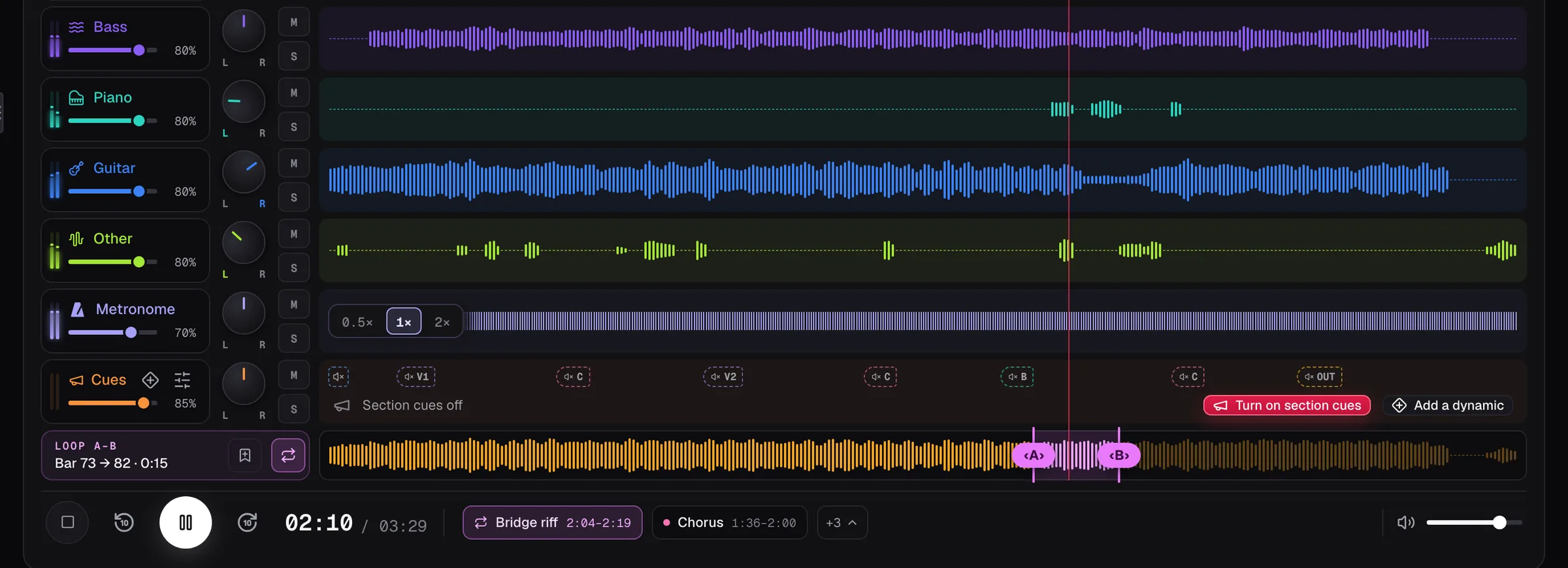
The click has its own row in the Stems mixer, like a stem. In the Play along and Sheet layouts, where the mixer is hidden, it’s a switch in the header with a dot for each beat of the bar.
- On / off
- Beat dots
- 0.5×
- 1×
- 2×
- Accent
Downbeat accent
Beat one of each bar sounds higher, so you never lose the one.
Half, normal, double
Click every other beat, every beat, or twice a beat.
Volume and pan
Its own fader; pan it to one ear if you like.
04 / 10 · Practise with it
Slow it down.
Keep the click.
same beat, slower
- Speed
- 0.75×
- Slow the song down to learn it; the click stays on its beats.
- Loop
- Bars 9–12
- Loop the hard bars with the click on.
- Stems
- Drums off
- Split the song, mute the drums, and keep time with the click.
05 / 10 · Where
On YouTube
or in the Studio.
In Chrome, the Chord Lens extension clicks along on the YouTube page, with its own row beside the stems. In the Studio, on the web or in the Mac app, the click works on your own files with no split. Key and speed are free in Chrome and, once you sign in, in the Studio, for the whole song up to your plan’s song-length limit.
06 / 10 · How accurate
Right on most songs.
Honest about the rest.
Songs with a clear groove get a click right on the beat most of the time, from the first bar to the last.
Free-time intros, rubato and songs with no clear pulse are harder: a beat can land early or late there. With no tracked beats at all, the Studio clicks at the song’s average tempo, and the Chrome extension has no click for it.
The click feels off?
- Try half or double: some songs feel in the other.
- Turn the click down and listen for beat one.
- Loop the bar and listen at a slower speed.
- Try a cleaner recording of the same song.
07 / 10 · Compared
Chord Lens vs
a metronome app.
Three ways to practise in time with a song, and where they differ.
| Metronome apps | DAW click | By ear | Chord Lens | |
|---|---|---|---|---|
| Follows the band’s tempo | No | If you map it | Yes | Yes |
| Works on a YouTube song | No | No | Yes | Yes |
| Set any BPM | Yes | Yes | — | No, the song’s |
| Tap tempo, count-in | Often | Yes | — | No |
| Stems to mute | No | If you have them | No | Yes |
| Cost | Free or per app | Per DAW | Your time | Free to start |
08 / 10 · How players use it
Four ways
players use it.
Tighten your timing
Play the song with the click, then without.
Drummers
Mute the drums and play the part on the click.
Worship teams
Rehearse at the record’s own tempo.
Teachers
Loop the bar, slow it down, keep the click.
09 / 10 · What it won’t do
What it
won’t do.
so you know before you start
No metronome without a song
It clicks on a song’s beats; there’s no empty metronome.
No BPM you set
The tempo is the song’s; slow the song to slow the click.
No tap tempo
The beats come from the recording, not from tapping.
No click count-in
For a spoken count-in, use the Guide track maker.
10 / 10 · Plans
Free to start.
The click comes with every chart, Free included. Signing in is free; Free has a set number of new songs each month, and Premium and Pro have more. Key and speed are free in Chrome and, once you sign in, in the Studio, for the whole song up to your plan’s song-length limit.
See plans and prices01How do I add a metronome to a YouTube song?
On YouTube, add the Chord Lens extension and unmute the Metronome row: it clicks on the song’s own beats, with beat one accented. In the Studio, upload your song and turn the metronome on.
02Does the click follow the song’s tempo changes?
Yes. It clicks on the beats tracked from the recording, so when the band pushes or settles, the click goes with it.
03Can I set my own BPM?
No. The tempo is the song’s. Slow the song down and the click slows with it, or switch the click to half or double.
04Does it accent the downbeat?
Yes. Beat one of each bar clicks at a higher pitch than the other beats, so you always hear where the bar starts.
05Can I change the click’s volume?
Yes. The Metronome has its own row in the Stems mixer, like a stem: a volume fader, pan, mute and solo.
06What do 0.5× and 2× do?
At 1× it clicks on every beat. At 2× it clicks twice a beat, on the beat and halfway to the next. At 0.5× it clicks every other beat, always keeping beat one; in the Studio, a song in 6/8 or 12/8 clicks every third beat.
07Does it work when I slow the song down?
Yes. Slow the song down and the click slows with it, still on the song’s beats.
08Do I need to split the song?
No. The click works on a song with no split. Split it into stems when you want to mute the drums and keep the click.
09Does it work on my own files?
Yes. Drop an MP3, WAV or M4A into the Studio, or the Chord Lens app for Mac, and the click follows that file’s beats.
10Does it work in the Chrome extension?
Yes. In Chrome, the Chord Lens extension has the same Metronome row beside the stems, with volume, pan, mute, solo and 0.5×, 1× or 2×, and the click plays along on the YouTube page.
11Is there tap tempo or a count-in?
No. There is no tap tempo and no click count-in: the beats come from the recording. For a spoken count-in before a section, use the Guide track maker.
12Is it free?
Yes. The click comes with every chart, Free included. Key and speed are free in Chrome and, once you sign in, in the Studio, for the whole song up to your plan’s song-length limit.
13Can I download the song with the click?
Yes, in the Studio. A download can carry the click, on its own or in the mix. Downloads are MP3 on Premium and WAV on Pro, for your own practice and study, not for redistribution.
14What if a song has no clear beat?
Where a song has no clear pulse, such as a free-time intro or rubato, a click can land early or late. With no tracked beats at all, the Studio clicks at the song’s average tempo, and the Chrome extension says “No beat grid for this song” and has no click.
15Is this different from the Guide track maker?
Yes. This page is the click on the song’s beats. The Guide track maker speaks over the song: section names, a count-in and the dynamics you place.
In short
The whole page
in four lines.
Any song.
A YouTube video or your own file.
Its own beat.
A click on every beat, beat one accented.
Your mix.
Volume, pan, half or double.
Free to start.
The click is on every plan.