 Chord Lens
Worship and bands · 03 of 04
WORSHIP SET PLANNING: KEYS, CHARTS AND CUES. ready before Sunday
The short answer
Worship set planning comes down to three things per song. Pick a key the congregation and the leader can both sing, and move the recording there. Give the band a chart in that key, ideally in numbers. Then add spoken cues for the sections, so the team can rehearse at home with the arrangement they’ll play on Sunday.
01 / 08 · THE PLAN
The set lives in your plan. The songs live in the Studio.
Every team plans a set somewhere: a shared doc, a planning app, a list on the rehearsal-room whiteboard. Keep doing that. The plan is where the order lives, along with who leads each song, the key, the tempo, and how you get from one song to the next. That is a team decision, and it belongs where the whole team can see it.
Chord Lens doesn’t hold a setlist. It works one song at a time: you open each song from the plan in the Studio, from its YouTube link or from your own audio file, and prepare it there. Its key, its chart and its cues come out of that song, and you write the results back into the plan. You can keep the week’s songs together in a Collection in the Studio’s library, a folder on that computer, but the order and the keys belong in the plan.
A useful plan has one line per song with at least these: the song, the link to the version you are playing, the key, the BPM, who leads, and a note on the arrangement, such as “skip verse 2” or “double the last chorus”. The Studio’s Copy link button puts a song’s YouTube link on your clipboard to paste straight in.
Work through the plan in order, one song at a time: key, then chart, then cues.
02 / 08 · KEYS
A key for the room, not just the record.
Most worship songs were recorded in the key that suits the artist who sang them, and that is often too high for a congregation. A room full of people singing together is most comfortable with a melody that stays in a middle range and doesn’t sit on its top notes for long. If the chorus on the record makes your leader strain, the room will stop singing.
Try the song in the key you are thinking of before you commit. In the Studio, press Key + or − and the recording moves a semitone at a time, up to 12 either way, at the same speed. The chords on the chart move with it, re-spelled for the new key, and if the song is split into stems, every stem moves too. Sing the highest and lowest lines of the song along with it. Our guide to the best key for your voice has a quick way to test a range.
Think about the songs on either side as well. Two songs back to back in the same key, or keys a step apart, make an easy transition: the band can hold a chord and the leader can talk over it. A big jump between keys needs a gap, a count-in or a short modulation, and that belongs in the plan.
Write the key you chose into the plan. When you open the song again, check that the Key control reads the key in the plan before you print or rehearse anything.
Moving a song more than a few semitones from the record makes the recording sound shifted. The notes stay right, so it is fine for rehearsal; for the band, the chart in the new key is what counts.
03 / 08 · METHOD
Prepare each song in six steps.
This is the routine for each song in the set. Once you have done it a few times it takes about ten minutes a song.
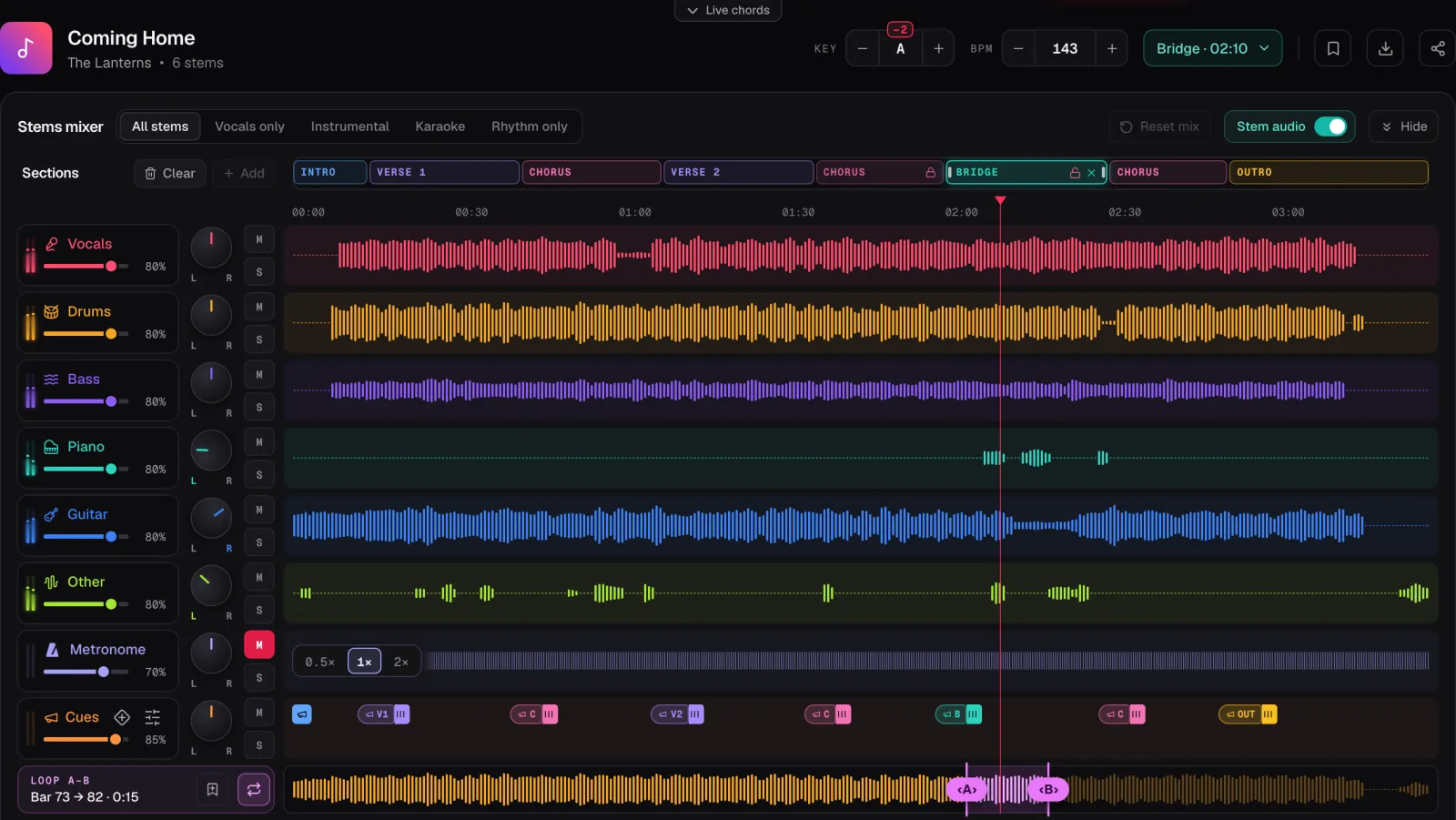
In the screenshot the demo song Coming Home is moved from B to A, two semitones down, and the Key control marks the shift as −2. The section cues are switched on: each section in the cue lane carries its spoken name, ready to call Verse, Chorus and Bridge a bar before they arrive.
Open the song
Paste the link from your plan into the Chord Lens Studio, or drop in an MP3, WAV or M4A file.
Check the sections
Look over the sections along the top. Rename or move any that are wrong, since the chart and the cues follow them.
Set the key
Press Key + or − until the song sits for your leader and the room, and write the key into the plan.
Print the chart
Switch on Nashville numbers if your band reads them, pick Lead or Grid, and print. Printing needs Premium or Pro.
Add the cues
Turn on the section cues, check the count-in, and drag in any dynamics such as Build or Last Time.
Rehearse it
Play the song through with the cues, the way the band will hear it, and note anything that changes.
04 / 08 · CHARTS
One chart, in the key you chose.
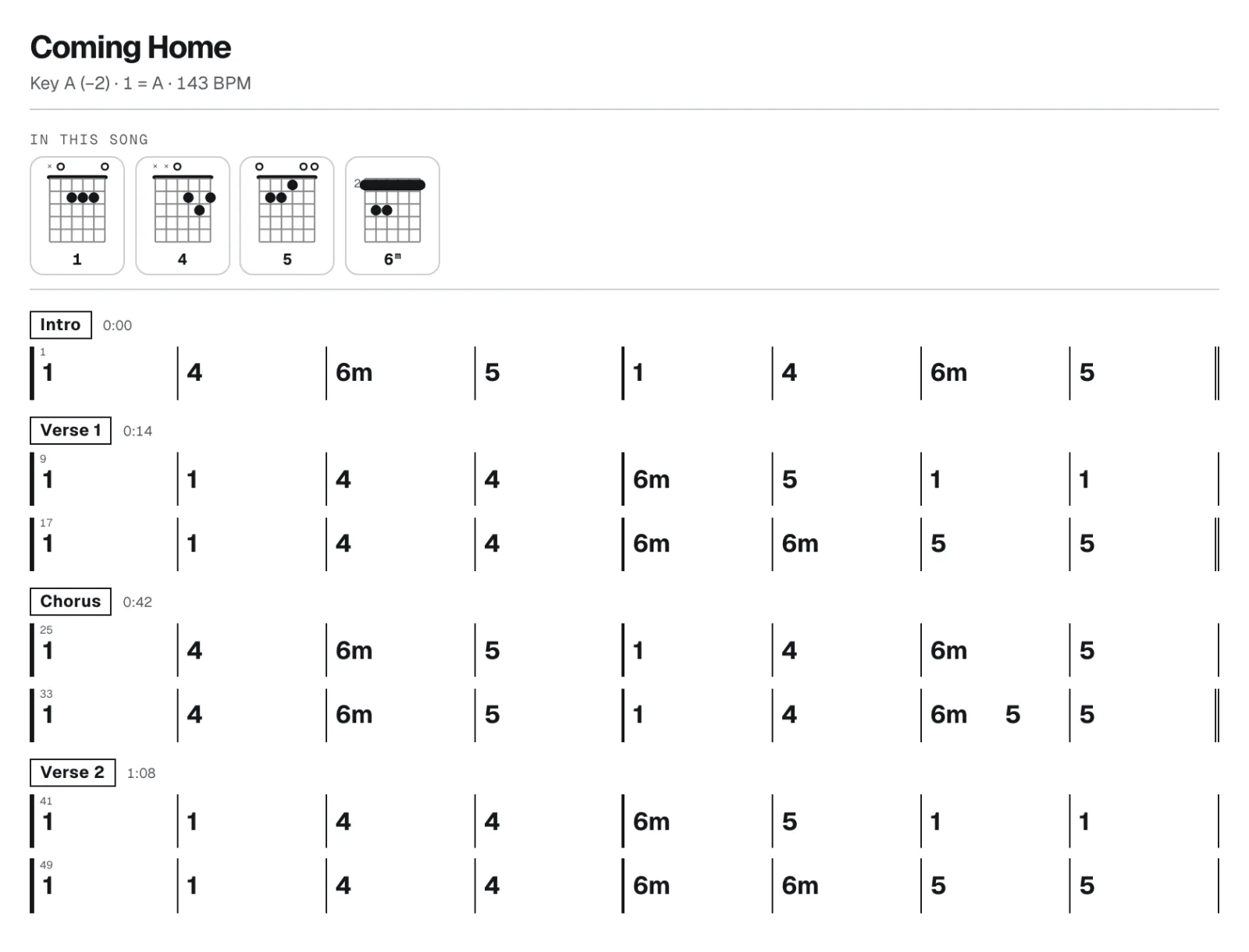
Once the key is set, the chord sheet is already in it. Every chord on the chart has moved with the song. Print it from the chord sheet’s printer button, and the page carries the song’s title and a line saying which key, capo and tempo its chords are for, such as “Key A (−2) · 143 BPM”. Printing is part of Premium and Pro; on a phone it opens the phone’s print sheet, where you can save a PDF.
Pick the view that suits your band before you print. Lead prints the chords over the words in two columns, which is what a singer or an acoustic guitarist usually wants. Grid prints a real-book style chart, eight bars to a row, with each section named and timed and the bar lines lined up down the page, which suits a band that counts bars. The shapes of the chords in the song print at the top, for whichever instrument you have picked.
For a band that plays the same songs in different keys from week to week, switch on Nashville numbers. The chart then reads 1, 4, 5 and 6m instead of letters, and the header adds “1 = A” so everyone knows where 1 is. The same printed chart works whichever key the leader picks next time. Our guide to the Nashville number system explains how to read one.
Two more switches change what prints. Simplify swaps hard chords for the basic chord under them, which helps a newer player keep up, and the header says “Simplified” so nobody wonders why the chart looks different. A capo, set for guitar, prints the shapes to play with it and puts “Capo 3” in the header; the capo chart guide shows which fret gives which key.
05 / 08 · CUES
A leader in everyone’s ear.
Teams that use in-ears often run a guide track: a voice that says “Chorus” just before the chorus, counts the band in, and calls “Last Time” before the final repeat. It keeps a band together when the leader changes the arrangement on the fly, and it helps newer players most of all.
The Guide Track Maker builds one on the song you have open in the Studio. Turn on the section cues and each section speaks its name ahead of it, from 37 recorded names that include worship ones such as Vamp, Tag and Exhortation. The count-in is on from the start, one or two bars, fitted to the song’s meter. Then drag in the dynamics you want onto the beat they belong on: Build, Break, Drums In, Worship Freely, Last Time, Key Change Up and more. Chord Lens never guesses where the band should build; you place each one.
The cues come from the song’s sections, so a section in the wrong place gives a cue in the wrong place. That is why checking the sections comes first in the routine.
For in-ears, switch In-ears to Split left / right: the cues and the click play in the left ear and the band, folded to mono, in the right. That works when the Studio plays its own audio, which means a split song or your own file, not a YouTube song before it is split. On Free, cues and the count-in play inside the 2-minute part you choose; Premium plays them for the whole song, and Pro can export them for your own practice.
06 / 08 · REHEARSE
Rehearsal starts at home.
Put the key and the link for each song in the plan, and each musician can open the same song in the Studio and set it to the same key. Splitting needs a computer, in Chrome or Edge.
From there each player works on their own part. The bassist solos the bass and loops the turnaround. The keys player slows the bridge to 0.75× to hear the voicings. The drummer mutes the drums and plays the song with the click and the cues. Our guides to making a backing track and slowing a song down cover those routines.
Everyone arrives on the night with the song in the same key, the same arrangement and the same cues in their head. The rehearsal goes on the hard parts, and the set on Sunday sounds like a band that knew where it was going.
07 / 08 · Do it in one click
Guide Track Maker
Spoken cues for any song: section names a bar early, a count-in, and the dynamics you place.
01How do I plan a worship set?
Keep the order, keys, leaders and notes in your team’s plan. Then prepare each song: pick a key the room can sing, print a chart in that key, and add spoken cues.
02Does Chord Lens have setlists?
No. It works one song at a time. Keep the set’s order and keys in your team’s plan, and open each song in the Studio to set its key, chart and cues.
03How do I choose a key for congregational singing?
Try the song with the Studio’s Key control and sing its highest and lowest lines. Pick the key where the leader and the room are comfortable, not the record’s.
04Can I print a chord chart in a new key?
Yes, on Premium and Pro. Set the key and print: the chart prints in that key, with the key and tempo in its header.
05Can the chart show Nashville numbers?
Yes. Switch on Nashville numbers and the chart, on screen and on paper, reads in numbers, with “1 = A” in the printed header.
06Can I add spoken cues like Verse, Chorus and Last Time?
Yes, in the Studio. Turn on the section cues for spoken section names and a count-in, and drag in dynamics such as Build or Last Time.
07Can I send the cues to my in-ears only?
Yes, when the Studio plays its own audio, such as a split song or your own file. Split left / right puts the cues and click left and the band right.