 Chord Lens
Slow down songs
Slow down songs: same pitch, any speed
Slow any song on YouTube down to learn the fast part, and keep it in its own key. Loop the bars you keep missing, play them at half speed, then bring them back up. Under the video with the Chrome extension, or in the Studio with the chords in time. Free.
Last updated
The short version
At a
glance.
slow it, loop it, play it
Chord Lens slows the song you’re learning without dropping its pitch, loops the bars you choose, and keeps the chords in time while you do. Everything else on this page is the detail.
- Quarter speed to doublein small steps, under the video
- Pitch stays putslower is never lower
- Loop any barsset A and B, play it again
- Save your loops3 per song on Free, no limit on Premium and Pro
- Chords in timethey slow down with the song
- Change the key tooa capo-friendly key at any speed
- Slow one partsplit the stems and solo it
- YouTube or your own filesthe video you watch, or an MP3, WAV or M4A upload in the Studio
- Free in Chromespeed and loop, the whole song
01 / 10 · What it is
Slower.
Same song.
A song slower is the oldest way to learn it: the run you can’t catch at full speed is clear at three quarters. Old tape machines dropped the pitch as they slowed, so the song came out lower and the chords on your guitar stopped matching.
Chord Lens slows the music and holds its pitch, so a song in G at half speed is still in G. Pick the speed, loop the bars you’re on, and play along until it sits, then step it back up.
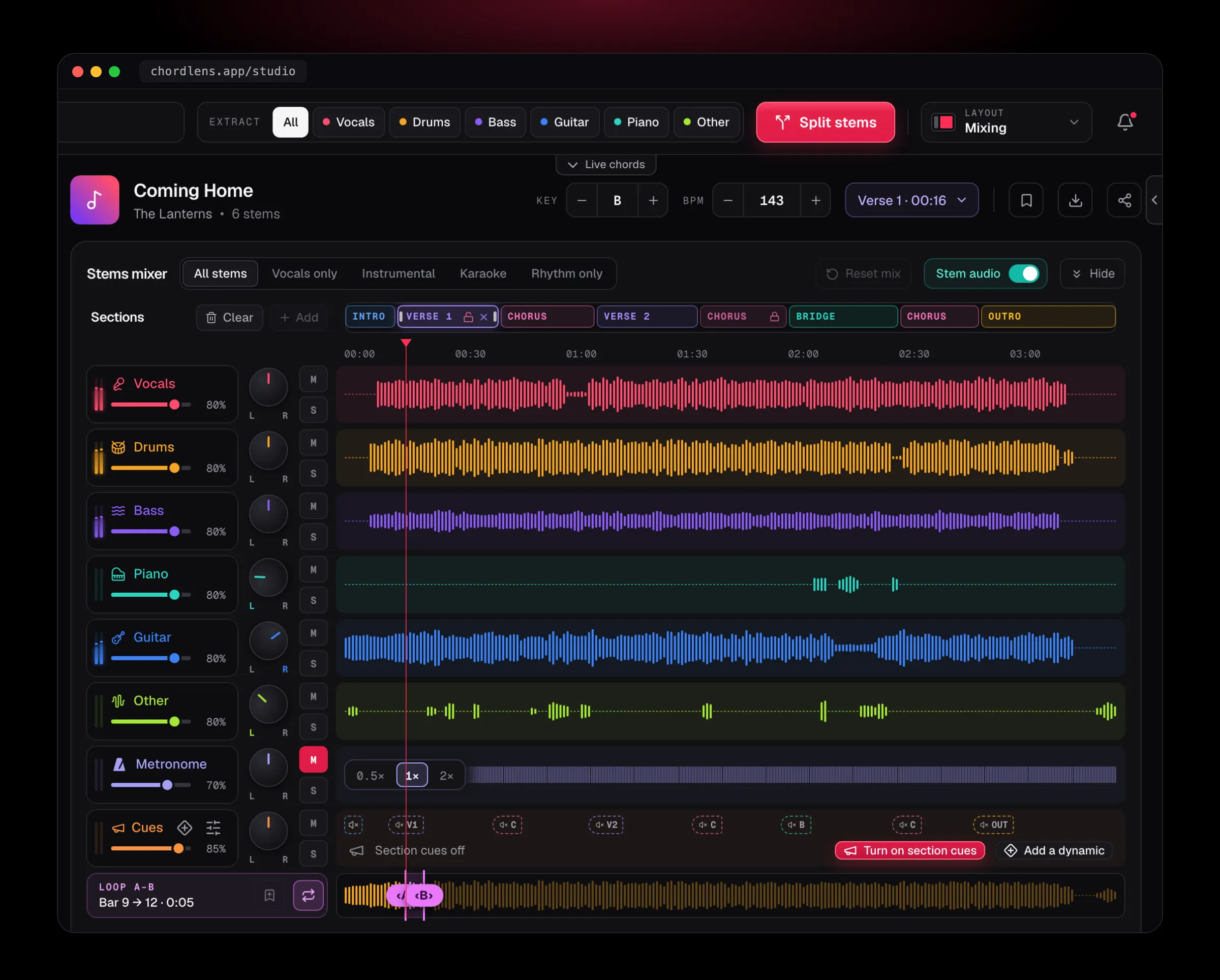
It happens where you already are. Under a YouTube video, the Chrome extension puts the speed beside the chords, so there’s no second app to load it into. In the Studio, the BPM stepper sits next to the key, and the chart, the words and the stems all follow the tempo you set.
It suits a guitarist chasing a solo, a singer learning a fast verse, a drummer working out a fill and a pianist reading the changes. Each of them gets the same song at their own speed, still in the key of the record.
Have the song as a file? The Studio slows MP3, WAV and M4A the same way.
Speed apps
Want the song as a file first, then slow it in one app and read the chords in another.
Slow it where you play
Slows the song you’re watching and keeps the chords, the loop and the key in one place.
02 / 10 · How to
Slow a song
in four steps.
just open the song
Open the song
Add Chord Lens to Chrome and open any YouTube video, or upload an MP3, WAV or M4A file in the Studio (up to 50 MB).
Pick a speed
Step the speed down. 0.75× is a good start; go lower for the fast runs.
Loop the hard bars
Set A at the start of the bars and B at the end. Save the loop to come back to it.
Bring it back up
Play it until it sits, then step the speed up until you’re at the record.
On the Mac? The Chord Lens app runs the same Studio.
Get the Mac appThe speed is yours from the first note: there’s nothing to split or wait for before a YouTube video plays slower under the extension. In the Studio, the key and the tempo move together, and every step is instant.
03 / 10 · The speeds
From a crawl
to double time.
Step the speed in small moves, from a quarter of the record to twice it. The chords and the words stay in time with whatever speed you pick.
- 0.25×
- 0.5×
- 0.75×
- 1×
- 1.5×
- 2×
Learn it
Half speed or slower for the run you can’t hear yet.
Drill it
Three quarters up to the record, until your hands know it.
Push it
Above 1×, so the record feels easy at its own speed.
Under the video, the extension goes from 0.25× to 2× in steps of 0.05, and YouTube’s own speed menu stays in step with it. In the Studio, the BPM stepper moves the tempo one beat per minute at a time, from half the song’s tempo to double, and shows the BPM you’re playing at rather than a percentage.
04 / 10 · Loops
Loop the bar
you keep missing.
then save it
- A–B
- Bars 9–12
- Set the start and the end, and the song goes round those bars until you stop it.
- Saved
- Solo, bridge
- Keep the loops you drill and jump back to any of them. Free keeps 3 per song.
- Speed
- 0.75×
- Each loop plays at the speed you set, so you can slow just the hard part.
The loop snaps to the song’s beat grid, so it turns on the downbeat rather than half a beat late. Drag either handle to move one end, drag the middle to move the whole loop, or use the arrow keys to nudge it a beat at a time.
05 / 10 · Why pitch stays
Slower
is never lower.
Slowing a recording the plain way lowers it too, so the song stops matching your instrument. Chord Lens stretches the sound in time instead and keeps every note where it was, so the chords you read are the chords you hear at any speed.
That’s why the key and the speed are two separate controls. Move the speed and the key stays put; move the key and the speed stays put. Want the song a step down and a little slower for a worship set? Set both, and every chord on the chart is re-spelled for the new key.
06 / 10 · How it sounds
Clear at three quarters.
Honest at a quarter.
Down to about half speed a song keeps its sound: the notes are clear and the groove is still there, just slower.
Below that you hear the stretch: drums smear, and reverb and fast strums blur. It’s still the right notes in the right key, which is what you need to learn a run, but it won’t sound like the record.
Too blurry to follow?
- Go up a step: 0.6× often sounds cleaner than 0.5×.
- Split the stems and solo the part you’re learning.
- Loop fewer bars, so the hard bit comes round more often.
- Try a studio version: live takes stretch less cleanly.
07 / 10 · Compared
Chord Lens vs
other ways to slow a song.
Three ways to slow a song you heard on YouTube, and where they differ.
| Speed apps | YouTube’s own speed | By ear | Chord Lens | |
|---|---|---|---|---|
| Works on the YouTube video you’re watching | No, a file | Yes | Yes | Yes |
| Chords in time while slowed | No | No | No | Yes |
| Loop A–B and save it | Often | No | — | Built in |
| Slow one instrument | Some | No | — | With the stems |
| Change the key too | Some | No | No | Yes |
| Cost | Per app | Free | Your time | Free |
YouTube’s own speed menu is fine for a quick listen, and a good speed app earns its place when you already have the file. Chord Lens is for the moment you want to play along: the song slowed, the bar looped, and the chords there in time while you do.
08 / 10 · How players use it
Four ways
players use it.
Learn a solo
Loop the run at 0.5×, then step it up a notch each time it’s clean.
Catch the words
Slow a fast verse and read the lyrics in time on the chart.
Find a chord change
Slow the bar where the chord moves and watch it light up as it plays.
Practise to a tempo
Set the speed you can play at and turn on the metronome over it.
Teachers slow a passage down to show a student what’s happening inside it, then bring it back up for the student to play along. Bands loop the bridge before a rehearsal. Singers slow a verse they can’t yet keep up with, and learn the words before the tune.
09 / 10 · What it won’t do
What it
won’t do.
so you know before you start
No perfect sound at a crawl
Below half speed you hear the stretch. The notes stay right.
Downloads, for your own study
On Free the slowed song plays in Chord Lens. Premium downloads the stems or your mix as MP3 and Pro adds WAV, for your own personal study and practice, not to share or publish.
No private videos
Private, age-restricted, members-only and removed videos can’t be opened.
Not a tempo map
It slows the whole song evenly; it doesn’t change the tempo bar by bar.
10 / 10 · Plans
Free.
Speed, pitch and the A–B loop come with every plan. Free keeps 3 saved loops per song; Premium keeps as many as you like. Chords and the words stay free too. Under the video the extension slows the whole song on any plan; in the Studio, Free slows a 2-minute part of a song, the part you choose, and counts it like a split.
See plans and prices01How do I slow down a song without changing the pitch?
Open the song with Chord Lens, in Chrome under the YouTube video or in the Studio, and step the speed down. The song slows and stays in its key, with the chords in time.
02How slow can it go?
A quarter speed (0.25×) under the video with the Chrome extension, and half the song’s tempo in the Studio. Both go up to double speed.
03Does slowing it down change the key?
No. The pitch stays where the record has it at every speed, so a song in G is still in G and the chords on the chart still match your instrument.
04Can I loop just a few bars?
Yes. Set A at the start and B at the end, and the song goes round those bars at the speed you chose until you turn the loop off. The loop snaps to the beat.
05Can I save my loops?
Yes. Save a loop, name it, and jump back to it later. Free keeps 3 saved loops per song; Premium and Pro keep as many as you like.
06Can I slow down just the guitar or the bass?
Split the song into stems and solo the part you want: the whole song slows, and you hear only that part. The stems follow the speed and the key.
07Why does it sound blurry at very slow speeds?
Below about half speed the sound is stretched further than it was recorded, so drums smear and reverb blurs. The notes and the key stay right. Go up a step, solo the part, or try a studio version.
08Can I speed a song up as well?
Yes, up to double speed, with the pitch held the same way. Playing a little above 1× makes the record feel easy when you go back to it.
09Is it free?
Yes. In Chrome, speed, pitch and the A–B loop are free for the whole song, with no ads. Free keeps 3 saved loops per song, and in the Studio slows a 2-minute part of a song, counted like a split.
10Does it work on any YouTube video?
On any video that plays in a public YouTube page. Private, age-restricted, members-only and removed videos can’t be opened.
11Does it work on my phone?
The extension runs in Chrome on a computer. The Studio runs in a browser on a computer or a phone, though splitting stems needs a computer.
12Can I change the key while it’s slowed?
Yes. The key and the speed are separate controls: move the key and the speed stays where you set it, and every chord on the chart is re-spelled.
13Can I slow down my own files?
Yes, in the Studio: bring an MP3, WAV or M4A file and slow it, loop it and change its key the same way, with chords.
14Do the chords stay in time?
Yes. The chart follows the song at whatever speed you pick: the chord on the beat lights up, and the words run underneath where the song has lyrics.
15Can I slow it down with a metronome?
Yes, in the Studio. The metronome clicks on the song’s own beat, so it slows with the song and keeps you on the grid at any speed.
In short
The whole page
in four lines.
Slower.
From a quarter speed up to double.
Same key.
The pitch stays where the record has it.
Looped.
A to B, saved to come back to.
Free.
In Chrome, for the whole song; Premium keeps more loops.