 Chord Lens
Practise and play · 02 of 07
HOW TO MAKE A BACKING TRACK FROM ANY SONG. the real band, minus you
The short answer
To make a backing track from any song, split the recording into stems, then mute the part you play: guitar, bass, piano, drums or vocals. The rest of the original band keeps playing, so you fill the gap. Slow it down or change the key if you need to, and read the chords in time as you go.
01 / 08 · WHAT
The whole band, with a gap for you.
A backing track is a song with one part missing: yours. A guitarist plays over a track with no guitar, a singer over one with no vocals, a drummer over one with the drums taken out. You play the missing part, and the band around you is the record you learned the song from.
For practice it beats playing alone by a long way. You hear whether your part sits with the drums, whether your chord changes land with the bass, and whether your tone fits the mix. Playing along with the full record helps too, but your part is hidden under the original player, so it is hard to hear your own mistakes. Take that part out and every note you play is on show.
For years the only ways to get one were to buy a re-recorded version, find a karaoke file, or record the other parts yourself. Re-recordings are often close but rarely the real thing, and they only exist for popular songs. Splitting the song yourself gives you a backing track from the original recording, for almost anything you can play.
02 / 08 · METHOD
Make a backing track in five steps.
Stem splitting does the heavy lifting. A stem is one group of instruments pulled out of the finished mix: the vocals, the drums, the bass and so on. Once a song is in stems, a backing track is just a mix with your stem turned off.
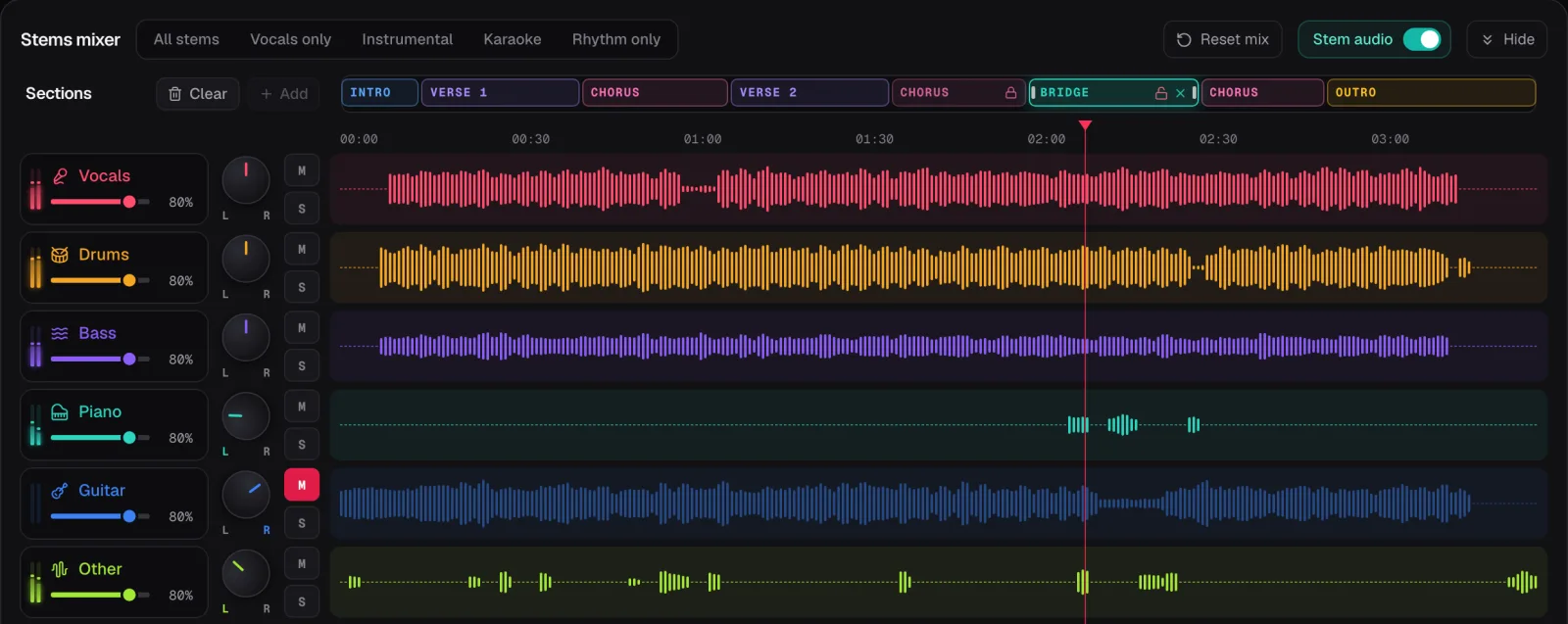
In the screenshot the demo song Coming Home is split into its six stems, and the guitar is muted. Its waveform goes dark and its M button lights up, while the vocals, drums, bass, piano and other parts play on. That is a guitar backing track, ready to play over.
Open the song
Upload your own MP3, WAV or M4A file into the Studio on a computer. With the Chrome extension you can do it under the YouTube video.
Split it into stems
Press Split stems. On Free, choose the 2 minutes you want to play first; Premium and Pro split the whole song.
Mute your part
Press M on your instrument’s row. To play over just the groove, press Rhythm only instead.
Set the speed and key
Slow it down while you learn the part, and move the key if you play or sing it somewhere else. The stems follow both.
Play along
Read the chords in time on the chart, and play your part with the band.
03 / 08 · MIX
One mute, or a whole preset.
The Chord Lens Backing Track Maker splits a song into six stems: vocals, drums, bass, guitar, piano and other. Each has its own mute, solo and fader, so you can take out one part, several parts, or just turn one down. Five presets set the common mixes in one press: All stems, Vocals only, Instrumental, Karaoke and Rhythm only.
Guitarists and keyboard players usually mute their own stem and leave the rest. If you play rhythm guitar in a band, try Rhythm only as well: just the drums and bass, so you are the whole harmony and have to hold the song up yourself.
Bass players mute the bass and listen hard to the kick drum. A bass line that locks with the kick is most of the job, and with the original bass gone you’ll hear straight away when you drift.
Drummers mute the drums and play to the band. This is harder than it sounds, because the drums usually set the time. It is great practice for keeping a steady tempo without a click.
Singers mute the vocals, or press Instrumental, which takes the lead vocal out. For a karaoke mix, the Karaoke preset also takes out Other, where backing vocals usually land; our guide on making a karaoke version of a song covers it.
Don’t mute your part all the way at first. Pull its fader down low instead, so the original is a quiet guide you can lean on, then mute it once you know the part.
04 / 08 · PRACTICE
Learn it slow, then play it with the band.
A backing track is most useful once you know roughly what to play. Before you mute your part, solo it and listen. Loop a few bars, slow them down, and work the part out. Our guide to slowing down a song without changing the pitch has the full routine.
Then mute it and play the same loop with the band. Keep the speed down at first. Speed and pitch are separate, so slowing the song keeps the band in the key you play in. Raise the speed a few BPM at a time until you’re at the record’s tempo, then play the whole section, then the whole song.
Follow the chart while you play. The chords light up on the beat, and where the song has lyrics the words run underneath, so you always know where you are. If you lose your place, the section you’re in is shown by name.
Want a click as well? The Studio’s metronome has its own row in the mixer and clicks on the song’s own beat, so it slows down with the song. Turn it up while you’re learning and down once the groove feels natural.
05 / 08 · GOOD SPLITS
When you can still hear a bit of your part.
Splitting is very good, but it isn’t magic. Parts that share the same space in the mix can bleed into each other: two guitars playing the same chords, a piano under a pad, a backing vocal sitting on top of a synth. When you mute your part and still hear a ghost of it, it has usually landed in a neighbouring stem.
The fix is to pull the neighbour down too. A second guitar or a keyboard part often sits in Other, so try muting or lowering it. If you play piano and the guitar stem still has some chords in it, lower the guitar a little. A backing track doesn’t need every other part at full volume to be useful.
The recording matters as well. Clear studio versions split more cleanly than live takes, which have every instrument bleeding into every microphone. Heavily distorted guitars and dense mixes are hard for any splitter. If a split sounds rough, try a different upload of the same song.
06 / 08 · KEEP IT
Keep it for practice.
On Free the stems play inside Chord Lens. On Premium you can download the stems, or your mix of them, as MP3 from the Studio, and Pro adds WAV. Downloads are for your own personal study and practice, not to share, sell or publish. The song still belongs to the people who made it.
Splitting runs in your browser on your own machine, so it needs a computer. On a phone you still get the chords, which is handy for a quick look at a chart before a rehearsal.
To keep a part you’re working on close at hand, save the loop. Free keeps 3 saved loops per song, so the bars you’re drilling are one press away next time you open the song.
07 / 08 · Do it in one click
Backing Track Maker
Split any song into six stems, mute your part, and play along with the original band.
01How do I make a backing track from a song?
Upload it to the Chord Lens Studio, or open the YouTube video with the Chrome extension, split it into stems, then mute your instrument. The rest of the original band keeps playing.
02Can I use Chord Lens on my own files, or only YouTube?
Both. The Chrome extension works right on the YouTube video you’re watching, listening to the song as it plays. To split stems, upload your own audio in the Studio (MP3, WAV or M4A, up to 50 MB). Premium exports stems as MP3 and Pro adds WAV, for your own study and practice.
03Which parts can I take out?
Any of the six stems: vocals, drums, bass, guitar, piano and other. Each has its own mute, solo and fader, so you can remove one part or several.
04Can I slow the backing track down?
Yes. Slow it down and the pitch stays put, so the band stays in the key you play in. Loop the hard bars and drill them at a speed you can play.
05Is it free?
Free to try. Free splits a 2-minute part of a song, the part you choose; Premium and Pro split the whole song.
06Can I download the backing track?
On Premium, as MP3, and Pro adds WAV. Downloads are for your own personal study and practice only. On Free the stems play in Chord Lens.
07Why can I still hear some of my part?
Parts that share the same space can bleed into each other, like two guitars. Lower the neighbouring stem as well; a second guitar often sits in Other.
08Can I make a backing track on my phone?
Not the split: splitting runs in your browser on your own machine and needs a computer. On a phone you still get the chords.