 Chord Lens
Practise and play · 01 of 07
HOW TO SLOW DOWN A SONG WITHOUT CHANGING THE PITCH. slower is never lower
The short answer
To slow down a song without changing its pitch, use a player that time-stretches the audio instead of playing it slower. Drop the speed to about 0.75×, loop the bars you’re learning, and raise the speed a step each time you play them cleanly. The key stays put, so your instrument still matches the record.
01 / 08 · WHY
Slower used to mean lower.
Play a record at the wrong speed and two things change at once: it gets slower, and it gets lower. A tape or a turntable running slow stretches every sound wave, and a longer wave is a lower note. Drop a song to three-quarter speed that way and it falls by about five semitones. A song in G comes out somewhere near D, and nothing you play on your instrument lines up with it.
That is fine for a laugh and useless for practice. You want the opposite: the same notes, in the same key, just further apart in time. Then every chord you find at half speed is the chord you play at full speed, and every note you sing back is the right one.
Modern players do this with time-stretching. The software cuts the sound into tiny slices and spaces them out, so the music takes longer without the waves themselves getting longer. The pitch stays where the record has it. Almost every practice tool you’ll meet works this way now, including the speed control under a YouTube video and the BPM stepper in the Chord Lens Studio.
So the question isn’t really “can I slow it down without changing the pitch?” Any good tool can. The question is how to use slow playback well: how slow to go, what to loop, and how to get back up to the speed of the record.
02 / 08 · METHOD
Slow it down in five steps.
This is the routine that works for a riff, a solo, a fast strumming pattern or a tricky vocal run. It takes a few minutes to set up and saves hours of playing a passage wrong at full speed.
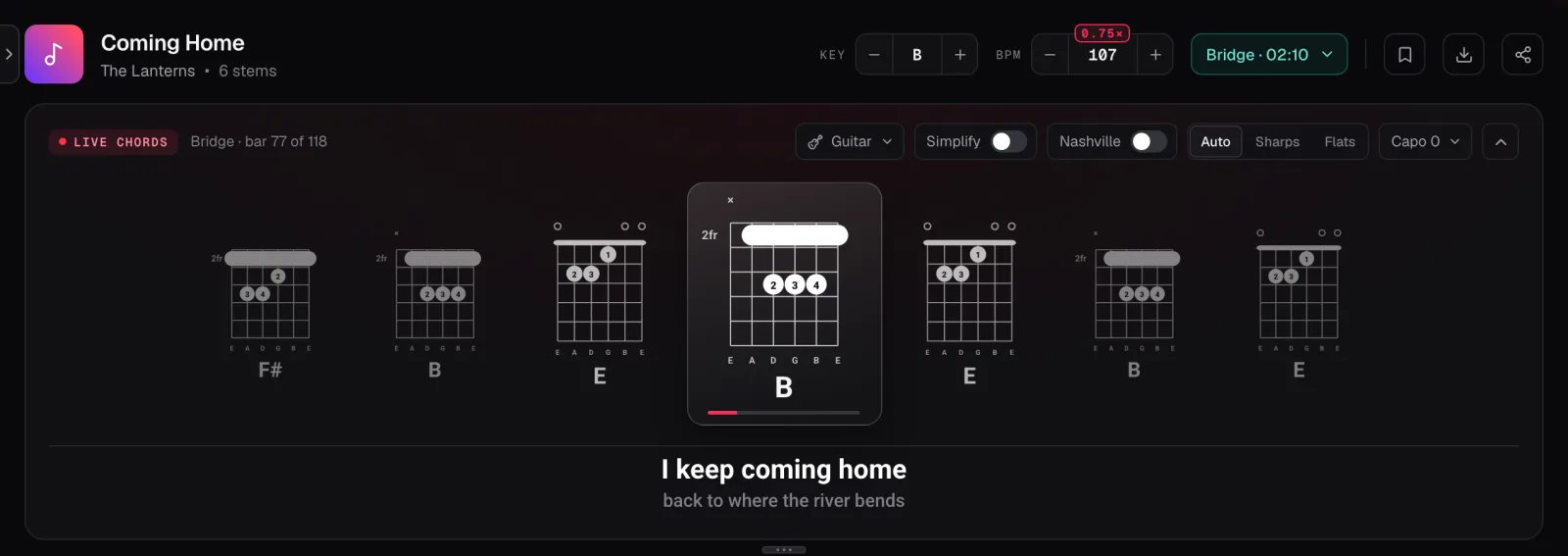
In the screenshot the demo song Coming Home is in B at 143 BPM. Thirty-six presses on the BPM minus take it to 107, which the Studio marks as 0.75×. The Key control still reads B, and the chords above the lyric are the same shapes you’d play at full speed.
Open the song
Paste the YouTube link into the Studio, or bring your own MP3, WAV or M4A file. With the Chrome extension, the controls sit right under the YouTube video.
Pick a speed
Step the tempo down to about 0.75× of the song’s BPM. Go lower for a fast run, but rarely below half speed.
Loop the hard bars
Set A at the start of the passage and B at the end. The song goes round those bars at the speed you chose.
Play it until it’s clean
Play along with the loop several times in a row without a mistake before you change anything.
Step back up
Raise the speed a little, play it clean again, and repeat until you’re at the speed of the record.
03 / 08 · HOW SLOW
Slow enough to be right, no slower.
Start at 0.75×. For most songs that is the sweet spot: slow enough to hear every note of a busy part, close enough to the original that the groove still feels like the song. Many players never need to go further.
Go to half speed (0.5×) for the hardest passages: a fast solo, a run of sixteenth notes, a strumming pattern full of ghost strokes. At half speed you can hear which way each note goes and where each hand lands. Stay there only as long as you need to.
Below half speed the recording starts to fall apart. The sound is stretched further than it was ever recorded, so drums smear, reverb turns to mush, and fast notes blur into each other. The notes and the key are still right, but it gets hard to hear the details you slowed down for. If you need that much help, loop a shorter piece instead of slowing it further.
In the Chord Lens Studio the BPM stepper runs from half the song’s tempo up to double, one BPM at a time, with the pitch held at every step. The Chrome extension goes further under the video, from 0.25× to 2× in steps of 0.05, which is handy for a single ornament you want to hear in slow motion. You can also speed a song up the same way; practising a part a little above 1× makes the record feel easy when you go back to it.
Think in BPM, not percentages. Write down the tempo you can play cleanly each day, and you’ll see your progress in numbers.
04 / 08 · LOOP
Loop it, or you’re just listening.
Slowing the whole song down and playing from the top wastes most of your practice on bars you already know. The real gains come from slowing just the hard part and going round it again and again.
Keep the loop short: one to four bars. Start it a beat before the hard part, so you have a moment to get ready, and end it a beat after, so you practise landing on what comes next. The join between two passages is often where players stumble, and a loop that crosses it fixes that too.
In Chord Lens, set A at the start and B at the end of the bars. The loop snaps to the beat, so it comes round in time and you don’t lose the count at the join. Save the loop with a name and you can jump straight back to it tomorrow. Free keeps 3 saved loops per song; in the demo song, a loop called Bridge riff sits in the player bar ready to press.
When the loop is clean at your slow speed, don’t move on to the next passage straight away. Raise the speed first, then move on. Learning every part at 0.75× and only then trying the song at full speed tends to leave you with a song you can play slowly and nothing more.
05 / 08 · SPEED UP
Climb back up in small steps.
The step back up is where most practice goes wrong. Players jump from 0.75× straight to the record, miss half the notes, and decide the slow work didn’t help. It did; the jump was too big.
Raise the speed in small steps instead. A few BPM at a time is plenty. Play the loop cleanly two or three times at each speed before the next step. If a step falls apart, go back to the last speed that worked and stay there a little longer. Some days you’ll reach full speed in ten minutes; some days you’ll stop at 0.9× and finish there tomorrow.
Once the loop is clean at the record’s tempo, play the whole section with the song, then the song from the top. A part that is solid on its own can still trip you when it comes out of the bar before, so give the joins some time too.
If you like counting in beats, turn on the Studio’s metronome. It clicks on the song’s own beat, so it slows with the song and keeps you on the grid at any speed. See YouTube Metronome for how it lines up.
06 / 08 · GO FURTHER
Slow it down, then hear only your part.
Sometimes the problem isn’t speed. The part you want is buried under the band, and slowing it down just gives you a slower blur. Split the song into stems and solo the part you’re learning: the whole song slows, and you hear only the guitar, the bass or the piano. The stems follow the speed and the key. The stem splitter gives you six: vocals, drums, bass, guitar, piano and everything else. Splitting runs in your browser on a computer; Free splits a 2-minute part of the song that you choose, and Premium and Pro split the whole song.
Key and speed are separate controls. If the song sits awkwardly for your voice or your hands, move the key with the Key control and the speed stays where you set it, with every chord on the chart re-spelled. Our guide to transposing chords explains what changes when you do.
And if you are learning a song from scratch rather than polishing one bar, slow playback is only one part of the job. Learning a song by ear walks through the whole loop: slow it, sing it, find it, then bring it back up to speed.
07 / 08 · Do it in one click
Slow Down Songs
Slow any song, keep its pitch, and loop the bars you’re learning, with the chords in time.
01How do I slow down a song without changing the pitch?
Use a player that time-stretches the audio, such as Chord Lens under a YouTube video or in the Studio. Step the speed down and the song slows while its key stays the same.
02Does slowing a song down change its key?
Not with time-stretching. The notes stay where the record has them, so a song in G is still in G at 0.75× and the chords still match your instrument.
03What speed should I practise at?
Start at 0.75×. Drop to half speed for the hardest runs, then raise the speed a few BPM at a time as each loop gets clean.
04How slow can Chord Lens go?
Half the song’s tempo in the Studio, one BPM at a time, and a quarter speed (0.25×) under the video with the Chrome extension. Both go up to double speed.
05Why does a song sound blurry when I slow it down a lot?
Below about half speed the sound is stretched further than it was recorded, so drums smear and reverb blurs. Loop a shorter piece instead, or solo the part you’re learning.
06Can I slow down just the guitar or the bass?
Split the song into stems and solo the part you want. The whole song slows and you hear only that part. Splitting needs a computer.
07Can I slow down a song on my phone?
Use a computer for the full routine: the Chrome extension runs in Chrome on a computer, and splitting stems to solo a part needs one too. On a phone the Studio still shows the chords.
08Can I speed a song up without changing the pitch?
Yes, up to double speed, with the pitch held the same way. Practising a little above the record’s tempo makes full speed feel easy.