 Chord Lens
YouTube chord finder
YouTube to Chords: chords in time with the video
Get chords from a YouTube video in three steps: add the free Chord Lens extension to Chrome, open the song on YouTube, and click Chords under the video. Chord Lens listens to the recording, works out the chords and plays them in time with the video, drawn for guitar, piano, ukulele, bass or mandolin, with the words underneath. No ads.
Last updated

Keep the tape running
The short version
At a
glance.
nine things, one video
Chord Lens hears the song in a YouTube video and gives you its chords, in time, on the instrument you play. Everything else on this page is the detail.
- Chords in time with the videothe chord on the beat lights up, the next one waits
- The shape to playguitar, bass, ukulele, mandolin or piano
- Words under the chordsthe lyric line as it is sung, where the song has lyrics
- Key ±12 semitonesin the Studio (±6 in the extension); the recording moves with it
- Capo shapeson guitar, ukulele and mandolin
- Half to double speedslower without the chipmunk; loop the bar you miss
- Key, BPM and a metronomeon the song’s own beat
- Six stemsmute the singer, solo the bass
- Free, no adschords on every plan; key and speed in Chrome
01 / 10 · What it is
What is a YouTube
chord finder?
A YouTube chord finder listens to the song in a YouTube video and tells you what to play along: the chord names, when each one changes and how to hold it. Chord Lens is one, a free Chrome extension that works the chords out from the recording itself, not from a chart someone typed up.
Working from the recording matters for the songs chord sites skip: a live take, an acoustic cover with forty views, a demo uploaded yesterday. If you can play it on YouTube, Chord Lens can listen to it.
It also keeps time. A chord sheet on another tab can’t tell you where you are in the song. Here the chord on the beat lights up while the video plays, and the next one waits beside it, so you see a change coming before you hear it.
It suits a beginner who wants the three chords of a campfire song, and a gigging player who needs a cover in the singer’s key by Friday. Both get the same thing: the chords, in time, in a shape their hands know.
Want the chords of a song file instead? The chord finder takes MP3, WAV and M4A in the Studio the same way.
Looks it up
Finds a chart somebody already wrote for this song. Quick when the song is famous, empty when it isn’t, and rarely in time with the video.
Listens to it
Hears the recording you’re watching and works the chords out, so a cover, a live version or a new upload gets chords like a hit does.
02 / 10 · How to
How do I get chords
for a YouTube video?
under a minute, start to strum
Add the free Chord Lens extension to Chrome, open the song on YouTube and click Chords under the video. Chord Lens listens to the recording, works out the chords and plays them in time with the video. Pick guitar, piano, ukulele, bass or mandolin and press play. In the Studio, paste a YouTube link instead.
Add Chord Lens to Chrome
Install the extension from the Chrome Web Store. It needs no account.
Open the YouTube video
Click Chords under the video. Chord Lens listens to the song as it plays and works the chords out.
Pick your instrument
Guitar, bass, ukulele, mandolin or piano. Set the key, a capo or a slower speed if you want.
Press play
The chord on the beat lights up, the next one waits beside it, and the words run underneath.
Rather stay on YouTube? Add Chord Lens to Chrome, open any video and click Chords. The chart plays along under the video, no account needed.
Add to ChromeThe first time anyone opens a song, Chord Lens takes a short while to listen to it, then the chart appears. Both ways in give you the same chords, so start wherever you already are.
03 / 10 · Your instrument
Does it work for
piano and ukulele?
Yes. Chord Lens draws every chord for the instrument you pick: guitar, ukulele and mandolin get frets and fingers, piano gets the keys to press, and bass gets the notes to play, by interval. Pick another instrument and the same song’s chords are drawn for it, still in time with the video.
Sevenths, suspended and added-note chords (G7, Fmaj7, Dsus4, Cadd9) are named and drawn as they are, not cut down to a plain triad. If you want the easy version, turn on Simplify. How each shape follows the key and the capo is on Chord shapes for any song.
- Guitar
- Bass
- Ukulele
- Mandolin
- Piano
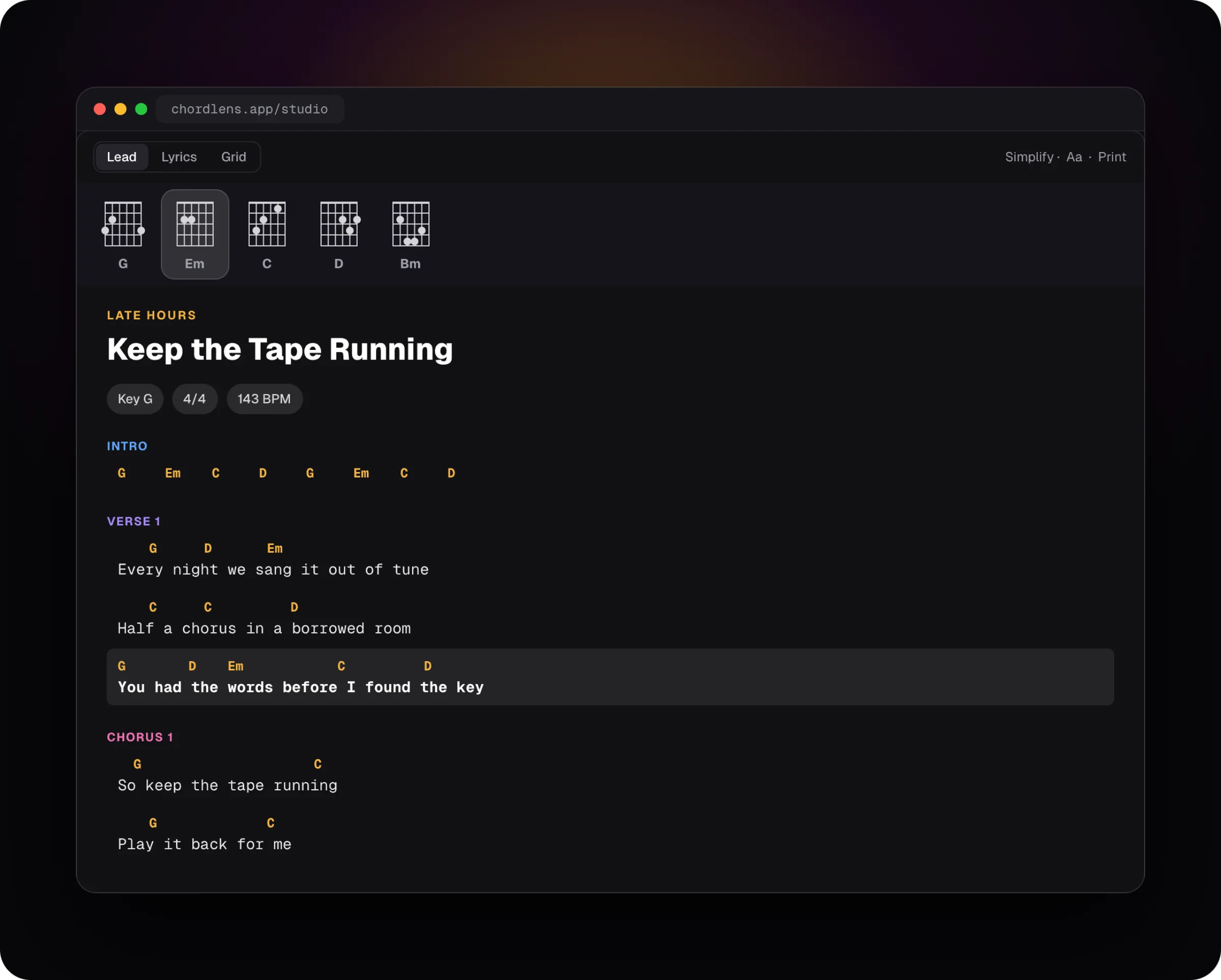
Then pick how you like to read. The same chords, laid out three ways:
Words with chords
The lyric line with each chord sitting over the word it lands on, like a songbook.
Bar grid
Every bar numbered, one to a box, so you see how long each chord lasts and where the changes fall.
Words alone
Just the lyrics, for when your hands know the chords and you want to sing.
04 / 10 · Key, capo, speed
Your key.
Your speed.
same recording!
- Key
- −2
- Move the song up to 12 semitones either way in the Studio, 6 in the extension. The recording moves with it and every chord is re-spelled.
- Capo
- Capo 2
- On guitar, ukulele or mandolin, set a capo and the chart shows the shapes to play with it.
- Speed
- 0.75×
- Slow it down without the chipmunk: the pitch stays put. Loop the bar you keep missing.
A song too high to sing? Take it down two semitones and the singer comes down with you. A song in E flat that your fingers don’t like? Set a capo, and the chart shows easy open shapes that still sound right against the record. A step or two sounds clean. Push a dense mix a long way and you will hear that it has been processed.
The top of the chart shows the song’s key and tempo in BPM. Turn on the metronome and it clicks on the song’s own beat, so you can count yourself in at any speed.
05 / 10 · Stems
Six stems,
if you want them.
Split the song into vocals, drums, bass, piano, guitar and everything else, each on its own fader. Mute the singer and sing it yourself. Solo the bass and learn the line. Turn the guitar down and play the part over the band. The chords keep running while you mix.
Splitting runs on your own computer, so it needs a desktop browser rather than a phone. The Free plan splits part of each song; Premium and Pro split more of it.
Stems are a learning tool as much as a karaoke one. When a chord is hard to hear, the bass on its own usually tells you the root. When a strumming pattern hides under the drums, the guitar on its own makes it plain.
06 / 10 · How accurate
A strong first draft.
Your ears have the last word.
Most pop, rock, folk and worship songs come out close to what you’d find in a good songbook: clear harmony, steady changes. Chord Lens names the chords it hears, sevenths and suspended chords included, and lines each change up with the beat.
It has harder days too. Dense jazz voicings get simplified. A heavily distorted guitar or a muddy live recording can blur a change. A song that moves between keys can trip a chord or two. Treat the chart as a draft you check by ear, the way a good teacher would.
A clean studio recording with a clear bass line is the easiest case. A solo voice with a lot of reverb, or a guitar part that rings open strings over every change, is harder, because the notes that make the chord are less clear. Chord Lens still gives you its best reading, and the tools to check it are one click away.
We don’t print an accuracy score, because no single number is true of every song. The honest test is your own: play along for a verse and listen.
A chord sounds off? Check it in thirty seconds.
- Loop the bar it sits in.
- Slow it to 0.75×. The pitch stays put.
- Solo the bass stem: the bass note is usually the chord’s root.
- Strum the chord against it. Your ear settles it.
07 / 10 · Compared
Chord Lens vs
the other ways.
There are four common ways to get the chords of a song you heard on YouTube. Each has its place; here is where they differ.
| Chord sites | Song-catalogue apps | Working it out by ear | Chord Lens | |
|---|---|---|---|---|
| Any upload, cover or live take | Only if someone wrote it | Only songs in the catalogue | Yes | Yes |
| In time with the video | No | Sometimes | You keep your place | Yes, chord on the beat |
| Your key and capo | Transpose the text | Often | By hand | The recording moves too |
| Shapes for your instrument | Usually guitar | Guitar, piano | — | Guitar, bass, ukulele, mandolin, piano |
| Slow it down, loop a bar | No | Paid | With a second app | Quarter to double speed, free in Chrome |
| Cost | Free with ads | Subscription | Your time | Free, no ads |
Working a song out by ear is still the best training there is, and a good chord site is quick for a famous song. Chord Lens is for everything in between: the song you heard once, in the version you heard, on the instrument you hold.
08 / 10 · What it doesn’t do
What it won’t
pretend to do.
No tabs or sheet music
Chord Lens gives you chords and their shapes, not note-for-note tablature or notation. For a riff or a solo, solo the guitar stem and learn it by ear.
No guessing at songs it can’t hear
Private, age-restricted, members-only or removed videos can’t be opened, so they get no chords.
No changing YouTube for anyone else
The chart sits beside the video on your screen. The video, its uploader and its ads are untouched.
Not words for every song
The lyrics show when the song has them. For many songs without any, Premium can write them; an instrumental plays with chords only.
09 / 10 · No chords?
No chords?
Try this.
nine times out of ten it’s one of these
No Chords button on YouTube
Check the extension is on in chrome://extensions, then reload the YouTube tab. The button sits in the video player’s controls on a watch page, not on the home feed.
Some videos won’t open
Private, age-restricted, members-only and removed videos can’t be opened.
The song is too long
Every plan has a longest song it will take. Premium and Pro take longer ones; chords stay free, and so do key and speed in Chrome.
Still stuck
Reload the page once. Then send us a note from Feedback in the Studio’s sidebar; a person reads it.
10 / 10 · Plans
Is Chord Lens
free?
Yes. Chords for YouTube videos are free on every plan, with no ads, and so are the lyrics a song already has, the shapes for all five instruments and the metronome. Key and speed are free too, in Chrome and, once you sign in, in the Studio.
Premium and Pro lift the limits on splitting songs into stems and give you longer songs. Premium also writes lyrics for songs that have none, and prints the chart.
See plans and prices01How do I get the chords of a YouTube video?
Open the video on YouTube with the Chord Lens extension and click Chords. Chord Lens listens to the song as it plays, works the chords out, and plays them in time with the video with the words underneath.
02Is there a Chrome extension that shows chords on YouTube?
Yes. Add Chord Lens to Chrome, open a song on YouTube and click Chords in the player. The chart plays along under the video, with the shape to play, and it needs no account.
03Can I use Chord Lens on my own files, or only YouTube?
Both. The Chrome extension works right on the YouTube video you’re watching, listening to the song as it plays. To split stems, upload your own audio in the Studio (MP3, WAV or M4A, up to 50 MB). Premium exports stems as MP3 and Pro adds WAV, for your own study and practice.
04Does it get YouTube chords for any video?
Any video with music it can open. Chord Lens works the chords out from the recording, so a cover, a live take or a video uploaded today gets chords the same way a hit does. Private, age-restricted, members-only and removed videos can’t be opened.
05Are YouTube chords free?
Yes. Chords and the lyrics a song already has are free on every plan, with no ads; key and speed are free in Chrome and, once you sign in, in the Studio, for the whole song up to your plan’s song-length limit. Premium and Pro lift the limits on splitting songs into stems and give you longer songs.
06How accurate are the chords?
Close to a good songbook on most pop, rock, folk and worship songs, with each change on the beat. Dense jazz voicings, heavy distortion or a muddy live recording can blur a chord, so loop the bar, slow it down and check it by ear.
07Which instruments get YouTube chords?
Guitar, bass, ukulele, mandolin and piano. Each chord is drawn for the one you pick; bass shows the notes to play, by interval.
08Can I change the key or use a capo?
Yes. Move the key up to 12 semitones either way in the Studio, or 6 in the extension, and the recording moves with it, every chord re-spelled. On guitar, ukulele or mandolin, set a capo and the chart shows the shapes to play with it.
09Does it show the tempo (BPM) and the key?
Yes. The song’s key and tempo sit at the top of the chart, and the metronome clicks on the song’s own beat.
10Does it show sevenths and suspended chords?
Yes. Sevenths, major sevenths, suspended and added-note chords are named and drawn as they are. Turn on Simplify if you’d rather play plain chords.
11Can I slow a song down and loop a part?
Yes. Play anywhere from half speed to double with the pitch left where it was, and loop the bar or section you’re learning.
12Do I need an account?
Not for the extension. Install it, open a video, click Chords. The Studio asks you to sign in with Google.
13Can I use my own songs?
Yes, in the Studio: bring an MP3, WAV or M4A file and it gets chords the same way.
14Which devices does it run on?
The extension runs in Chrome on a computer. The Studio runs in a browser on a computer or a phone, though splitting stems needs a computer. Chord Lens for Mac runs on Macs with Apple silicon, M1 and later.
15Does it record my audio or my screen?
No. Chord Lens never records your microphone or your screen. It sends our server the video’s ID, and the server listens to that video’s own sound; a file you bring to the Studio is sent to work out its chords.
16Is there an app that gets chords from YouTube on a phone?
Yes: the Chord Lens Studio, in your phone’s browser, with no app store download. Paste the YouTube link and the chords play in time with the video. On a computer, the Chrome extension puts them on YouTube itself.
17How does Chord Lens compare with Chordify, Chord ai or Moises?
Chord Lens works on the YouTube video you have open and adds stems, with key and speed free. Chordify has a catalogue of songs that already have chords, Chord ai hears songs through the microphone, and Moises is a practice suite. Our chord finder app comparison and Chord Lens vs Chordify go through each one.
In short
The whole page
in four lines.
It listens.
Chords come from the recording, so any upload gets them.
It keeps time.
The chord on the beat lights up as the video plays.
It fits you.
Your instrument, your key, your capo, your speed.
You check it.
A draft for your ears: loop, slow, solo the bass.