 Chord Lens
Guide track maker
Guide Track Maker: spoken cues for any song
A voice that calls the next section a bar before it lands, counts you in, and says the dynamics you place: Build, Break, Last Time. Open a song in the Chord Lens Studio, turn the cues on, and play it like the band has a leader in your ear. Free to try.
Last updated
The short version
At a
glance.
a voice in your ear
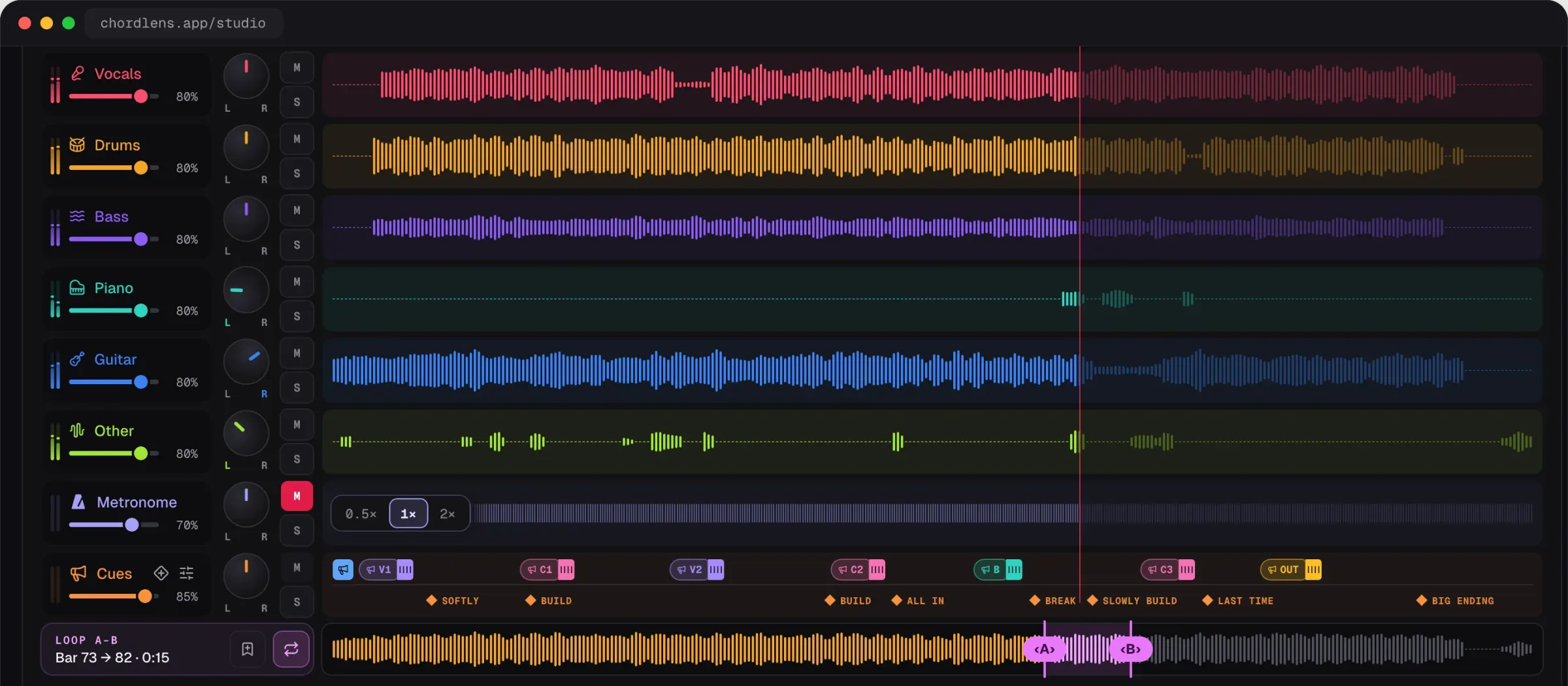
Chord Lens adds a spoken guide track to the song you’re playing: section names, a count-in and the dynamics you place, in time with the music. Everything else on this page is the detail.
- 37 section namesVerse 1, Pre Chorus, Bridge, Tag, Outro…
- A count-inone or two bars, fitted to the meter
- 18 dynamicsBuild, Break, Drums In, Last Time…
- Placed on the beatdrag one in, it snaps to a free beat
- In-ear splitcues and click left, band right
- Chords keep playingthe chart stays in time under the cues
- Works with the stemsmute your part, keep the voice
- Any song you uploadan MP3, WAV or M4A file
- Free to tryinside your 2-minute part on Free
01 / 10 · What it is
A leader
in your ear.
A guide track is the voice bands play to on stage and in rehearsal: it calls “Verse”, “Chorus”, “Bridge” just before each part, counts the band in, and says when to build, break or end. Worship teams and touring bands run one in their in-ears so nobody misses a turn.
Chord Lens makes one for the song you’re learning. The sections come from the song’s chart, the count-in fits its meter, and you drop dynamics on the beats you want. There are no tracks to buy and nothing to record.
Spoken cues are in the Studio, on the web and in the Mac app. The Chrome extension doesn’t have them.
Pre-made guide tracks
Exist for the songs someone has already made one for, in their arrangement, and you buy them per song.
A guide for any song
Builds the cues on the song you open, in your arrangement, with the chords in time underneath.
02 / 10 · How to
Make a guide track
in four steps.
nothing to record
Open the song
Go to chordlens.app/studio, sign in with Google, and upload an MP3, WAV or M4A file (up to 50 MB).
Switch on the names
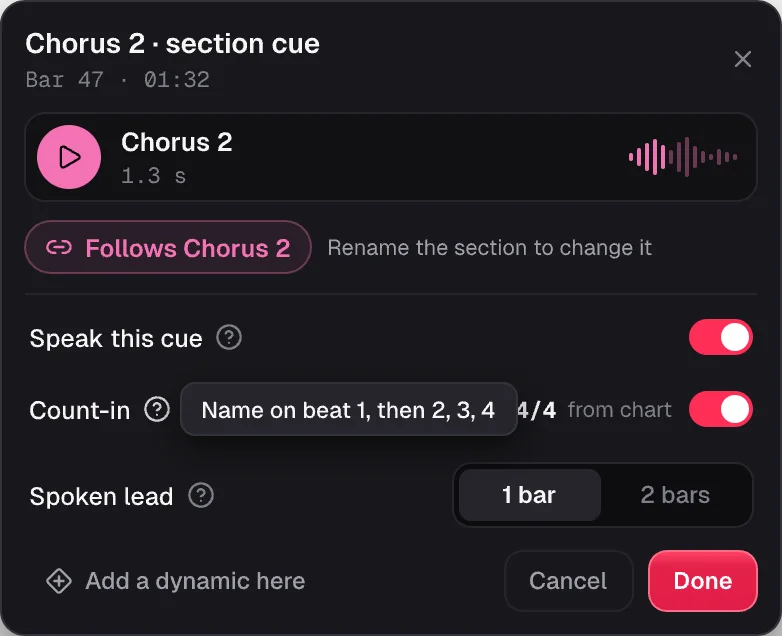
Click a section and switch Speak on. The count-in is on already; set its lead to one bar or two.
Drop in the dynamics
Drag Build, Break or Last Time from the palette onto a beat. It snaps to the nearest free one.
Press play
Hear each cue in time. Split the ears to send the cues and the click to your in-ears, the band to the room.
On the Mac? The Chord Lens app runs the same Studio, cues included.
Get the Mac app03 / 10 · What it says
Sections, counts
and dynamics.
Three kinds of cue, each a real recorded voice, not a robot. They sit in their own lane under the stems, so you see every cue before you hear it.
- Verse 1
- Chorus
- Bridge
- 1 · 2 · 3 · 4
- Build
- Last Time
Section names
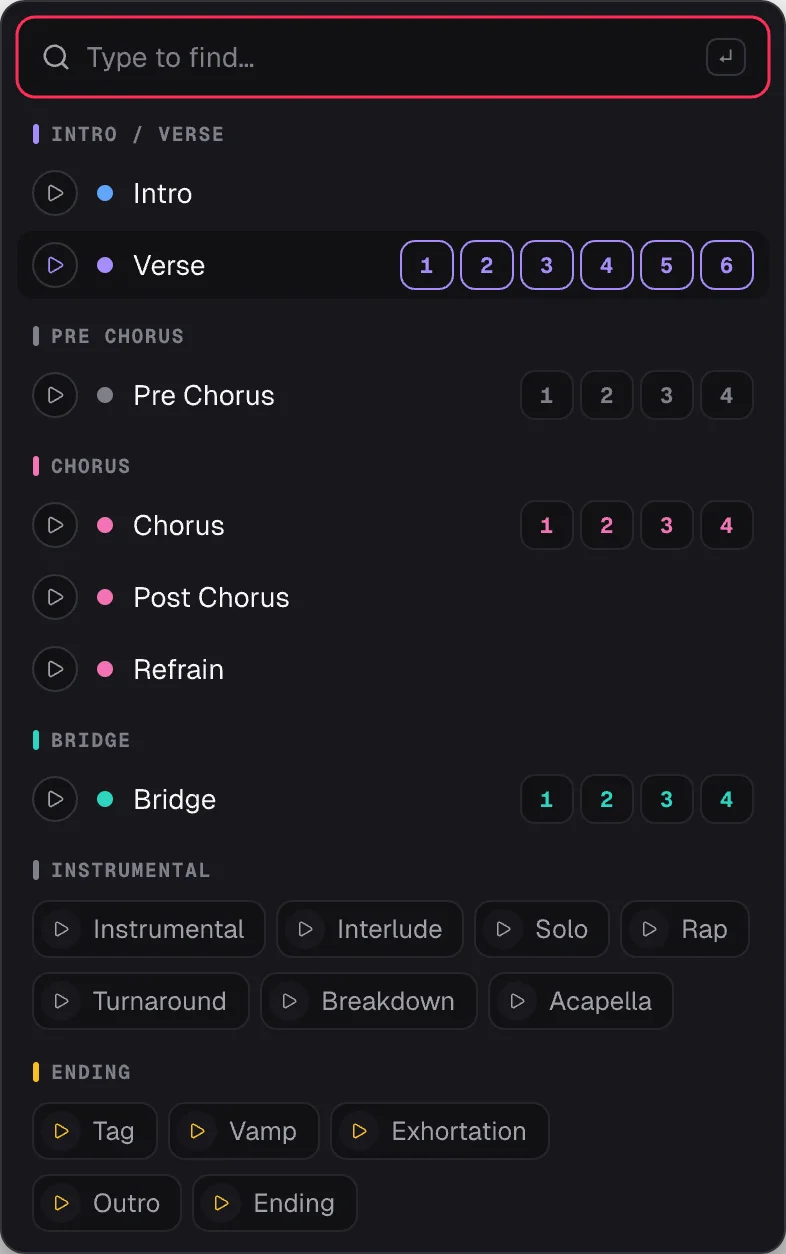
37 recorded names, from Intro and Verse 1 to Pre Chorus, Bridge, Tag, Vamp and Outro. Each section speaks once you switch it on.
Count-in
One or two bars before a section, counted to fit the song: quarters, eighths or dotted beats in 6.
Dynamics
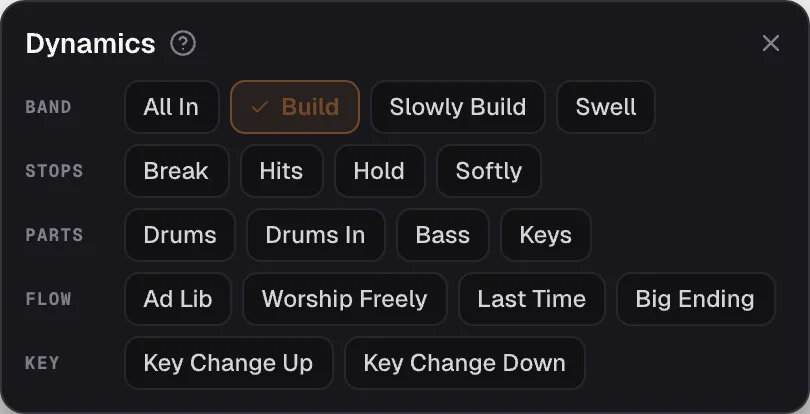
18 calls in five groups: Build, Break, Drums In, Last Time, Key Change Up and more.
Hear the voice
the real recordings, press play
04 / 10 · In your ears
Cues left.
Band right.
like a stage in-ear mix
- Split
- L / R
- The cues and the click in the left ear, the band folded to mono in the right, for in-ears and a speaker.
- Click
- On the beat
- A metronome locked to the song’s own beat, under the cues.
- Hide
- Dynamics
- Keep the section names and the count, and turn the dynamics off for a plain guide.
05 / 10 · How it times them
Early enough
to play on time.
A section’s name is spoken ahead of it, so you hear “Chorus” while there’s still time to get there. The count-in fills the bar or two before. When two cues would talk over each other, names win over counts and counts over dynamics, and the one that gives way is marked in the lane. Nothing is moved without you.
06 / 10 · What you set
The chart gives the sections.
You give the feel.
The sections and the beat come from the song’s chart, so names and counts land in time from the start. Rename a section from the list of recorded names, or move its edges, and its cue follows.
The dynamics are yours. Chord Lens doesn’t guess when the band should build or stop; you place each one on a beat, and you can nudge it a beat or a bar. A chart with sections in the wrong place gives cues in the wrong place, so check the sections first.
A cue doesn’t sound?
- Check its section speaks: names are off until you switch them on.
- Look for a ⚠ in the lane: another cue won that beat.
- A cue past the song’s end is dropped.
- On Free, cues play only inside your 2-minute part.
07 / 10 · Compared
Chord Lens vs
other guide tracks.
Three ways to get a guide track for a song, and where they differ.
| Pre-made tracks | Click apps | A leader on the mic | Chord Lens | |
|---|---|---|---|---|
| Any song you can open | Only those on sale | Yes | Yes | Yes |
| Section names spoken | Yes | Some, set by hand | If they remember | 37 recorded names |
| Your dynamics | Their arrangement | Some | Yes | 18, on any beat |
| In-ear L/R split | Yes | Yes | — | Built in |
| Chords in time | No | No | No | Yes, under the cues |
| Cost | Per song | Per app | A volunteer | Free to try |
08 / 10 · How bands use it
Four ways
bands use it.
Rehearse at home
Play the set with the cues you’ll hear on Sunday, so the turns are in your hands.
Learn the arrangement
Hear “Bridge” and “Last Time” where they fall, and stop getting lost in a long song.
Drummer’s in-ears
Cues and click left, band right, and count the band in yourself.
Play your part alone
Mute your stem, keep the guide, and play it like the band is there.
Between rehearsals, the guide on how to practice without a band turns this into a weekly routine: your part muted, the cues in your ears, the band all around you.
09 / 10 · What it won’t do
What it
won’t do.
so you know before you start
No automatic dynamics
It won’t guess where to build or break. You place every dynamic.
No ear split on YouTube playback
The left/right split needs the Studio’s own audio. A song YouTube plays keeps both ears.
Not in the extension
Spoken cues are in the Studio and the Mac app, not the Chrome extension.
No names until you choose
Each section speaks once you switch it on; the count-in is on from the start.
10 / 10 · Plans
Free to try.
On Free, cues and the count-in play inside the 2-minute part you pick and fall silent outside it. Premium plays them for the whole song. Pro adds export, for your own practice. Chords and the words stay free on every plan.
See plans and prices01What is a guide track?
A spoken track that plays with the song and calls the next section, counts the band in and says the dynamics, so everyone knows what comes next. Chord Lens makes one for any song you open in the Studio.
02Which section names can it say?
37 recorded names: Intro, Verse and Verse 1 to 6, Pre Chorus and Pre Chorus 1 to 4, Chorus and Chorus 1 to 4, Post Chorus, Refrain, Bridge and Bridge 1 to 4, Instrumental, Interlude, Solo, Rap, Turnaround, Breakdown, Acapella, Tag, Vamp, Exhortation, Outro and Ending. A section with another name speaks as the nearest one, so Guitar solo says Solo.
03Does it count me in?
Yes. When a section speaks, its count-in is on unless you turn it off: the name on beat 1, then 2, 3, 4, in the bar or two before the section starts. It fits the meter, so a song in 3/4 counts to three.
04Which dynamics can I add?
18, in five groups. Band: All In, Build, Slowly Build, Swell. Stops: Break, Hits, Hold, Softly. Parts: Drums, Drums In, Bass, Keys. Flow: Ad Lib, Worship Freely, Last Time, Big Ending. Key: Key Change Up and Key Change Down.
05Does it work for worship teams?
Yes. The names and calls include the ones worship sets use, such as Vamp, Tag, Exhortation, Worship Freely and Last Time, so a team can rehearse a song at home with the cues they’ll hear on Sunday.
06Can I send the cues to my in-ears only?
Yes, when the Studio plays its own audio, such as a split song or your own file. Switch In-ears to Split L/R: the cues and the click play in the left ear and the band, folded to mono, in the right.
07Why can’t I split the ears on a YouTube song?
Before you split it, YouTube plays the song in its own player, and the Studio can’t route that sound to one ear. Split the song into stems, or open your own file, and the Studio plays the audio itself, so Split L/R works.
08Why didn’t a cue play?
Check that its section speaks, since names are off until you switch them on. A ⚠ in the lane means another cue won that beat, a cue past the song’s end is dropped, and on Free cues play only inside your 2-minute part. If Hide dynamics is on, the dynamics stay silent.
09Is it free?
Yes, to try. On Free the cues and the count-in play inside the 2-minute part you pick and fall silent outside it. Premium plays them for the whole song, and Pro adds export. Chords and the lyrics a song already has are free on every plan; key and speed are free in Chrome and, once you sign in, in the Studio, for the whole song up to your plan’s song-length limit.
10How much of a song gets cues?
On Free, the 2-minute part you choose for the free split; the cues are silent outside it. On Premium and Pro, the whole song. Only Pro exports the cues, for your own personal study and practice, not to share, sell or publish.
11Is it in the Chrome extension?
No. Spoken cues are in the Chord Lens Studio, on the web at chordlens.app/studio and in the Mac app, which runs the same Studio. The extension has the chords, stems, key and speed on YouTube, but no cues.
12Does it find the dynamics for me?
No. The section names and the counts come from the song’s chart, but Chord Lens never guesses where the band should build or stop. You drag each dynamic onto a beat, and can nudge it by a beat or a bar.
13Can I use it with my own files?
Yes. Drop an MP3, WAV or M4A file into the Studio and it gets a chart, sections and cues. Your own file plays as the Studio’s own audio, so Split L/R works on it too.
14Do the chords still show?
Yes. The chart keeps running in time with the cues, the chord on the beat lit, so you can read the changes while the voice calls the sections.
15Can I mute my part and keep the cues?
Yes. Split the song into stems and mute or turn down your part. The cues have a fader of their own, so the voice and the click stay while you play.
In short
The whole page
in four lines.
Spoken cues.
Section names, a count-in and your dynamics.
In time.
Each name a bar early, the count fitted to the song.
In your ears.
Cues and click left, band right.
Free to try.
Inside your 2-minute part on Free; the whole song on Premium and Pro.