 Chord Lens
YouTube karaoke maker
YouTube Karaoke Maker: the singer out, the words in
Turn any song you upload into karaoke: the lead and backing vocals out, the band in, the words lit in time, and the song moved to your key. Upload an MP3, WAV or M4A in the Studio. Free to try: Free splits a 2-minute part.
Last updated
The short version
At a
glance.
sing the song, not over it
Chord Lens splits the song, mutes the voices with one Karaoke press, shows the words in time and lets you change the key. Everything else on this page is the detail.
- Karaoke in one pressvocals and backing voices muted
- The band staysdrums, bass, piano, guitar
- Words in timethe line lit as it’s sung
- Your keyup or down, the band follows
- Bring a voice backturn Vocals up a little to guide you
- Chords on screenplay and sing at once
- Loop the hard linesing the bridge until it sits
- Your own audioupload an MP3, WAV or M4A in the Studio
- Free to trya 2-minute part on Free
01 / 10 · What it is
The band.
Without the singer.
A karaoke track is a song with the singing taken out, so you can sing it yourself over the real band. Karaoke channels only have the songs someone has already made a track for, and usually not in your key.
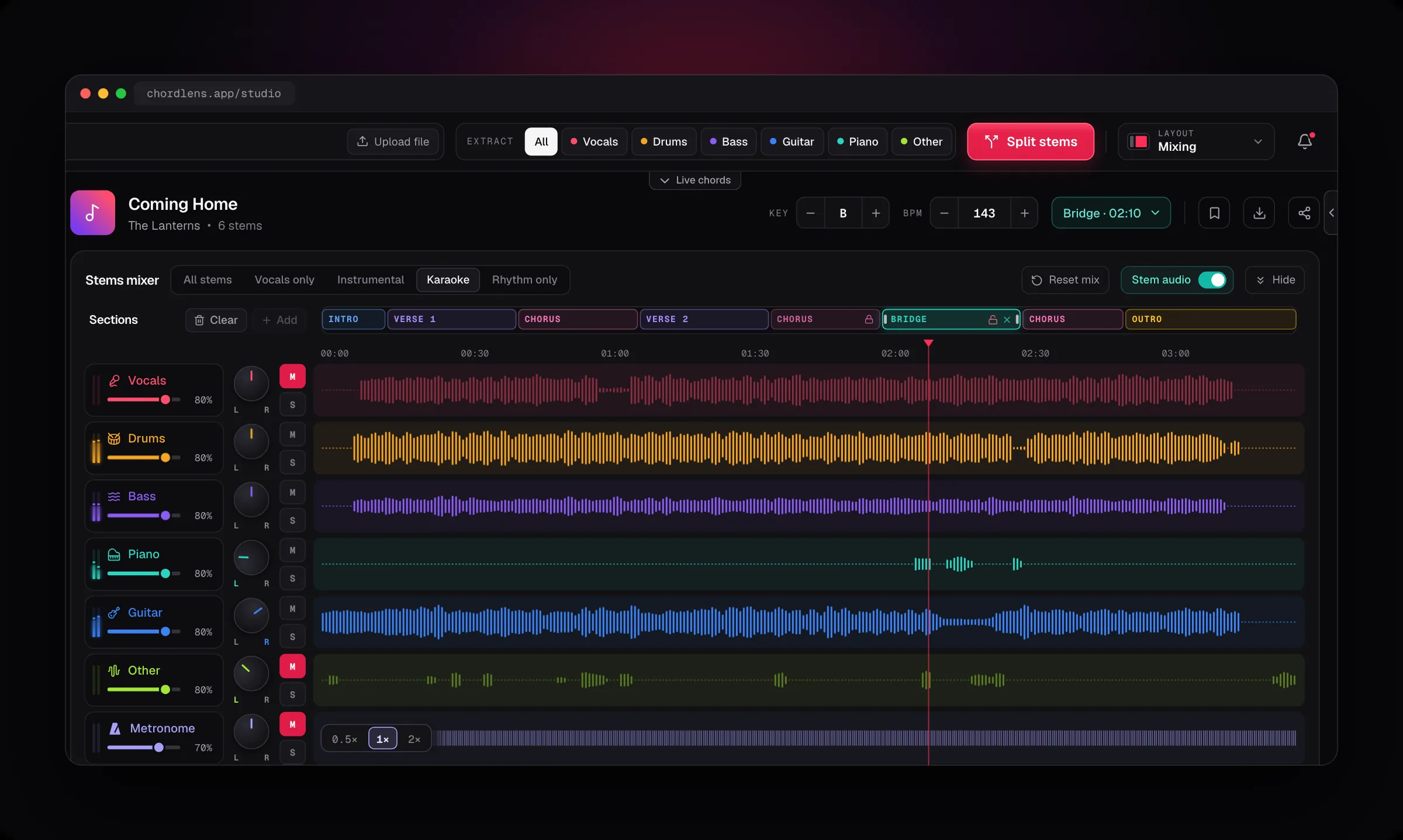
Chord Lens makes one from the song itself. It splits the recording into six parts, and the Karaoke press mutes the lead vocal and the Other part, where backing voices usually sit. The words light up line by line, and the key moves to suit your voice.
Because it works from the audio you give it, the cover you found last night, a live take or a song in a language the karaoke catalogue skipped all turn into karaoke the same way as a hit. Upload it in the Studio and split.
It suits a singer rehearsing for a gig, a worship team learning a new song in their singer’s key, a guitarist who sings and plays, and anyone who wants a karaoke night with the songs they actually listen to.
Watching on YouTube? The Chrome extension works right on the video, listening to the song as it plays.
Karaoke channels
Have the songs somebody already made, in the key they picked, with words burnt into the video.
Karaoke from any song
Makes it from the song you open, in your key, with the words and chords in time.
02 / 10 · How to
Make karaoke
in four steps.
just open the song
Open the song
Upload an MP3, WAV or M4A file in the Studio, up to 50 MB. On YouTube, Chord Lens in Chrome listens to the song as it plays.
Split the song
Press Split. On Free, pick the 2 minutes you want to sing.
Press Karaoke
The lead and backing voices go quiet; the band keeps playing.
Sing it in your key
Step the key until the chorus sits, and read the words as they light up.
On the Mac? The Chord Lens app runs the same Studio.
Get the Mac appThe chords and the words come first, because they’re quick: the server listens to the song and sends them back. The split comes second, because it runs in your browser on your own computer, and you can read the lyrics or set the key while it works. A song you split stays split in the Studio, so next time the karaoke is ready when you are.
03 / 10 · The mix
Karaoke, or
something in between.
Karaoke is one of five mixes, one press each. Or set the faders yourself: keep a little of the singer to guide you, or take the guitar out too.
- All stems
- Karaoke
- Instrumental
- Vocals only
- Rhythm only
- Your mix
Karaoke
Lead and Other muted: the backing voices go too.
Instrumental
Only the lead vocal muted, the backing voices kept.
Guide vocal
Vocals down low, so you hear where the line goes.
The mixes sit above the faders. Karaoke mutes Vocals and Other together, because backing voices and stray vocal lines tend to land in Other. Instrumental mutes only Vocals, for when you want the harmonies to stay behind you. A mix only sets mute and solo, so your levels stay where you put them, and Reset mix brings the whole song back.
04 / 10 · Your key
Sing it
in your key.
the band moves with you
- Key
- −2
- Drop the song two semitones and the whole band follows, at the same speed.
- Chords
- Re-spelled
- Playing as you sing? The chords move to the new key too.
- Where
- Chrome
- Key is free for the whole song in Chrome and, once you sign in, in the Studio, up to your plan’s song-length limit.
A song written for a voice that isn’t yours? Move it up to 12 semitones either way in the Studio, or 6 in the extension, and every stem comes with you, not just a chord chart. Small moves sound cleanest: a step or two is hard to tell from the record, while a long way up or down on a dense mix sounds processed.
05 / 10 · The words
The line lights up
as it’s sung.
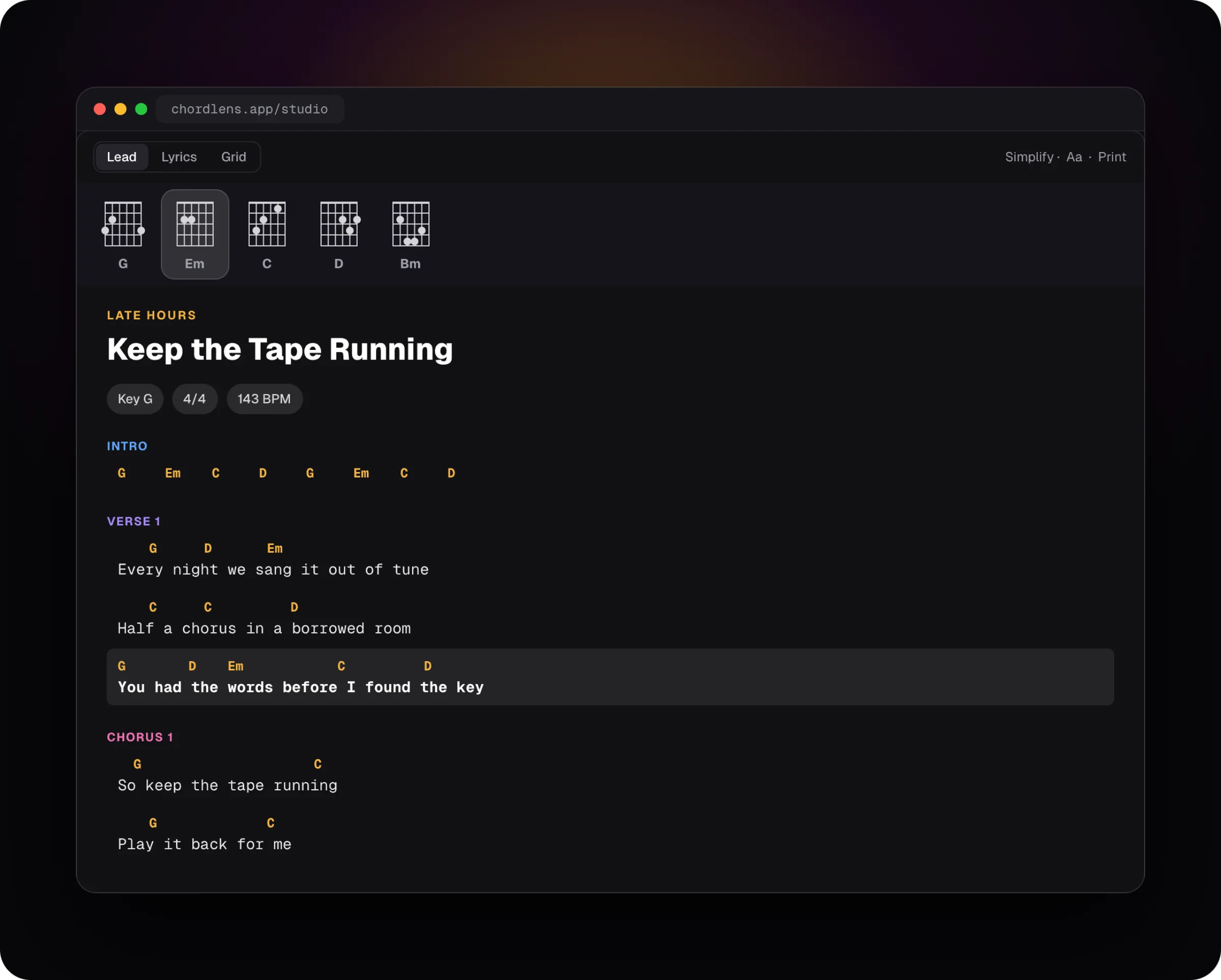
When a song has lyrics, Chord Lens shows them under the chords and lights each line as it comes, so you know when to come in. Reading lyrics is free on every plan. For a song with none, Premium and Pro can generate them. To read the words with the chords over them, see Lyrics and Chords.
06 / 10 · How clean
Clean enough to sing over.
Honest about the rest.
Most songs come out clean enough to sing over: the band is intact and the lead voice is gone.
Some of the voice can stay behind: heavy reverb, vocals doubled by a guitar line, old mono recordings. You may hear a faint ghost of the singer. It’s for singing along, not a studio backing track.
When you sing, a faint ghost rarely matters: your own voice covers it. It shows most in a quiet bridge.
Still hear the singer?
- Pull Other down too, if you used Instrumental.
- Sing louder than the ghost: it hides under a live voice.
- Try a studio version: live takes split less cleanly.
- Move the key a step: a shifted ghost is harder to follow.
07 / 10 · Compared
Chord Lens vs
other karaoke.
Three ways to sing a song without the singer, and where they differ.
| Karaoke channels | Vocal remover sites | Sing over it | Chord Lens | |
|---|---|---|---|---|
| Any song you can open | Only those made | Upload a file | Yes | Yes |
| Singer out | Yes | Yes | No | Yes, one press |
| Words in time | Burnt in | No | — | Lit line by line |
| Your key | Rarely | No | — | Built in |
| Chords too | No | No | No | Yes |
| Cost | Free, with ads | Per file | Free | Free to try |
A karaoke version made by hand is hard to beat when one exists for your song. Chord Lens is for every song that doesn’t have one, and for the ones that do but sit in someone else’s key.
08 / 10 · How singers use it
Four ways
singers use it.
Practise a song
Sing it with the band, the words lit, until you don’t need them.
Find your key
Step the key until the chorus is comfortable, then keep it.
Sing and play
Read the chords and the words at once, voice and guitar together.
Learn the harmony
Mute the lead, keep the backing voices, and sing the line under them.
Worship teams use it to learn a new song in the key their singer needs. Teachers press Karaoke for a student to try a phrase over the real band. Choir members pick Instrumental, keep the backing voices, and loop the bars where their part comes in.
09 / 10 · What it won’t do
What it
won’t do.
so you know before you sing
Downloads, for your own study
On Free the karaoke plays in Chord Lens. Premium downloads the stems, or your karaoke mix, as MP3 and Pro adds WAV, for your own personal study and practice, not to share or publish.
No split on phones
Splitting needs a computer. On a phone you still get the chords and the words.
No words for every song
Lyrics show when a song has them; Premium and Pro can generate them for songs without.
Not a perfect backing track
A ghost of the voice can stay. It’s made for singing along.
Chord Lens is for practising and studying a song yourself: learning the melody, working on your range, singing along. That kind of personal use is broadly considered fair use under US copyright law, with similar rules elsewhere. Downloads on Premium and Pro are for that same personal study, not to share, sell or publish. To publish a karaoke cover, use the original audio under YouTube’s licensing, or get a sync license.
10 / 10 · Plans
Free to try.
Free splits a 2-minute part of a song, the part you choose. Premium and Pro split the whole song. Reading lyrics is free on every plan; Premium and Pro generate them for songs without. In Chrome, the key change is free for the whole song.
See plans and prices01How do I make karaoke from a song?
Upload the song in the Chord Lens Studio, press Split, then Karaoke. The singers go quiet, the band keeps playing, and the words light up in time.
02Does it take out the backing vocals too?
Mostly, yes. Karaoke mutes the Vocals stem and the Other stem, where backing voices usually sit. Pick Instrumental instead to mute only the lead vocal and keep the backing voices.
03Can I change the key to suit my voice?
Yes. Move the key up to 12 semitones either way in the Studio, or 6 in the extension. The whole band moves with it and every chord is re-spelled; a step or two sounds cleanest. The key is free for the whole song in Chrome and, once you sign in, in the Studio, up to your plan’s song-length limit.
04Does it show the lyrics?
Yes, when the song has them: the words show under the chords and each line lights up as it’s sung. Reading lyrics is free on every plan.
05What if a song has no lyrics?
Premium and Pro can generate lyrics for many songs that have none. On Free you still get the karaoke and the chords.
06Can I keep a little of the singer?
Yes. Pull the Vocals fader down low instead of muting it, and you hear a quiet guide of where the line goes. A mix only sets mute and solo, so your levels stay where you put them.
07Why can I still hear the singer a little?
Heavy reverb, a voice doubled by an instrument and old mono recordings can leave some of the singer in the other stems. Sing over the ghost, try a studio version of the song, or move the key a step.
08Is it free?
Yes, to try. Free splits a 2-minute part of a song, the part you choose; Premium and Pro split the whole song. Reading lyrics is free on every plan. The key change is free for the whole song in Chrome and, once you sign in, in the Studio, up to your plan’s song-length limit.
09How much of a song can I sing on Free?
A 2-minute part of each song you split, placed over the part you want to sing. Premium and Pro split the whole song.
10Can I do it on my phone?
No. Splitting needs a computer, in Chrome or Edge, because phones and tablets don’t give a web page enough memory. On a phone you still get the chords and the words.
11Can I save the karaoke as a file?
On Premium you can download the stems, or your karaoke mix, as MP3 from the Studio, and Pro adds WAV. Downloads are for your own personal study and practice, not to share, sell or publish. On Free the karaoke plays in Chord Lens. To publish a karaoke cover, use the original audio under YouTube’s licensing, or get a sync license.
12Can I use Chord Lens on my own files, or only YouTube?
Both. The Chrome extension works right on the YouTube video you’re watching, listening to the song as it plays. To split stems, upload your own audio in the Studio (MP3, WAV or M4A, up to 50 MB). Premium exports stems as MP3 and Pro adds WAV, for your own study and practice.
13Do the chords show too?
Yes. The chords run in time with the words, so you can play and sing at once. Move the key and they’re re-spelled for the new key.
14Can I loop a part to practise?
Yes. Set a loop over the line you keep missing, the bridge or a high chorus, and sing it until it sits.
15Is this different from the vocal remover?
It’s the same split. The vocal remover page is about taking the voice out or keeping only the voice; this page is about singing: the Karaoke press, the words in time and your key. Both open in the same Studio.
In short
The whole page
in four lines.
Singers out.
One Karaoke press mutes the lead and backing voices.
Words in time.
Each line lit as it’s sung.
Your key.
The band moves with you.
Free to try.
A 2-minute part on Free; the whole song on Premium and Pro.