 Chord Lens
Worship and bands · 01 of 04
WHAT IS A WORSHIP GUIDE TRACK, AND HOW DO TEAMS USE ONE? a leader in every ear
The short answer
A worship guide track is a spoken track the band hears in their in-ears, never the room. It counts the band in, calls each section a bar before it starts, such as “Verse”, “Chorus” or “Bridge”, and says the dynamics, like “Build” or “Last Time”. Teams use one so every player knows where the song is going.
01 / 09 · WHAT
A voice that knows the arrangement.
A guide track is a recorded voice that runs alongside a song and tells the band what comes next. Just before the chorus it says “Chorus”. In the bar before a section it counts “1, 2, 3, 4”. When the leader wants the band to swell or drop out, it says “Build” or “Break”. Underneath it there is usually a click, a metronome locked to the song’s tempo.
It is called a guide because that is all it does: it guides. Nobody in the congregation hears it. It goes to the musicians’ in-ear monitors or headphones, and the room only hears the band playing together. Done well, a guide track is invisible. The only sign it is there is a band that starts together, changes sections together and ends together.
Guide tracks began in bands that play to backing tracks on stage, where a missed count-in means the band and the track part company. Worship teams picked them up for a different reason. A church band changes from week to week, rehearses for an hour, and often plays a long, open-ended arrangement where the leader decides on the night to repeat a chorus or go back to the bridge. A voice in everyone’s ear that says what is coming keeps that kind of band together.
02 / 09 · WHY
Why a church band leans on one.
Volunteer bands rotate. The drummer this Sunday may not have played with this bass player before, and neither may have played this arrangement. A guide track gives everyone the same map, so the newest player knows as much about where the song goes as the person who planned it.
Worship arrangements are long and loose. A song might run verse, chorus, verse, chorus, bridge three times, a quiet chorus, a big chorus, then a vamp under prayer. Counting repeats in your head while you play and sing is where people get lost. When “Bridge” or “Last Time” is spoken a bar early, nobody has to count.
Eyes are busy. A worship leader is facing the room, not turning to the band with hand signals. Keys players are reading a chart, guitarists are watching their hands, and singers are watching the words. A spoken cue reaches all of them without anyone looking up.
The drummer gets a start. A guide track counts the band in at the right tempo every time, so a song never starts too fast because the adrenaline is up. The drummer can still count off, but they count off with the click.
A guide track never replaces listening. Use it to learn the arrangement until the turns feel natural, then let the voice confirm what you already know.
03 / 09 · PARTS
Click, count, calls and dynamics.
Most guide tracks have the same four layers, and it helps to think of them separately, because each one does a different job.
The click is the pulse. It keeps the tempo honest, especially in the quiet parts where a band tends to slow down. Our guide to practising with a metronome on the song covers how to get comfortable playing to one.
The count-in fills the bar or two before a section: the section’s name on beat one, then “2, 3, 4”. It sets the tempo and says exactly where the downbeat lands. In a song in 3/4 it counts to three, and in a 6/8 song it counts the dotted beats.
The section calls name each part a bar before it starts: Intro, Verse 1, Pre Chorus, Chorus, Bridge, Tag, Outro. Worship sets add their own words to that list, such as Vamp, Exhortation and Refrain, for the moments a song opens up.
The dynamic calls say how to play, not where you are: All In, Build, Break, Hits, Softly, Drums In, Worship Freely, Last Time, Big Ending, Key Change Up. They carry the arrangement the leader has in mind, and they are the part a team most often changes.
04 / 09 · MAKE ONE
Make a guide track for any song in six steps.
There are two common ways to get a guide track. Some companies sell pre-made tracks for popular worship songs, in their own arrangement, one song at a time. The other way is to build one on the recording you are learning from. The Chord Lens Guide Track Maker does the second: it adds spoken cues to the song you open in the Studio, on the web or in the Mac app, with no recording or editing on your part.
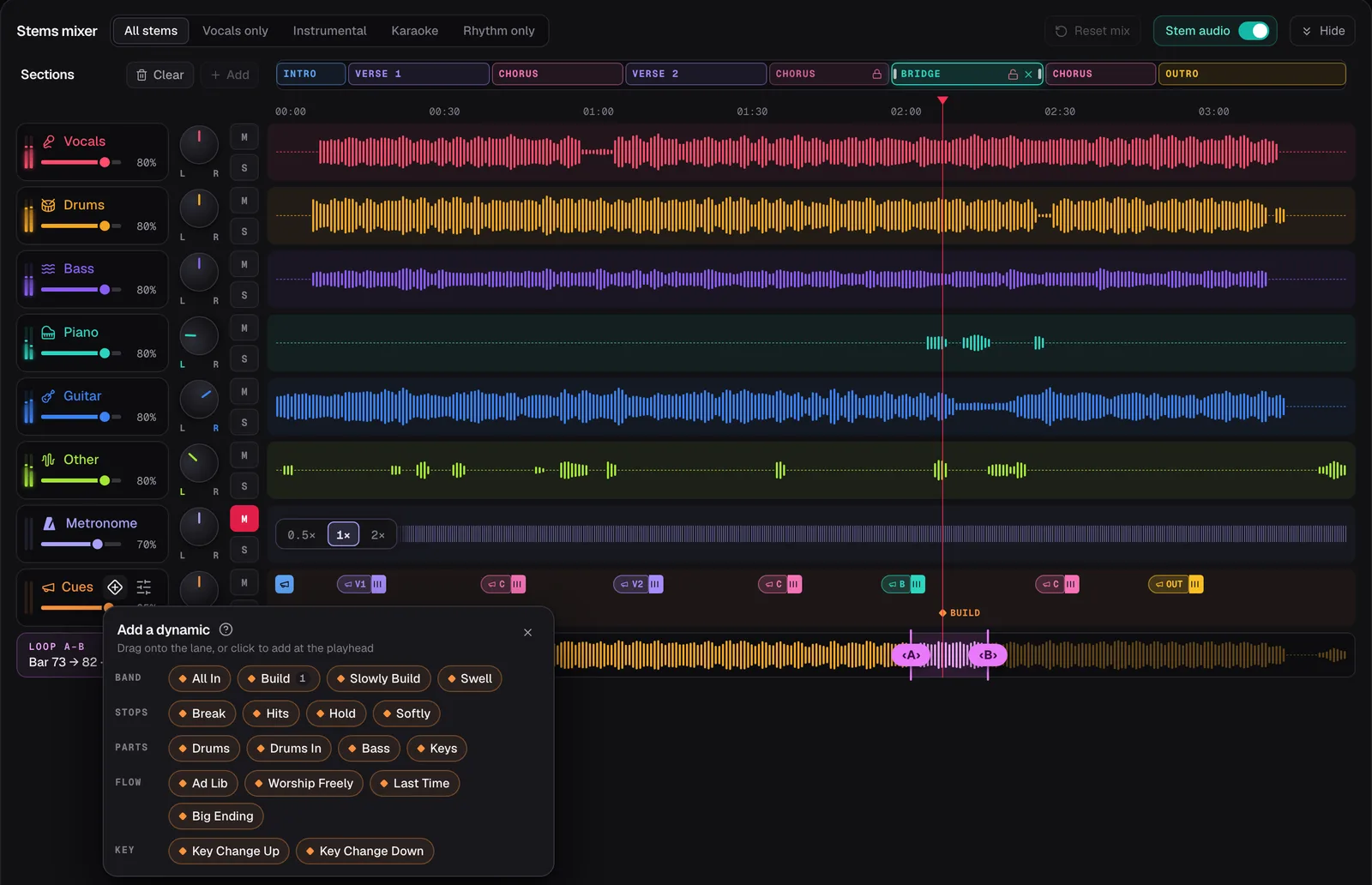
In the screenshot the demo song Coming Home has its section cues switched on, so each section in the Cues lane carries its spoken name and a count. A Build has been dropped onto the bridge, and the palette of dynamics is open, ready to drag the next one onto a beat.
Open the song
In the Chord Lens Studio, paste the YouTube link of the version your team plays, or drop in an MP3, WAV or M4A file.
Check the sections
Look over the sections along the top. Rename any that are wrong from the list of names, and drag their edges to where each part really starts.
Turn on the section cues
Press Turn on section cues so every section speaks its name, or click one section and switch Speak on for just that one.
Set the count-in
The count-in is on from the start. Set its lead to one bar or two, whichever your band needs to get ready.
Drop in the dynamics
Open Add a dynamic and drag Build, Break or Last Time onto the beat where the leader wants it. Nudge it a beat or a bar if it lands early.
Play it through
Play the song with the cues and listen for anything that lands in the wrong place, then fix the section or the dynamic and play it again.
05 / 09 · TIMING
Early enough to play on time.
A cue that arrives on the downbeat is a cue that arrives too late. By the time you have heard “Chorus”, the chorus has started. That is why a section’s name is spoken ahead of it, with the count-in filling the bar or two before, so you hear where you are going while there is still time to get there.
Chord Lens takes the sections and the beat from the song’s own chart, so the names and the counts land in time from the start. What it doesn’t do is guess the feel. It never decides where the band should build or stop. You place every dynamic yourself, on the beat it belongs on, and that is where the arrangement your leader has in mind goes in.
Sometimes two cues want the same moment, say a section name and a Build on the same downbeat. Names win over counts, and counts win over dynamics, and the one that gives way is marked with a ⚠ in the lane, so you can move it to the beat before. Nothing is moved without you.
Because the cues follow the sections, a section in the wrong place gives a call in the wrong place. Check the sections before you add anything else; it is the step that saves the most time.
06 / 09 · IN-EARS
Cues in one ear, the band in the other.
On stage, guide tracks go to the in-ears and never to the front-of-house speakers. You can rehearse the same way at home. In the Studio, switch In-ears to Split L/R and the cues and the click play in your left ear, with the band, folded to mono, in your right. It is the same split a stage in-ear mix uses, so the voice stays clear however loud the band gets.
Split L/R needs the Studio to play the audio itself. That means a song you have split into stems, or your own file. A YouTube song before it is split plays in YouTube’s own player, which keeps both ears together.
Once the song is split you can also mute your own part. The cues have their own fader, so a bassist can take the bass out, keep the voice and the click, and play the song as if the band were in the room. Our guide to making a backing track goes through that routine.
If the dynamics get in the way while you learn a part, switch on Hide dynamics. The section names and the count stay, and the band calls go quiet until you want them back.
07 / 09 · THE TEAM
The same cues for every player.
A guide track only helps a team if everyone rehearses with the same arrangement. Whoever plans the set opens each song, checks its sections and places the dynamics, then shares the link with the band. Each player opens the same song in the Studio on their own computer and places the same cues, or follows the arrangement notes in the team’s plan.
Spoken cues are in the Studio, not in the Chord Lens Chrome extension, which shows the chords and the stems under a YouTube video but says nothing. The Studio’s chart keeps running under the cues, the chord on the beat lit, so a player can read the changes while the voice calls the sections.
On Free, the cues and the count-in play inside the 2-minute part of the song you choose and fall silent outside it, which is enough to learn a tricky turn. Premium plays them for the whole song. Pro can also export the cues as an audio file, for your own personal study and practice, not to share, sell or publish.
When the guide track is ready, the rest of the song still needs a key and a chart. Making a chord chart for your band is the next step in this path, and worship set planning puts the keys, charts and cues together for a whole set.
08 / 09 · Do it in one click
Guide Track Maker
Spoken cues for any song: section names a bar early, a count-in, and the dynamics you place.
01What is a guide track in worship?
A spoken track the band hears in their in-ears. It counts the band in, names each section a bar before it starts, and calls dynamics such as Build or Last Time.
02Does the congregation hear the guide track?
No. It goes only to the musicians’ in-ears or headphones. The room hears the band. In the Studio, Split L/R puts the cues and click in one ear and the band in the other.
03Is a guide track the same as a click track?
Not quite. A click track is the metronome on its own. A guide track adds a voice that counts in and calls the sections and dynamics, usually with the click underneath.
04Can I make a guide track for any song?
Yes. Open the song in the Chord Lens Studio from a YouTube link or your own file, switch on the section cues, and drag in the dynamics you want.
05Does Chord Lens place the dynamics for me?
No. The section names and the count-in come from the song’s chart, but you place every dynamic, such as Build or Break, on the beat where you want it.
06Which words can the guide say?
37 section names, from Intro and Verse 1 to Tag, Vamp, Exhortation and Outro, a count of up to seven, and 18 dynamics such as Build, Break, Worship Freely and Last Time.
07Is the guide track free?
Free to try. On Free the cues play inside the 2-minute part of the song you choose. Premium plays them for the whole song, and Pro adds export for your own practice.
08Is it in the Chrome extension?
No. Spoken cues are in the Chord Lens Studio, on the web and in the Mac app. The extension has the chords and the stems under the YouTube video, but no cues.