 Chord Lens
Worship and bands · 04 of 04
HOW TO REHEARSE WITHOUT A FULL BAND. the record fills the empty chairs
The short answer
To practise without a band, let the original recording be the band. Split the song into stems, mute the parts you and whoever is with you will play, and keep the rest. Turn on spoken cues so a voice calls each section, set the key and tempo your band uses, and rehearse the arrangement as if everyone were there.
01 / 08 · WHY
Bands rarely all turn up.
A band needs everyone in one room at one time, and that is the hardest thing in music to arrange. The drummer works late on Thursdays. The bass player is away for a month. The keys player only makes Sunday mornings. And if you play on your own, a singer with a guitar or a pianist at home, you may not have a band at all, only songs that were recorded with one.
Practising alone has a gap in it. You can learn your part, but not how it fits. You never hear whether your strum sits with the hi-hat, whether your fill lands where the bass expects it, or whether you know when the second chorus comes round. Those are the things a rehearsal is for, and they are what goes wrong on the night.
The original recording can stand in for whoever isn’t there. Split it into its parts, take out the players who are present, and the record plays the rest: the real drummer, the real bassist, the real keys. You rehearse with a band that never cancels.
02 / 08 · METHOD
Rehearse with the record in five steps.
This works for one player at home or for half a band in a rehearsal room. The idea is the same: mute what you have, keep what you don’t.
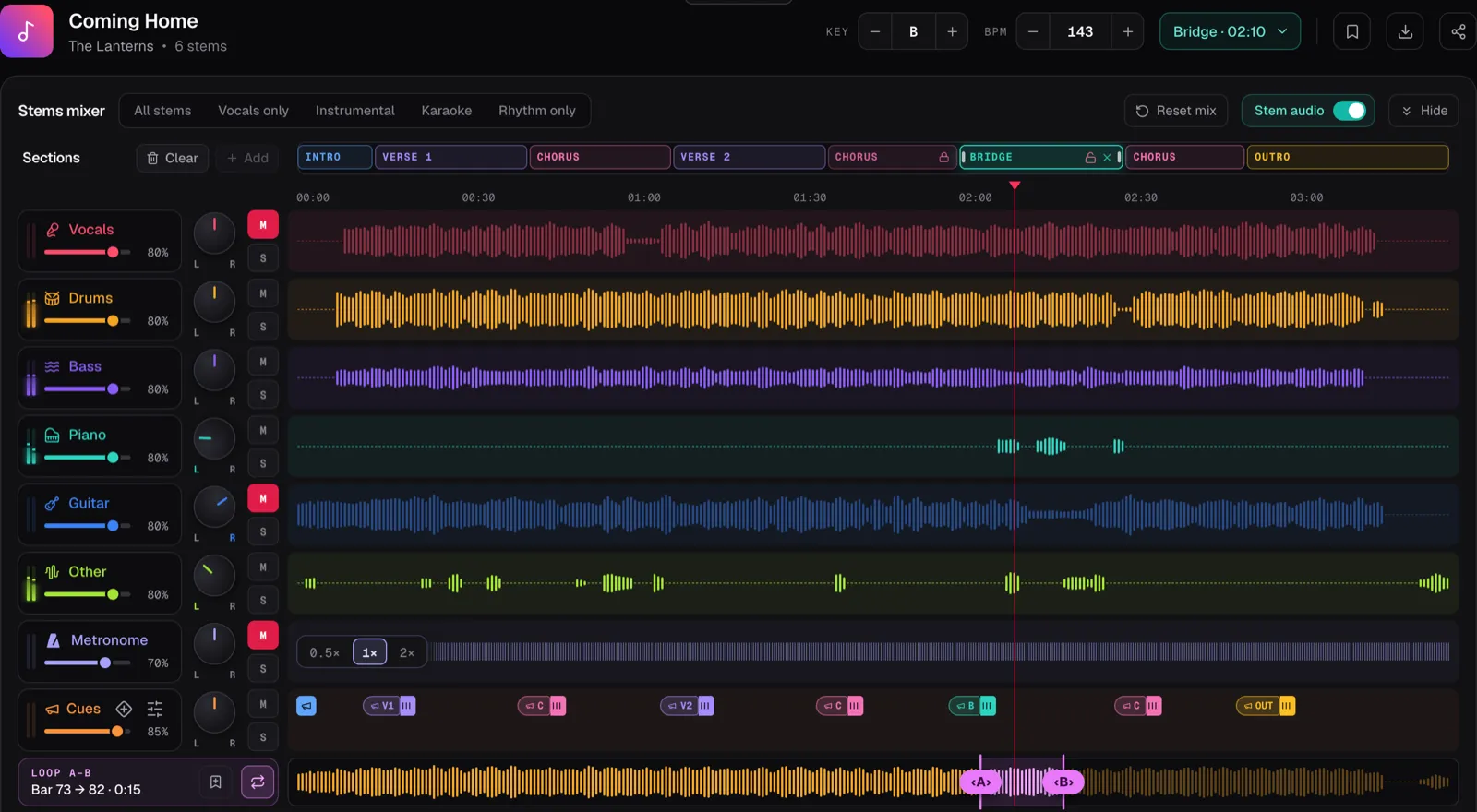
In the screenshot the demo song Coming Home is split into six stems with Vocals and Guitar muted, the way a singer who plays guitar would rehearse it. Drums, bass, piano and the rest play on, and the section cues are on, so each pill in the Cues lane is a spoken name with a count after it.
Open the song
Upload an MP3, WAV or M4A file into the Chord Lens Studio on a computer.
Split it into stems
Press Split stems. On Free, place the 2-minute window over the part you want to rehearse.
Mute who is here
Press M on the row for every part being played live: yours, and anyone rehearsing with you.
Match your band
Set the key and the BPM your band plays it at. The stems and the chords follow both.
Turn on the cues
Press Turn on section cues, so a voice calls each section and counts you in, and play it through.
03 / 08 · WHO PLAYS
Mute who’s there. Keep who isn’t.
On your own. Mute your part and nothing else. A singer who plays guitar mutes Vocals and Guitar, as in the screenshot. A keys player mutes Piano, and may want Other down too, since pads and synths often land there. Our guide to making a backing track covers single-instrument set-ups in detail.
A rehearsal with a missing player. Turn it round. If the band is all there but the bassist, mute everything except Bass, and the record’s bass player sits in. No drummer tonight? Keep Drums and mute the rest. Play it through the room’s speakers, at a level where you can hear it over the band.
A rhythm section rehearsal. Drums and bass working on their own mute Drums and Bass and keep the guitars, keys and vocal from the record, so they hear the shape of the song they are holding up. Singers can do the reverse: Instrumental takes the lead vocal out, so the vocal team rehearses over the full band.
Don’t mute all the way if a part is new to someone. Pull its fader down instead, so the original is a quiet guide they can lean on, and mute it once they have it.
Turn the kept stems up rather than the master volume. Each stem has its own fader, so the missing player can sit as loud as they would on stage.
04 / 08 · ARRANGEMENT
The record’s band, your arrangement.
A record is one arrangement. Your band may play it in a different key, slower, or with the bridge twice. The Studio can follow some of that.
Key. Move the song up or down, up to 12 semitones, and every stem moves with it while the chords re-spell. Set it to the key your singer uses, and the record’s band plays there too.
Tempo. Step the BPM to the speed your band plays it at, from half to double the song’s tempo. The pitch stays put, so the band stays in your key.
Cues. The section cues say each section’s name a bar ahead and count you in, the way a band leader would. Drag in the dynamics your arrangement uses, such as Build, Break or Last Time, on the beat they belong. A rehearsal with cues runs like a performance: nobody stops to ask where they are. The Guide Track Maker has the full list of what the voice can say.
What the record can’t do is change its structure. If your band repeats the bridge, the record won’t; loop that section instead, or rehearse it separately.
05 / 08 · IN THE ROOM
Cues in the ear, band in the room.
If someone wears in-ears, switch In-ears to Split L/R. The click and the cues play in the left ear, and the record’s band, folded to mono, plays in the right. Send the left side to the in-ears and the right to a speaker: the drummer hears the count, and the room hears the band.
Split L/R works when the Studio plays its own audio, which means a split song or your own file. The metronome has its own row too, clicking on the record’s beats, if your drummer wants a click under the cues.
Keep the record a little quieter than you would at home. In a room with live players, the kept stems should sound like one more player, not like a record everyone is playing over.
06 / 08 · GOOD TO KNOW
What it needs, and what it costs.
Splitting runs in your browser on a computer, in Chrome or Edge. Free splits a 2-minute part of the song that you choose, and the cues play inside that part; Premium splits up to 8 minutes and Pro up to 12, with the cues for the whole song. Spoken cues are in the Studio and the Mac app, not the Chrome extension.
Chord Lens works one song at a time and has no setlist; keep the order of your set in your band’s plan. On Premium you can download the mix as the mixer plays it, as MP3, and Pro adds WAV, for your own personal study and practice, not to share, sell or publish.
07 / 08 · Do it in one click
Backing Track Maker
Split any song, mute the parts you have, and let the original band play the rest.
01How do I practise without a band?
Split the song into stems and mute your part. The original players fill in around you, with the chords in time on screen.
02Can the record fill in for a missing band member?
Yes. Mute every stem except the missing player’s, such as Bass, and play it through the room’s speakers while the band plays live.
03Can I rehearse in my band’s key?
Yes. Move the key up or down to 12 semitones; the stems follow and the chords re-spell. The tempo moves separately.
04Can I hear the section names called out?
Yes. Turn on section cues and a voice says each section’s name a bar early and counts you in. Add Build, Break or Last Time where your band uses them.
05Can the drummer hear the cues and not the room?
With Split L/R the click and cues play in the left ear and the band in the right, on a split song or your own file.
06Does Chord Lens have setlists?
No. It works one song at a time. Keep your set’s order in your band’s plan and open each song in the Studio.
07Is it free?
Free to try: Free splits a 2-minute part you choose, with cues inside it. Premium splits up to 8 minutes and Pro up to 12.