 Chord Lens
Start here · 04 of 06
HOW TO FIND THE BPM OF A SONG. count it, then check it
The short answer
To find the BPM of a song, tap along with the beat and count the taps for 15 seconds, then multiply by four. Ask whether the song could feel twice as fast or half as slow, because both counts are common. To check your number, open the song in Song Key Finder, which counts the tempo from the song’s beats.
01 / 07 · WHAT
BPM is the beat you tap, not the notes you hear.
BPM means beats per minute: how many times the steady pulse of a song goes by in sixty seconds. At 60 BPM there is one beat a second. At 120 there are two. It’s the number a drummer counts in with, the number a band’s click is set to, and the number you step down when you want to practise a song slower.
The beat is the pulse your foot finds without thinking, not the busiest thing in the track. A hi-hat playing sixteenth notes and a pad holding one chord for four bars can sit on the same beat. If you count the hi-hat you’ll get a number four times too high; if you count the chord changes you’ll get one far too low. So the first job is to feel the pulse, and only then to count it.
In most pop, rock, worship and country songs, the pulse is easy to find once you listen for the drums: the kick drum tends to land on beats 1 and 3, and the snare on 2 and 4. Tap your foot on all four, kick and snare alike, and you’re tapping the beat. In a ballad with no drums, follow the strum of the guitar or the left hand of the piano instead.
Why bother with the number? Because it travels. Write “143” on a chart and anyone in the band can set a click to it. Note the tempo you can play a riff cleanly at today, and next week you’ll know whether you’ve got faster. And once you know the BPM, slowing a song down stops being a guess: 0.75× of 143 is 107, and that’s a number you can climb back up from.
02 / 07 · METHOD
Find it in five steps.
You need the song, a clock or a phone stopwatch, and about a minute. Pick a stretch of the song where the band is playing steadily, such as a chorus, rather than a free-time intro or a held ending.
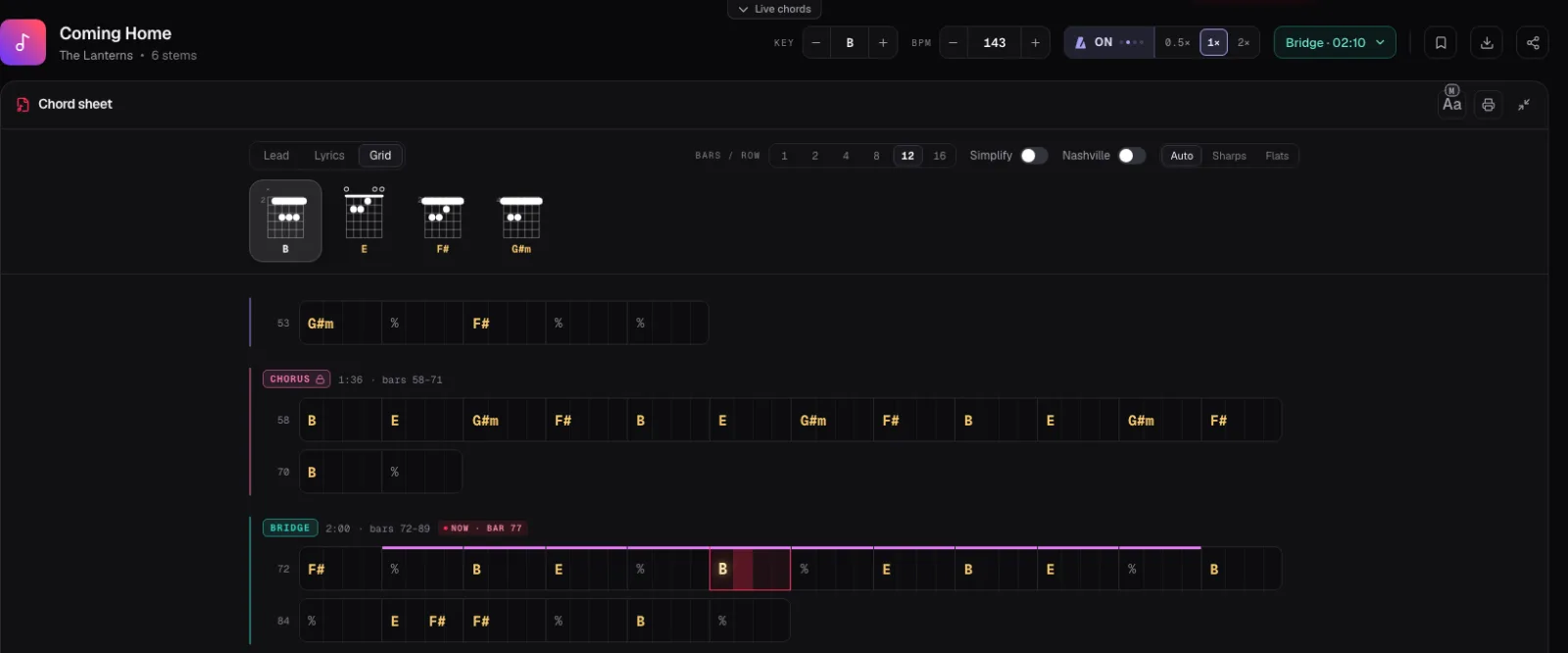
The screenshot is the Studio’s demo song, Coming Home. Its header reads 143 BPM, which works out at about 36 beats in 15 seconds. With the metronome switched on, the four dots beside it light up one by one with the bar, and the grid below shows the same four beats in every bar of the chart.
Find the pulse
Play the chorus and tap your foot or hand on the beat, the steady pulse you would clap along to, until it feels automatic.
Count for 15 seconds
Start a stopwatch on a beat you call one and count every tap until the 15 seconds are up.
Multiply by four
Your count times four is the song’s tempo in beats per minute. Count for 30 seconds and double it if you want a steadier number.
Check half and double
Tap again at half and at twice your speed. Pick the one that matches the snare on 2 and 4, or that a drummer would count in.
Check it against the song
Open the song in the Studio or Song Key Finder, read the BPM above the chords, and switch on the metronome to hear it click on the beat.
03 / 07 · HALF OR DOUBLE
Is it 70 or 140?
The most common mistake in finding a tempo isn’t a miscount. It’s counting the right pulse at the wrong level. A slow, heavy groove at 70 BPM can feel like 140 if you follow the hi-hat; a fast punk song at 180 can feel like 90 if you tap only the snare. Both answers describe the same song, and key and BPM sites regularly list one where you’d expect the other.
The test is the snare. In most songs with a drum kit, the snare hits on beats 2 and 4 of each bar. Tap your count and say “one, two, three, four” out loud: if the snare lands on your “two” and “four”, your count is the usual one. If it lands only on “three”, you’re counting double time; halve it. If it lands on every count, you’re counting half time; double it.
When you still can’t decide, think about how a drummer would count the band in. Nobody counts in a ballad at 140, and nobody counts in a fast rock song at 75. Pick the number the band would actually play to.
In the Chord Lens Studio you can hear both in a few seconds. Turn the metronome on and switch between 0.5×, 1× and 2×: at 0.5× it clicks every other beat, at 2× twice a beat. One of the three will sit in the groove the way you feel it, and the one that does tells you whether the number above it is the tempo you’d count.
Songs in 6/8 trip up counters most. You can count six quick beats or two slow ones in each bar; most players feel the two. The Studio shows a time signature with the key and BPM only when one was measured, and counts the song in four otherwise.
04 / 07 · TEMPO DRIFT
Real bands don’t play to one number.
A song recorded to a click holds one tempo from the first bar to the last, and any method gives you the same answer anywhere in it. Plenty of songs weren’t recorded that way. Live takes push in the chorus and settle in the verse, ballads breathe, and older records drift a few BPM over three minutes. Count the intro and the last chorus and you may get two different numbers, and both can be right.
For those songs a single BPM is an average. That is still useful, since it tells you roughly where the band sits, but don’t expect a fixed metronome set to it to stay with the record for long. Within a few bars the two drift apart, and it sounds as if you’re the one rushing.
Chord Lens handles this in two parts. The header shows one BPM for the song, counted from the beats it tracked through the recording. The metronome doesn’t tick at that number, though: it clicks on each tracked beat, so when the band pushes, the click pushes with it. That makes it a better practice partner for a live recording than any metronome app, which can only hold the tempo you set.
Some music has no steady beat to count: a free-time intro, a rubato piano verse, an ambient opening. There, any BPM is a guess. The Studio’s click can land early or late in those passages, and if a song has no tracked beats at all it clicks at the song’s average tempo. Count from the first bar where the band locks in.
05 / 07 · USE IT
Now put the number to work.
Practise slower, in numbers. Once you know the song is 143, practise the hard part at 107 (0.75×) and step up a few BPM at a time. In the Studio the BPM stepper runs from half the song’s tempo to double, one BPM a press, and the pitch stays where it is. Our guide to slowing a song down without changing the pitch has the full routine.
Set the band’s click. Tell the drummer the tempo before rehearsal instead of humming it. If the record drifts, give the tempo of the chorus, which is where the energy is and where a band most often rushes.
Write it on the chart. A tempo at the top of a chord chart saves a conversation every time the song comes back. When you print a chart from the Studio, the header carries the key, the capo and the BPM it was written for.
Keep it in time. The YouTube Metronome puts the click on the song’s own beats, with beat one accented, so you can play the whole song against it. Slow the song down and the click slows with it.
The tempo is half of what you need before you play along; the other half is the key. If you haven’t yet, find the key of the song next. Song Key Finder shows both at once, and in Chrome the extension puts them beside the YouTube video.
06 / 07 · Do it in one click
Song Key Finder
Paste a YouTube link or drop in a file. The BPM sits beside the key, counted from the song’s own beats.
01How do I find the BPM of a song?
Tap along with the beat, count the taps for 15 seconds and multiply by four. Then check whether half or double that number fits the groove better. For an exact figure, open the song in Song Key Finder.
02How does Chord Lens work out the BPM?
It tracks the beats through the recording and counts the tempo from them. The BPM shows beside the key at the top of the song, with the time signature when it was measured.
03Why does another site list double my BPM?
Many songs can be counted at two levels, such as 70 or 140. Both describe the same song. Use the one where the snare lands on beats 2 and 4, or the one a drummer would count in.
04Can I tap the tempo in Chord Lens?
No. There is no tap tempo; the tempo comes from the song’s own beats. Use the metronome’s 0.5×, 1× and 2× to hear which level fits.
05What if the song speeds up or slows down?
The BPM shown is one number for the song. The metronome clicks on each tracked beat, so it follows the band when it pushes or settles.
06Does the BPM change when I slow the song down?
Yes. Step the BPM down in the Studio and it shows the new tempo, from half the song’s tempo to double, while the pitch stays the same.
07Can I find the BPM of a YouTube video?
Yes. Paste the link into the Studio, or open the video in Chrome with the Chord Lens extension, which shows the key and BPM beside it.