 Chord Lens
Start here · 06 of 06
HOW TO TRANSCRIBE A SONG INTO A CHORD CHART. bar by bar, by ear
The short answer
To transcribe a song into a chord chart, write the key, tempo and time signature first. Then map the sections and count the bars in each one. Fill in the chords bar by bar, finding each from the bass note, and mark stops and pushes. Finish by playing the chart against the record at full speed.
01 / 08 · WHAT
A chart is a map, not a recording.
Transcribing a song can mean writing out every note the band plays. This guide is about the version most players actually need: a chord chart. One or two pages that tell a band the key, the tempo, the form, the chords in every bar, and the few moments that need everyone’s attention. A good chart lets a musician who has never heard the song play it through without getting lost.
Every chart answers the same questions, roughly in this order. What key, and what tempo? How many beats in a bar? What are the sections, and in what order? How many bars is each one? Which chords, and on which beats? And where are the hits, the stops, the pushes and the endings that you can’t guess from the chords alone?
Notice what isn’t on that list: strumming patterns, voicings, fills, the guitar riff. A chord chart leaves those to the player. That’s what makes a chart quick to write and quick to read, and it’s why transcribing one is a skill any player can learn, not only people who read notation.
You’ll need the song, a pencil, paper with some lines on it (or a grid you draw yourself), and your instrument. A way to loop and slow the recording helps a great deal, and a way to hear the bass on its own helps even more.
02 / 08 · METHOD
Transcribe it in six steps.
Work from the outside in: the frame first, then the form, then the chords. If you start writing chords in bar one before you know the form, you’ll end up rewriting the page.
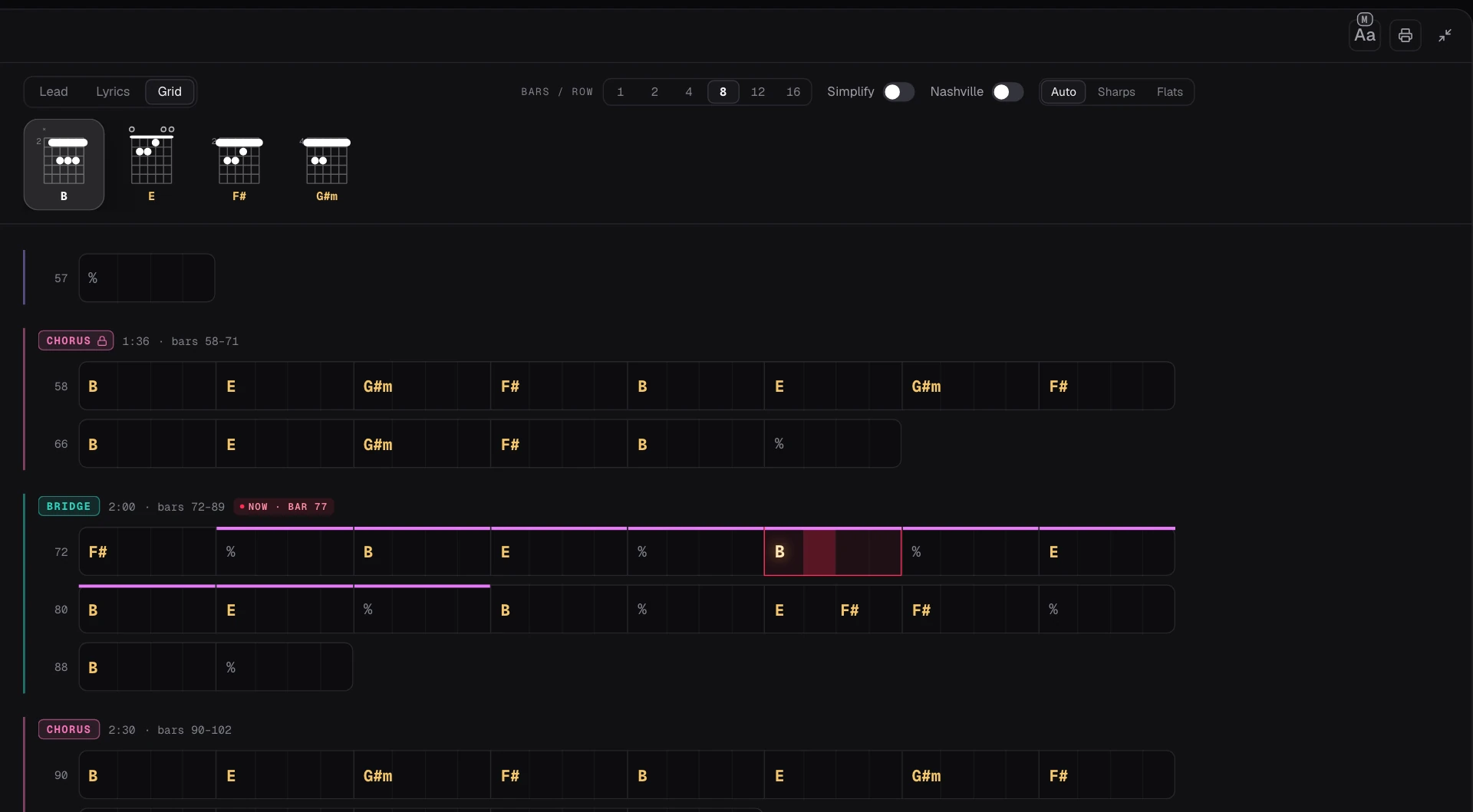
The screenshot is the Studio’s Grid view of the demo song, Coming Home, at eight bars a row, the way a chart prints. Each section is marked with its start time and its bar numbers, each bar is one box, and a % means the bar repeats the one before. That is exactly the shape you’re aiming for on your own page.
Write the frame
At the top of the page write the title, the key, the tempo in BPM and the time signature. Count the beat to find the tempo and the beats in a bar.
Map the form
Listen through once and list the sections in order: intro, verse, chorus, bridge, outro, and any repeats or tags.
Count the bars
Play each section again and count the bars, saying one on every downbeat. Draw that many boxes for the section, in rows of four or eight.
Fill in the chords
Loop each section, find the bass note at each change, and write the chord in its bar. Split a bar when the chord changes halfway through.
Mark the moments
Add the hits, stops, pushes and endings above the bars where they happen, in a word or two.
Check it at full speed
Play the whole chart along with the record without stopping. Every place you stumble is a mistake on the page or in your hands.
03 / 08 · BARS
Count the bars before you name a chord.
Counting bars is the step most people skip, and it’s the one that makes a chart trustworthy. Say “one, two, three, four” along with the record and put a finger down on each “one”. Sections almost always come in groups of four or eight bars, so if you count seven or nine, listen again: you’ve probably missed a bar, or the section really is odd, which is worth marking.
In the demo song the verse is sixteen bars and the first chorus is sixteen too, but the bridge runs eighteen, and the last chorus is cut short at thirteen. Those odd lengths are exactly what a chart is for. A band that has only heard the song once will play a bridge of sixteen and crash into the chorus two bars early, unless the page says otherwise.
Watch for pickups as well. Many songs start with a beat or two before the first full bar, a drum fill or a sung word leading in. Write the pickup before the first bar line rather than squeezing it into bar one; the printed Grid from the Studio does the same and labels it as the pickup.
Use the % sign for a bar that repeats the one before. It keeps the page readable when a verse holds one chord for two bars. On screen the Studio’s Grid uses it too; its printout writes every bar’s chord out, which some players prefer on a stand.
04 / 08 · CHORDS
Follow the bass and the chord names itself.
With the bars drawn, the chords are the easy part, because now you’re answering a small question each time: what is the chord in this box? Start with the bass. In most pop, rock, folk and worship songs the bass plays the root of the chord on the beat it changes. Hum that note, find it on your instrument, and you have the chord’s letter. Then decide major or minor by playing both against the record; one of them will clash.
Know the key and you can guess most chords before you hear them. In a major key, six chords do most of the work. In B major, the demo song’s key, they are B, C♯m, D♯m, E, F♯ and G♯m, and the song uses four of them. When a bass note doesn’t fit the key, that is a chord worth a second listen: a borrowed chord, a slash chord with a different bass note, or a key change.
Loop the section and slow it down while you do this. In the Chord Lens Studio, set A at the start and B at the end of the bars; the loop snaps to the beat, so it comes round in time. Step the BPM down to about 0.75× and the pitch stays where it is, so your instrument still matches. Slow Down Songs explains the loop and the speed control in more detail.
If the bass is buried, split the song into stems and solo it. The stem splitter separates the vocals, drums, bass, guitar, piano and everything else, so you can hear the bass line on its own and then the guitar or piano to check the chord’s quality. Splitting runs in your browser on a computer, and Free splits a 2-minute part of the song that you choose.
Write in pencil and expect to fix things. The first pass of any transcription has a few wrong bars; the full-speed check at the end is where you find them.
05 / 08 · FIRST DRAFT
Let the software draft it, then check it by ear.
Writing a chart from a blank page is good ear training. When you just need the chart, it’s faster to start from a draft and correct it. Paste the song into the Chord Lens Studio and it writes the chords in time with the music, marks the sections, and finds the key and the tempo. Switch the chord sheet to Grid and you’re looking at a chart: sections, bar numbers, and the chords in each bar.
Treat that as a first draft, not the final word. On most pop, rock, folk and worship songs it comes out close to a good songbook. It has harder days in the same places your ears do: dense jazz voicings get simplified, a distorted guitar or a muddy live recording can blur a change, and a song that moves between keys can trip a chord or two. Go through it section by section with the loop and your instrument, exactly as in the method above, and mark anything you hear differently.
The Studio doesn’t let you edit the chords on its chart, so make your corrections on paper. Print the chart and write your fixes, hits and stops on it in pencil, or copy the draft into your own chart as you check it. If a section is in the wrong place, you can move or rename it in the Sections row, and the Grid follows.
Display options help the draft read the way your band reads. Simplify shows the plain triads, so a G♯m7 becomes G♯m. Nashville writes every chord as a number in the song’s key, which is how many session and worship bands read charts; our Nashville Number System guide explains it. Sharps and Flats choose how the letters are spelled.
06 / 08 · PRINT
Put it on paper.
On Premium and Pro, the print button on the chord sheet prints the view you have open. Grid prints a real-book style chart: eight bars a row in one shared grid, so the bar lines line up down the page, with each section marked. Lead prints the chords over the words, and Lyrics prints the words alone.
The printed header says which key, capo and tempo the chords are named for, and whether they’re simplified, so a printout from a transposed song can never be mistaken for the original. A time signature appears only when one was measured. If you move the key first, every chord on the printout is spelled in the new key; our guide to transposing chords covers what changes.
On Free, the chart is the same on screen: read it in Grid view on a laptop or tablet, or copy it onto your own page as you check it by ear. Either way, the last step doesn’t change. Play the finished chart along with the record from top to bottom, without stopping, and fix whatever trips you.
07 / 08 · Do it in one click
AI YouTube Stem Splitter
Split any song into six stems and solo the bass, so every chord change is easy to hear.
01How do I transcribe a song into a chord chart?
Write the key, tempo and time signature, map the sections, count the bars in each, then fill in the chords bar by bar from the bass note. Check the chart against the record at full speed.
02Do I need to read music to transcribe a song?
No. A chord chart uses chord names, bar lines and a few words. If you can count beats and name chords, you can write one.
03How do I know where a bar starts?
Count along with the record and listen for the strongest beat, usually where the kick drum and the chord change land. Most sections are four or eight bars long.
04Can Chord Lens transcribe a song for me?
It writes a first draft: the chords in time, the sections, the key and the tempo, viewable as a grid of bars. Check it by ear; its chart can’t be edited, so mark changes on a printout.
05Can I print the chord chart?
Yes, on Premium and Pro. Print prints the chord sheet in the view you have open, Lead, Lyrics or Grid, with the key, capo and tempo in its header.
06How do I hear the bass line clearly?
Split the song into stems on a computer and solo the bass, then loop and slow the section. The pitch stays the same at any speed.
07Should I write the chart in letters or numbers?
Letters if your band plays in one key; Nashville numbers if the key changes from week to week. The Studio can show either.