 Chord Lens
Practise and play · 05 of 07
PRACTICE WITH A METRONOME, AND COME IN ON TIME. one, two, three, four
The short answer
Most timing mistakes happen at the start: the first bar, and the first bar after a break. Practise those with a count-in. Turn on the song’s section cues so a voice counts you into each section, press play from the top to be counted in before the song, and keep the click on the band’s own beat underneath.
01 / 08 · WHY
Time goes wrong at the edges.
Ask a band where its timing falls apart and the answer is rarely the middle of a verse. Once a groove is going, everyone leans on it. The trouble is at the edges: the first bar of the song, the chorus after a stop, the moment the band comes back in after a quiet bridge. Someone comes in early, someone waits a beat too long, and the first bar is a mess before the groove settles again.
Practising alone hides this. You press play, the record starts, and you join in somewhere in the first bar. Nobody counts you in, so you never practise the one skill a band needs most: starting together, on beat one, at the right speed.
A count-in fixes that. On stage a drummer clicks four on the sticks, or a guide track in the band’s in-ears says the section name and counts the last beats before it. You hear where one is before you have to play it. Practise with one and your entries become a habit rather than a guess.
Our metronome for songs guide covers the click itself: why a fixed metronome drifts away from a record, and how to fade the click until your time holds alone. This guide is about the count, and about getting into the song and back in after every break.
02 / 08 · METHOD
Count-in and click in five steps.
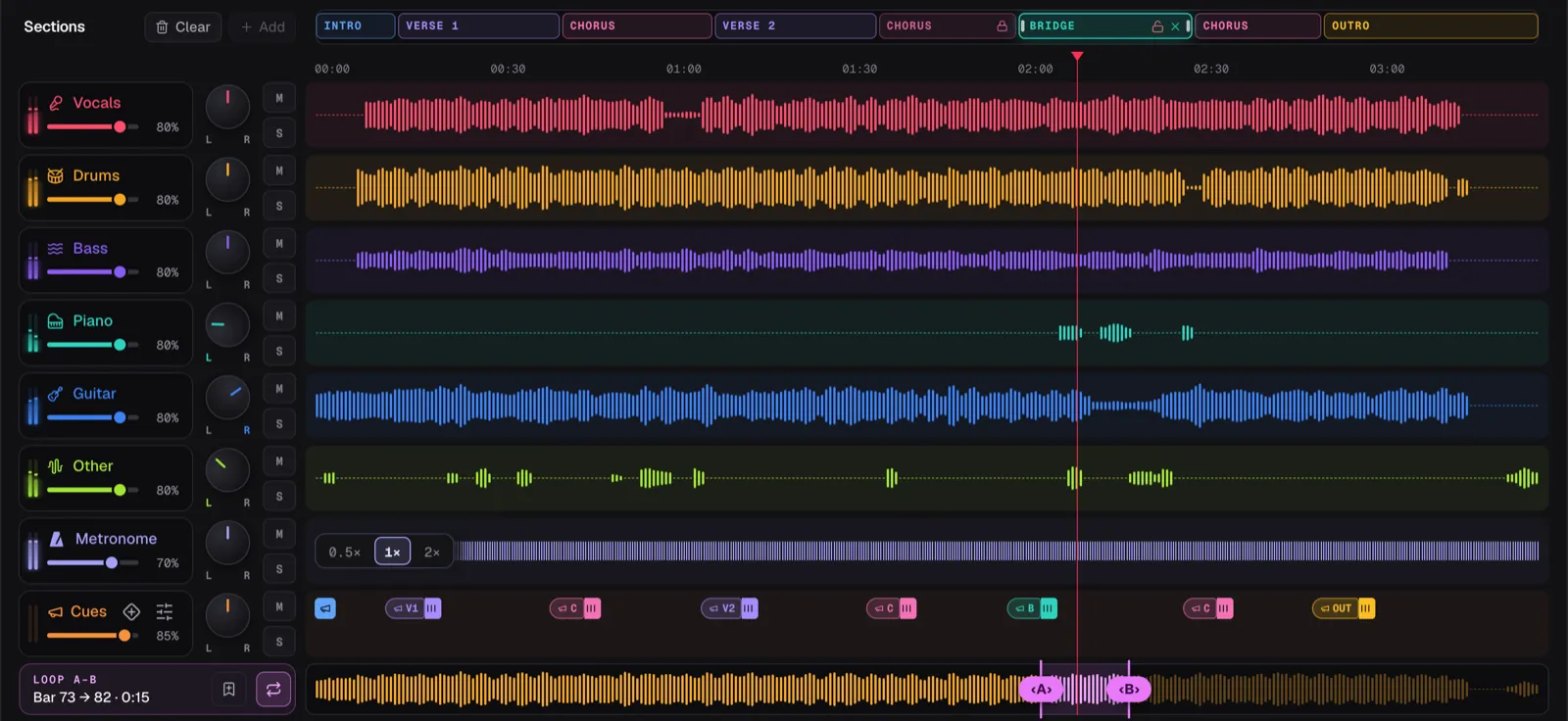
The Chord Lens Studio has both. The metronome clicks on the beats tracked from the recording, with beat one accented. The section cues are a voice that says each section’s name and counts you into it, a bar or two before it arrives.
In the screenshot the demo song Coming Home, in Key B at 143 BPM, has its Metronome row switched on at 1× and its section cues turned on. Each pill in the Cues lane is a section’s name, with a tick after it for each count word, and the blue pill at the left edge is the count before the song starts.
Open the song
Upload an MP3, WAV or M4A file into the Chord Lens Studio on a computer.
Turn on the click
Switch the metronome on in the header, or unmute its row in the Stems mixer, and leave it at 1x.
Turn on the cues
Press Turn on section cues. Every section now speaks its name, and its count-in is on already.
Play from the top
Press play at 0:00. The voice counts you in before the song starts, so your first note lands on beat one.
Listen for each entry
Play through. Before every section you hear its name and the count, so you know exactly where one is.
03 / 08 · THE COUNT
The name on one, then two, three, four.
A count-in in Chord Lens is spoken, not clicked. In the bar before a section, the voice says the section’s name on beat one and counts the rest of the bar: “Chorus, 2, 3, 4”. The next downbeat is the chorus. It is what a band hears from a guide track, recorded in a real voice rather than a synthesised one.
The count fits the song. A song in 3/4 counts to three; songs in 6 count on dotted beats, the big pulse they swing on. Set the lead to one bar for a count just before the section, or two bars for an earlier warning, useful when the section starts with a fill or a pickup you need to be ready for.
If you press play from the very top and the first section speaks, the Studio counts you in before the song starts. On a YouTube song the video waits at 0:00 while the voice counts, then starts so the first downbeat lands where the count says. That is the closest thing to a drummer’s sticks you can get from a record.
When two cues would talk over each other, a name wins over a count, and a count over a dynamic. The one that gives way is marked ⚠ in the lane, so you know why a count went quiet.
Count out loud with the voice for the first few passes. Saying “2, 3, 4” yourself puts the beat in your body, not just in your ears.
04 / 08 · ENTRIES
Practise the first bar, not the whole song.
The way to fix late or early entries is to practise them on their own. Set a loop that starts two bars before a section and ends two bars into it. With the cues on, each pass gives you the count, the entry and a moment of the groove, then goes round again. Five minutes of that does more for your time than five run-throughs of the whole song.
Start the loop before the count. A section’s count-in falls in the bar or two before the section, so a loop that starts exactly on the chorus starts after the count is over. Drag the loop’s A back a bar or two and the count is inside it.
Pick the hard entries first. The chorus after a stop. The first verse after a long intro. The last chorus, which often comes in after a breakdown with the band dropping out. In Coming Home, try the bridge into the final chorus: the bridge winds down and the chorus has to come in at full strength on one.
If the entry is fast, slow the song. The BPM stepper goes down to half the song’s tempo, the pitch stays where it is, and the click slows with it, still on the song’s beats.
05 / 08 · IN YOUR EARS
The click in your ear, the band in the room.
On stage, the click and the count go to the band’s in-ears and never to the audience. The Studio can do the same. Switch In-ears to Split L/R and the click and the cues play in your left ear while the band, folded to mono, plays in your right. Put one earbud in for the click and the count, and play to the band on your speaker.
Split L/R works when the Studio plays the audio itself: a song you have split into stems, or your own file. A YouTube song that hasn’t been split plays in YouTube’s own player, which the Studio can’t route to one ear, so it keeps both ears.
The click and the count each have their own fader. The metronome and the cues each have a row like a stem, with volume, pan, mute and solo, so you can keep the count loud and the click quiet, or the other way round. Split the song and you can mute your own part as well, and play it where the record had it, counted in like a session player.
06 / 08 · GOOD TO KNOW
Where the count comes from, and where it doesn’t.
The counts land where the song’s sections are, and the sections come from the song’s chart. If a section starts in the wrong place, its count will too, so check the sections row first. Move an edge or rename a section and its cue follows.
Section names are off until you switch them on; once a section speaks, its count-in is on unless you turn it off. On Free, the cues and the count-in play inside the 2-minute part you choose and fall silent outside it. Premium plays them for the whole song, and Pro adds them to downloads. The metronome is on every plan.
Spoken cues are in the Studio, on the web and in the Mac app, not in the Chrome extension. There is no tap tempo and no empty metronome without a song: the tempo is the song’s. To shape a full guide track with dynamics such as Build and Last Time, see the Guide Track Maker; for the click alone, the YouTube Metronome.
07 / 08 · Do it in one click
Guide Track Maker
A spoken count-in before each section, the section names a bar early, and a click on the song’s beat.
01Can I get a count-in before a song starts?
Yes. Turn on the section cues and press play from the top. When the first section speaks, the Studio counts you in before the song begins.
02Is the count-in a click or a voice?
A voice. It says the section’s name on beat one and counts the rest of the bar, like “Chorus, 2, 3, 4”.
03Can I make the count-in longer?
Yes. Set a section’s lead to one bar or two. Two bars gives an earlier warning before a section with a pickup.
04Does the count-in work in 3/4 or 6/8?
Yes. The count fits the meter: a song in 3/4 counts to three, and songs in 6 count on dotted beats.
05Why don’t I hear a count when I loop a section?
The count falls in the bar or two before the section. Start the loop a bar or two earlier and the count is inside it.
06Can I hear the click and the count in one ear only?
Yes, on a split song or your own file: switch In-ears to Split L/R. The click and cues go left, the band right.
07Is it free?
The metronome is free. On Free the cues and count-in play inside the 2-minute part you choose; Premium plays them for the whole song.