 Chord Lens
Compare · 05 of 07
AN ULTIMATE GUITAR ALTERNATIVE FOR SONGS WITH NO TAB. when nobody has tabbed it
The verdict
Keep Ultimate Guitar for its huge library of tabs and chords written by players, note-for-note tabs and its apps. Use Chord Lens when the song has no tab, or the tab doesn’t match the take you love: it reads the chords from the recording itself and plays them in time with the video.
01 / 08 · SIDE BY SIDE
Two ways to get the chords.
Ultimate Guitar is a library. Its About page counts more than 2 million tabs and chords, written by the Ultimate Guitar team (its Official tabs) or sent in by players and checked by moderators. When a song is popular, someone has almost always written it up.
Chord Lens is not a library. You paste a YouTube link, or drop in your own MP3, WAV or M4A, and it works the chords out from the recording, then plays them in time with the song. Nobody has to have written the song up first, so a cover, a live take, a local band or a video uploaded this morning gets chords the same way a hit does.
Read from each one’s own pages on the date above. Where a feature needs a paid plan, the cell says so. Ultimate Guitar’s paid plan is Pro; Chord Lens’s are Premium and Pro.
| Capability | Chord Lens | Ultimate Guitar |
|---|---|---|
| Chords for a song nobody has written up | Yes. Read from the recording | No. Tabs come from its team or users |
| A big library of songs ready to play | No. Paste any link | Yes. 2M+ tabs and chords |
| Note-for-note tabs and notation | No. Chords and shapes | Yes. Tabs (Pro) type |
| Chords in time with the recording | Yes. | With a catch. Pro: 29,000+ with backing tracks |
| Chord shapes | Yes. Guitar, bass, ukulele, mandolin, piano | Yes. Fretboard diagrams |
| Change the key | Yes. | With a catch. Pro |
| Simplify the chords | Yes. | With a catch. Pro |
| Metronome | Yes. | With a catch. Pro |
| Tuner | No. | With a catch. Pro |
| Print the chart | With a catch. Paid plan | With a catch. Pro |
| Mute or solo each instrument | With a catch. Free: 2-minute part, 5 a day | No. Not in its feature lists |
| Write and share your own tabs | No. | Yes. |
| Lessons | No. | With a catch. UG Courses, in the subscription |
| Phone apps in the stores | No. Mobile web app | Yes. iOS, Android |
| Free to use | Yes. Free plan, no ads | Yes. Non-official tabs |
- Yes
- With a catch, named in the cell
- No
02 / 08 · NO TAB
When the search comes back empty.
Every tab library has the same gap: it only holds what someone sat down and wrote. The songs that fall through are the ones you most often want to learn: the acoustic version from a session video, the worship song your church sang on Sunday, a friend’s band, a B-side, a song in a language the library’s writers don’t cover.
There is a second gap. A tab is one person’s reading of one version. If the live take you love is a step lower, or the cover you’re learning moves the bridge, the tab is for a different recording. Chord Lens reads the one you have open.
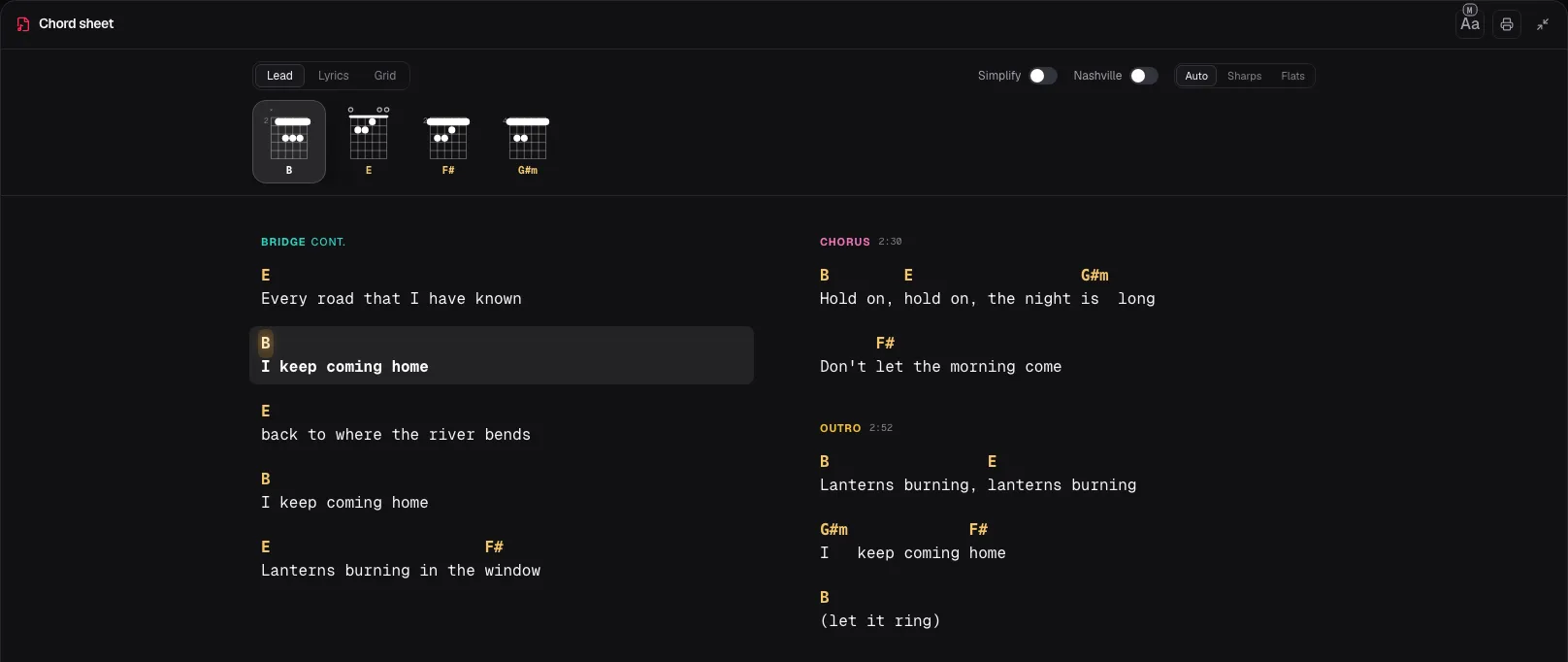
The Lead view puts the chords over the words as they are sung, where the song has lyrics, and lights the line playing now. A shape for each chord sits above it, for guitar, bass, ukulele, mandolin or piano. Turn on Simplify for easier chords, or Nashville to see the numbers.
Where Chord Lens finds the song’s sections, intro, verse, chorus and bridge, it marks them along the song, so you can jump to the bridge or loop the bars you’re working out. Free saves 3 loops per song; Premium and Pro save as many as you like. When you want the chart on a music stand, Premium prints it, chords and words together.
03 / 08 · WHERE UG WINS
Where Ultimate Guitar is the better pick.
Riffs and solos. Chord Lens gives you chords and their shapes, not tablature or notation. Ultimate Guitar’s Tabs (Pro) type carries full notation, with notes and accidentals, and its Official tabs are made by its own team. If you need the exact notes of an intro riff, a tab is the faster route. In Chord Lens the nearest thing is to solo the guitar stem and learn the riff by ear.
A catalogue to browse. You can open Ultimate Guitar, search a title and start playing without a video. Chord Lens starts from a link or a file.
Players who write. Ultimate Guitar is a community: anyone can submit a tab, and each approved one earns a month of Pro. Its pages list bass, ukulele and drum versions too.
Its own apps. Ultimate Guitar has an app for iPhone, iPad and Android in the App Store and Google Play, with offline favourites, playlists and a left-handed mode; with Pro it adds a tuner, a metronome, transposing, autoscroll and printing, plus UG Courses lessons in the same subscription. Chord Lens has no tuner, and on a phone it is a mobile web app rather than a store app.
04 / 08 · USE BOTH
Using both, a song at a time.
Most players don’t have to choose. Look the song up on Ultimate Guitar first. If there’s a tab that matches the recording, play from it.
If there isn’t, or the chords sound wrong against the version you’re learning, paste the same video into YouTube to Chords. You get the chords of that recording in time, the key and the tempo, and the sections marked along the song where it finds them. Move the key up to 12 semitones either way, set a capo, or play anywhere from half speed to double with the pitch left where it is.
When you want to hear your own part, split the song into stems and mute it: vocals, drums, bass, piano, guitar and other. On Free you split a 2-minute part of the song you choose, 5 times a day, on a computer. For the words with the chords on a phone, open the same song in the Studio there.
Found a tab that’s close but not quite? Play it against the Chord Lens chart of the same video and listen for the bar where they part.
05 / 08 · Who it’s for
Who each one is for.
Chord Lens
- The song has no tab, or the tab is for a different version from the one you’re learning.
- You learn from YouTube, covers and live takes included, and want the chords in time on the video.
- You want to mute your part and play with the band, with key and speed free.
Ultimate Guitar
- You want note-for-note tabs of riffs and solos, or notation.
- You want to browse millions of songs that players have already written up, and share your own.
- You want a store app with a tuner, lessons and offline favourites.
06 / 08 · HOW WE CHECKED
How we checked.
We read Ultimate Guitar’s About page, its help article on tab types, its Submit a tab page and its App Store and Google Play listings on 23 October 2026, signed out, and linked each one below. Its home and Pro pages show almost nothing without JavaScript, so we took nothing from them but the home page’s headline; no Ultimate Guitar prices appear here, see its Pro page for yours.
We make Chord Lens. Every Chord Lens row comes from the Studio’s Upgrade page, its plan limits and our YouTube to Chords page the same day.
We ran no tests and print no scores: how close either one gets to a song is for your own ears. If a page changes, the date at the top tells you how old this is.
- Ultimate Guitar: home page (headline: catalogue and tab types)
- Ultimate Guitar: About (2M+ tabs and chords, Official tabs, community)
- Ultimate Guitar Help: Tabs (Official, non-official, Chords, Tabs (Pro), bass, ukulele, drums)
- Ultimate Guitar: Create a new tab (submissions, a month of Pro per approved tab)
- Ultimate Guitar: Chords & Tabs on the App Store (free and Pro features, UG Courses)
- Ultimate Guitar: Chords & Tabs on Google Play (Android app)
- Ultimate Guitar: Pro (prices; renders with JavaScript only, not read; checked 23 October 2026)
07 / 08 · Try it on your song
AI YouTube to Chords
Paste any YouTube link and get the chords of that recording in time. Free, no card.
01Is Chord Lens a free Ultimate Guitar alternative?
For chords, yes. The Free plan gives you chords in time on any YouTube video, the shape for your instrument, the words where the song has them, key, capo and speed, and no ads. It doesn’t replace Ultimate Guitar’s tabs: Chord Lens has no tablature or notation.
02How does Chord Lens get chords for a song with no tab?
It listens to the recording. Paste a YouTube link into the Studio, or click Chords under the video with the Chrome extension, and Chord Lens works the chords out from the song’s own sound, then plays them in time. Nobody has to have written the song up first.
03Does Chord Lens have tabs for solos and riffs?
No. Chord Lens shows chords and their shapes, not note-for-note tabs. To learn a riff, split the song into stems, solo the guitar, loop the bar and slow it down. For written-out solos, Ultimate Guitar’s tabs are the better pick.
04Are the chords always right?
No tool gets every song right, and we ran no test against Ultimate Guitar. Songs with a clear band and steady chords come out right most of the time; busy jazz voicings and noisy recordings are harder. Check the chart by ear, the same as you would a user-written tab.
05Can I use Chord Lens for bass or ukulele?
Yes. Chord Lens draws shapes for guitar, bass, ukulele, mandolin and piano; on bass it shows the notes to play. Pick the instrument above the chords, and set a capo on guitar, ukulele or mandolin.
06Is there a Chord Lens app for my phone?
Not in the app stores. On a phone the Studio installs to your home screen as a mobile web app, with the chords, the words and the sections. Splitting stems and uploading files need a computer. Ultimate Guitar has apps in the App Store and Google Play.