 Chord Lens
Using Chord Lens · 02 of 02
CHORD LENS FOR MAC: GET STARTED. the Studio, in its own window
The short answer
Chord Lens for Mac is the Chord Lens Studio in its own window, for Macs with Apple silicon (M1 or later). Download it from chordlens.app/download, drag it into Applications, and allow it once in System Settings. Then sign in with your Google account and open any song for its chords, words and stems.
01 / 09 · WHAT
The Studio, with its own place in your Dock.
Chord Lens for Mac is the same Chord Lens Studio you use on the web, in a window of its own. You sign in with the same Google account as on the web, so your plan and your History come with you.
So why have an app at all? Mostly because it is easier to live with. It has its own icon in the Dock and in Applications, it opens straight into the Studio rather than one more browser tab among twenty, and it stays out of the way of whatever else your browser is doing. If you practise every day, opening the app becomes part of the routine, the way opening a tuner or a metronome is.
What it does is what the Studio does: it turns a song from YouTube, or your own audio file, into chords in time with the music, with the shape for your instrument, the words where the song has them, the key and the tempo, and the song’s sections. On a Mac with Apple silicon it also splits an audio file you upload into six stems, so you can mute your own part and play along with the rest of the band.
02 / 09 · WHAT YOU NEED
An Apple silicon Mac and a Google account.
The app is for Macs with Apple silicon: M1 or later. Intel Macs aren’t supported yet, because the stem split needs Apple silicon. If you’re not sure which you have, open the Apple menu, choose About This Mac, and look for a chip name starting with M.
On an Intel Mac, or on Windows or Linux, use the Studio on the web instead at chordlens.app/studio: chords work in any browser, and splitting stems needs Chrome or Edge on a computer. Apps for Windows and Ubuntu are coming next, says the download page.
You also need a Google account to sign in. It’s the same sign-in as the web Studio, so if you already use Chord Lens in your browser, use that same account and everything you saved comes with you.
03 / 09 · INSTALL
Install it in five steps.
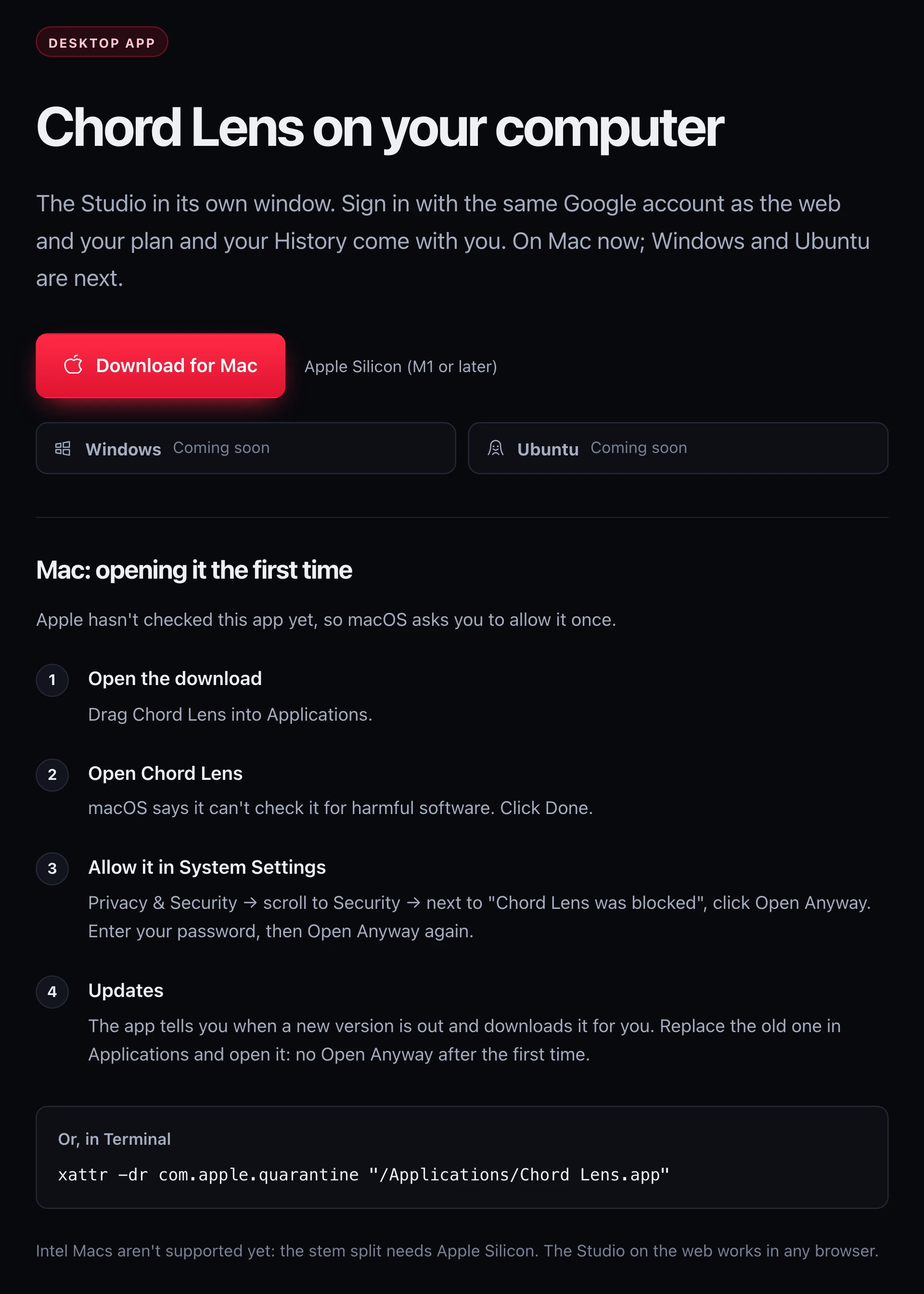
Go to chordlens.app/download on your Mac. The page shows a Download for Mac button with the version and the size when it knows them. Then follow these steps; the third is the only unusual one, and you do it once.
The screenshot is that download page: the Download for Mac button with Apple silicon (M1 or later) beside it, and the steps for opening the app the first time, ending with how updates work.
Download it
On chordlens.app/download, press Download for Mac. A disk image file downloads to your Mac.
Move it to Applications
Open the download and drag Chord Lens into Applications.
Open it once
Open Chord Lens. macOS says it can’t check it for harmful software. Click Done.
Allow it in System Settings
Go to Privacy and Security, scroll to Security, and next to Chord Lens was blocked click Open Anyway. Enter your password, then Open Anyway again.
Sign in
Chord Lens opens on the Studio. Sign in with the same Google account you use on the web.
04 / 09 · FIRST OPEN
Why macOS asks, and how to answer.
Apple checks apps from developers it has registered, and Chord Lens hasn’t been through that check yet. So the first time you open it, macOS stops and says it can’t check the app for harmful software. That message is about the missing check, and it shows for every app that hasn’t had it. You allow the app once in System Settings, and macOS remembers your choice.
If you’re comfortable with Terminal, there is a shortcut that does the same thing. After moving the app into Applications, run this command, then open the app as usual: xattr -dr com.apple.quarantine "/Applications/Chord Lens.app". It removes the flag macOS puts on downloaded files, which is what triggers the question.
Either way, you only do this once. The download page says updates don’t ask again: no Open Anyway after the first time.
Keep Chord Lens in your Dock once it opens. Practice starts more often when the song is one click away.
05 / 09 · FIRST SONG
Your first song in the app.
Open a song. Paste a YouTube link into the box at the top of the Studio, or press Upload file and choose an MP3, WAV or M4A from your Mac. The song opens with its chords in time with the music, the key and the tempo, and the sections along the top.
Pick your instrument. Live chords shows the shape of each chord as it comes, for guitar, bass, ukulele, mandolin or piano. Move the key up or down with the Key stepper, add a capo on guitar, or step the BPM down to practise slower without changing the pitch.
Split it. Press Split stems and the song separates into vocals, drums, bass, guitar, piano and other, each with its own fader, mute and solo. Above the faders, Vocals only, Instrumental, Karaoke and Rhythm only set the mix in one press. On Free you split a 2-minute part of the song, the part you choose; Premium splits up to 8 minutes and Pro up to 12.
Choose a layout. The Layout menu in the top right switches between Practice, Mixing, Play along and Sheet only, so the window shows the chords, the mixer or the chart the way you want them on your screen. Our guide to learning a song quickly takes it from there.
06 / 09 · UPDATES
Updates come to you.
You don’t have to check for new versions. The app tells you when a new version is out and downloads it for you. Replace the old one in Applications and open it, and that’s it: no Open Anyway after the first time.
Because the app shows the Studio itself, the Studio’s own improvements reach you the same day they reach the web, whether or not the app has a new version. The app’s updates are about the window around it.
07 / 09 · WEB OR APP
Use whichever is in front of you.
The Mac app and the web Studio are one account: sign in with the same Google account and your plan and your History are in both. Songs you split or upload are kept on the computer that split them. The web Studio shows chords in any browser, so a borrowed laptop or a church computer works too; splitting there needs Chrome or Edge.
On a phone, the Studio installs to your home screen as a mobile web app with the chords and the words; splitting needs a computer. Our guide to the chord app for iPhone and Android covers that side. If you watch on YouTube, the chords on YouTube guide shows the chords under the video itself.
08 / 09 · Do it in one click
Chord Lens for Mac
The Studio in its own window on your Mac: chords, words and stems for any song. Apple silicon.
01Is there a Chord Lens app for Mac?
Yes. Chord Lens for Mac is the Studio in its own window, for Macs with Apple silicon (M1 or later). Download it from chordlens.app/download.
02Does it work on an Intel Mac?
Not yet: the stem split needs Apple silicon. On an Intel Mac, use the Studio on the web: splitting there needs Chrome or Edge.
03Why does macOS say it can’t check Chord Lens?
Apple hasn’t checked the app yet, so macOS asks you to allow it once. Click Done, then Open Anyway in System Settings, Privacy and Security.
04Do I need to allow it again after an update?
No. The app tells you when a new version is out and downloads it for you; replace the old one in Applications and open it, with no Open Anyway.
05Are my songs the same as on the web?
Yes. You sign in with the same Google account as on the web, so your plan and your History are the same in both. Songs you split or upload are kept on the computer that split them.
06Is there a Windows or Linux app?
Not yet. Windows and Ubuntu are coming soon, says the download page. Until then, the Studio works in your browser at chordlens.app/studio.
07Is the Mac app free?
The download is free, and the app runs the same plans as the web: Free splits a 2-minute part of a song, Premium up to 8 minutes and Pro up to 12.