 Chord Lens
By instrument · 10 of 14
HOW TO LEARN DRUM PARTS BY EAR. one limb at a time
The short answer
To learn drum parts by ear, split the song into stems and solo the drums. Slow it to about 0.75× with a click on the song’s own beat, loop one bar, and learn the groove one limb at a time: kick, then snare, then hi-hat. Loop each fill on its own, then play along with the drums muted.
01 / 08 · WHY
Easy to feel. Hard to copy.
Anyone can nod along to a drum part. Copying it is another thing. A drum kit is five or six instruments played by four limbs at once, and in a full mix each of them hides behind something else. The kick sits under the bass guitar. The hi-hat shares its space with strummed guitars and shakers. The snare is the easy one, until a ghost note slips in between the backbeats.
Fills are harder still. A fill lasts a beat or a bar, it changes every time it comes round, and it is over before you’ve heard which drums it went across. Rewinding a video to catch it again and again gets you a vague idea and a sore finger.
So the first step isn’t playing at all. It’s hearing the kit clearly, on its own, slowly, with a steady count under it. Once you can hear just the drums, most grooves turn out to be simple patterns repeated, and most fills a handful of notes in a clear order.
After that the method is the one drum teachers have always used: break the groove into limbs, count it, play it slowly, and only then put it back together with the band.
02 / 08 · METHOD
Learn a drum part in six steps.
Work one section at a time: the verse groove, the chorus groove, then the fills that join them. Most songs only have a few different grooves, so you’ll learn more of the song than you expect in a single session.
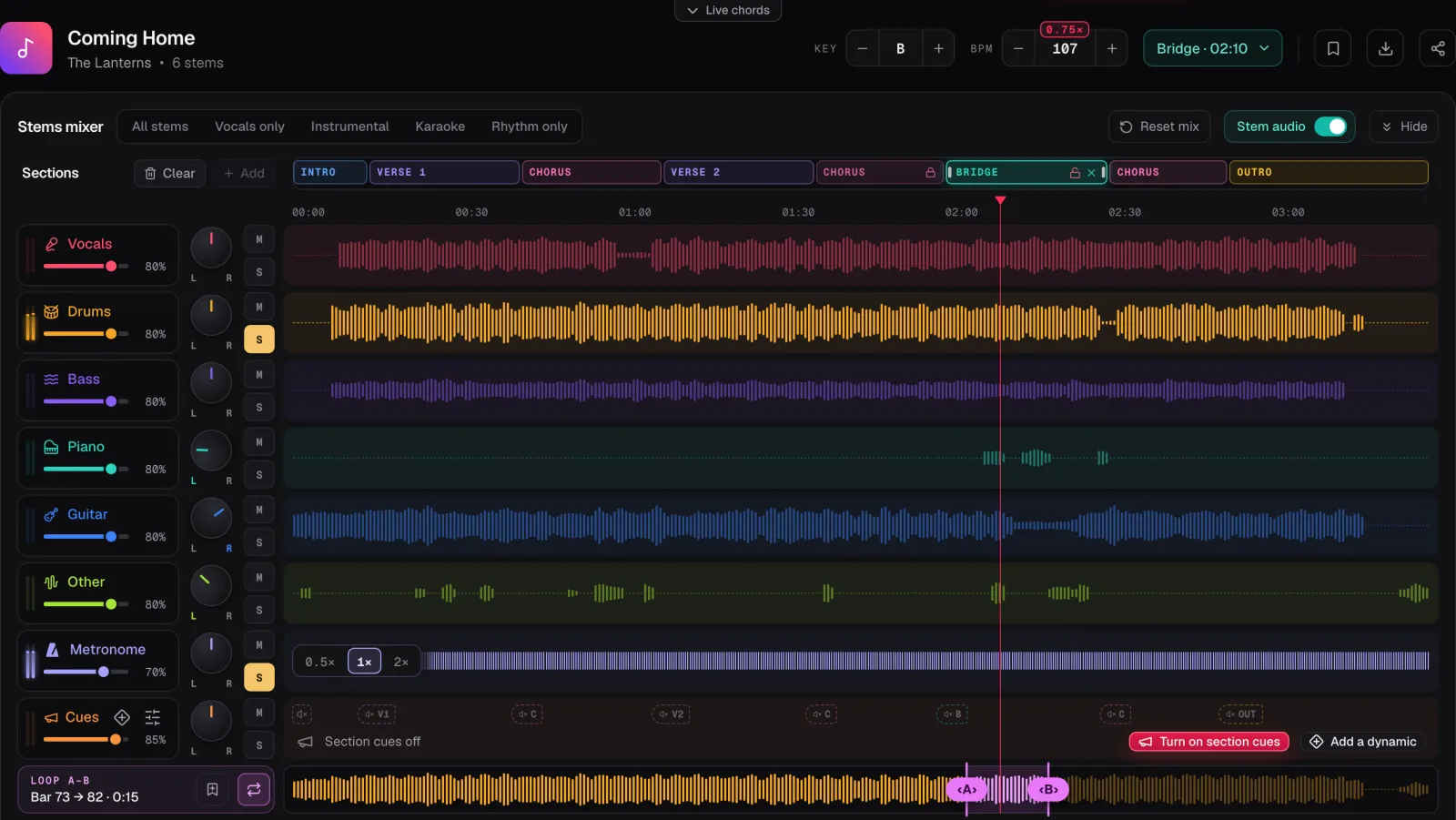
In the screenshot the demo song Coming Home is split into six stems. The S on Drums is lit, the metronome is on with its own S lit so the click plays beside the kit, and the tempo is down from 143 to 107 BPM, marked 0.75×. The song’s sections run along the top, so you can see the chorus coming.
Open the song
Upload an MP3, WAV or M4A file into the Chord Lens Studio on a computer.
Split and solo the drums
Press Split stems, then S on the Drums row. The whole kit plays alone.
Add the click
Turn the metronome on and press S on its row too, so the click plays with the soloed drums.
Slow it down
Step the BPM down to about 0.75×. The click slows with the song and stays on its beats.
Loop one bar
Turn the loop on and drag A and B around one bar of the groove, or around a fill and the bar before it.
Play it, then mute them
Learn the part limb by limb, then press M on Drums and play it yourself over the band.
03 / 08 · GROOVE
Kick, then snare, then hats.
Loop one bar of the groove and count it out loud with the click: “one and two and three and four and”. Every hit in a basic rock or pop groove lands on one of those words. Your job is to work out which words each drum plays on.
The kick first. Listen only for the low thump and tap your foot on each one. Most grooves put a kick on beat one; after that it varies, and the kick pattern is what makes one groove different from another. If it’s hard to hear, press Rhythm only in the Stems mixer: it plays the drums and the bass together, and the bass usually plays with the kick, which makes the kick pattern easier to follow.
Then the snare. In most songs it’s on two and four, the backbeat. Check whether that’s all it plays. Quiet extra snare hits between the backbeats, called ghost notes, give a groove much of its feel. At 0.75× you can usually hear them; at half speed you can count them.
Then the hi-hat or ride. Is it playing on every beat, every “and” as well, or faster? Is it open on some notes? The cymbal pattern is usually the steadiest part of the groove, so once you have it, it holds everything else together.
Now put the limbs back together slowly, two at a time: kick and hats, then add the snare. Write the groove down as a grid of counts if it helps: one line per drum, a mark under each count it plays. It is quicker than notation and it is all you need to remember a groove.
Turn the click to 2× for a slow song. It clicks on every “and” as well as the beat, which makes it much easier to place hi-hat notes and ghost notes exactly.
04 / 08 · FILLS
Fills live at the joins.
Most fills come at the end of a section, leading into the next one: the last bar of a verse before the chorus, the bar before the bridge. The Studio shows the song’s sections in time along the top of the mixer, so you can see exactly where each one ends and find the fill without hunting.
Loop the fill together with the bar before it. Playing the fill alone teaches you the notes; playing it out of the groove teaches you how to get into it without dropping a beat, which is where most players go wrong. Let the loop also run onto the first beat of the next section, so you practise landing the crash on one.
Slow a fast fill right down. At half speed a run around the toms comes apart into single strokes you can count. The Studio’s BPM goes as low as half the song’s tempo, one BPM at a time, and the drums keep their pitch, so the toms sound like toms. Learn the order of the drums first, then the rhythm, then raise the speed a few BPM at a time.
Save the loop when you have it and give it a name. Free keeps 3 saved loops per song, which is enough for the fills into each chorus. For a song you play often, the fills are worth learning exactly, because the band listens for them as cues.
05 / 08 · PLAY ALONG
Mute the drums. You’re the drummer now.
When the groove and the fills are in your hands, flip it round: press M on the Drums row and the band plays on without them. That is a drumless track of the record you just learned, and you are the one holding it together.
Keep the click on at first. The metronome clicks on the beats tracked from the recording, with beat one accented, so it follows the band if they push or pull. Turn it down a little each time through, until you are keeping time with just the bass and guitars. The metronome for songs guide has the routine for fading the click.
Not ready to lose the original drums completely? Pull the Drums fader down low instead of muting it. You’ll still hear a faint guide, and your playing on top of it will tell you straight away where you differ from the record.
Want the band to call the sections as you play? The Guide Track Maker adds spoken cues to the song: each section’s name a bar early and a count-in, the way drummers hear them in their in-ears on stage.
06 / 08 · GOOD TO KNOW
What the split can and can’t do.
Drums are usually the cleanest of the six stems, because a kick, a snare and a hi-hat sound like nothing else in the band. Cymbal wash can leave a trace in Other, and shakers, tambourines and electronic percussion can split between Drums and Other. If you still hear a bit of the kit after muting Drums, pull Other down a little.
The whole kit is one stem, so you can’t solo the snare or the hi-hat on its own; your ears do that part. Chord Lens gives you the drum audio and the song’s sections, not drum notation. Studio versions split more cleanly than live recordings.
Splitting runs in your browser on a computer, in Chrome or Edge, and the first split downloads the splitting engine once, about 140 MB. Free splits a 2-minute part of the song that you choose; Premium splits up to 8 minutes and Pro up to 12. For working out the tempo before you start, see finding the BPM of a song.
07 / 08 · Do it in one click
Drum Stem Splitter
Solo the drums from any song, slow them down, and play along with a click on the song’s beat.
01How do I learn drum parts by ear?
Solo the drums, slow the song to about 0.75× with a click on its beat, and loop one bar. Learn the kick, then the snare, then the hi-hat, and loop each fill on its own.
02How do I hear the drums on their own?
Split the song into stems and press S on the Drums row. The whole kit plays alone, with the song’s sections in time above it.
03Can I hear the kick and snare separately?
No. The kit is one stem. Listen for one drum at a time, and use Rhythm only to hear the kick against the bass.
04Can I keep a click while the drums are soloed?
Yes. Turn the metronome on and press S on its row as well. It clicks on the song’s own beats and slows with the song.
05How do I make a drumless track to play along with?
Split the song, press M on the Drums row, and the rest of the band plays on without them. Keep the metronome on if you want a click.
06How slow can I play the drums back?
Down to half the song’s tempo in the Studio, one BPM at a time, without changing the pitch.
07Does Chord Lens write out drum notation?
No. It gives you the drum audio and the song’s sections in time. Write the groove down as a grid of counts as you learn it.