 Chord Lens
Practise and play · 06 of 07
A GUITAR PRACTICE ROUTINE THAT STICKS. little and often beats long and rare
The short answer
A guitar practice routine that sticks is short and the same every day: about 25 minutes, in four blocks. Warm up with chord changes, drill the hardest bars of this week’s song on a loop, play the whole song, then finish with something you enjoy. Pick one song each Monday and play it with the band by Sunday.
01 / 08 · WHY
Most routines fail on day four.
Most guitarists have started a practice routine. Few have kept one. The usual plan is too big: an hour a day of scales, theory, technique and songs, written down on a Sunday night with real enthusiasm. By Thursday there wasn’t an hour, so nothing happened, and by the next week the plan is a guilty memory.
A routine that sticks is the opposite. It is short enough that you can do it on a bad day, the same every day so you don’t spend the first ten minutes deciding what to do, and built around a song, so every session ends with music rather than exercises. Twenty-five minutes, five days a week, adds up to more than two hours, and more than one long session you skipped.
It also needs to start fast. The minutes you lose finding the song, finding the hard bar, and finding the speed you were at yesterday are the minutes that make practice feel like a chore. So set things up once, at the start of the week, and let each day pick up where the last one left off.
02 / 08 · METHOD
Twenty-five minutes, four blocks.
Do the blocks in this order every day. Use a timer: stopping when it rings keeps the session short enough to come back to tomorrow.
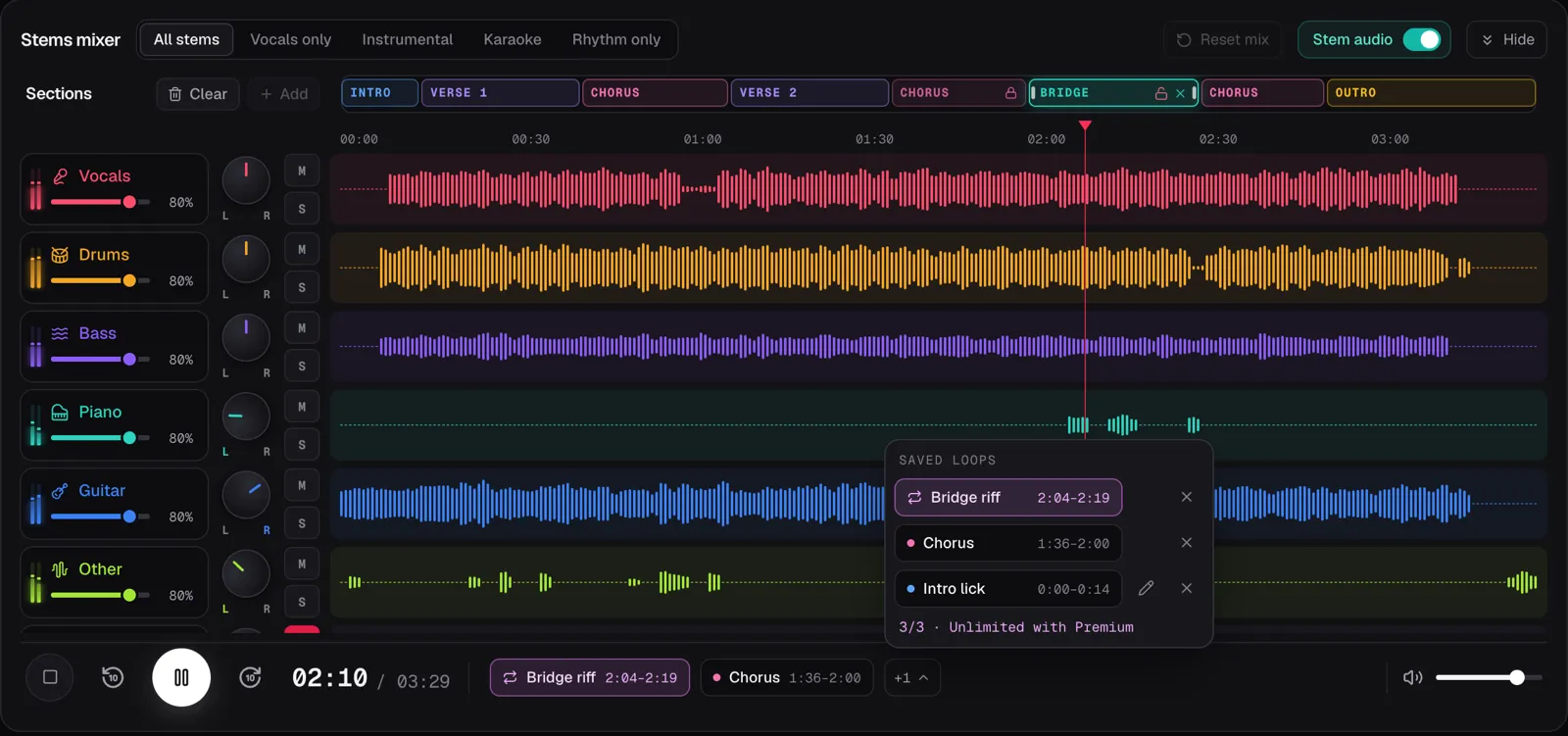
In the screenshot the demo song Coming Home is open in the Chord Lens Studio with its saved loops listed: Bridge riff, Chorus and Intro lick, each with its times. The sections run along the top of the mixer, and the loop chips sit in the transport, one press from playing.
Warm up with changes, 5 minutes
Take two chords from this week’s song and switch between them for one minute, counting the clean changes. Then the next pair.
Drill one loop, 10 minutes
Open the song, pick today’s saved loop, slow it until you can play it cleanly, and play it round and round.
Play the whole song, 5 minutes
Turn the loop off and play from the top to the end without stopping, at whatever speed holds together.
Play for fun, 5 minutes
Finish with a song you already know, or play over the band with your guitar muted. End on music.
03 / 08 · THE WEEK
One song a week, a job for each day.
Monday: set it up. Pick one song for the week, a little harder than what you can play now. Open it in the Studio and listen once through with the chords in time. Find the three places you can’t play yet, the bars that make you wince, and save a loop around each. Name them so you know what they are: Bridge riff, Chorus changes, Intro lick.
Tuesday to Thursday: one loop a day. The hardest loop on Tuesday, the next on Wednesday, the third on Thursday. In each session’s middle block, slow the song until the loop is clean, then step the BPM up a few at a time. When it holds at a speed, rename the loop with that tempo, say “Bridge riff 120”, so tomorrow you start there rather than from scratch.
Friday: put it together. No loops. Play the whole song through with the record at a speed you can manage, then a few BPM faster. Note where it falls apart: that is next week’s loop, or tomorrow’s.
Saturday: play with the band. Split the song into stems and mute the guitar, so you play your part where the original was. Our guide to making a backing track has the details. This is the day the week pays off.
Sunday: rest or review. Take the day off, or play last week’s song once for fun. Then pick next Monday’s.
Choose the song before you pick up the guitar. Deciding what to practise is the step that kills most sessions, so the routine decides it on Monday, once.
04 / 08 · LOOPS
The loop is the lesson.
The middle block is where you get better, and it only works on a short stretch of music. Four bars is plenty; one bar is fine. Play the whole song every time and you spend most of the session on the parts you can already play.
A saved loop keeps that stretch ready. In the Studio, set a loop around the bars, save it, and give it a name. Next time you open the song, it is in the list, one press away. Saved loops are kept for your account in that browser, each with its name and its start and end. The song still opens with looping off, so you choose which one to play.
Free keeps 3 saved loops per song, which is exactly one week of this routine. Premium and Pro keep as many as you like. When a loop is learned, remove it with its × and save the next one.
The rest of your set-up stays too. If you change a song’s mix, say to turn the original guitar down, or move a section’s edges, the Studio keeps that for you on that song, so tomorrow it opens the way you left it.
05 / 08 · TRACK IT
A log you don’t have to write.
A routine sticks better when you can see it working. You don’t need a practice diary. The Studio’s History, in the sidebar, lists every song you have looked up in Chord Lens, in the Studio or with the Chrome extension, grouped by day: Today, Yesterday, This week, then month by month. Each row shows the song, its key, when you opened it, and a count when you have looked it up more than once.
Look at it on Sunday. Five days with this week’s song in them is a good week. A gap tells you which day went missing, so you can move the routine to a time that works. Search it or filter it by Studio or Extension when the list gets long.
The Dashboard picks up where you stopped. Open the Studio and, for the song you had open last on that device, it says where you were, such as “You stopped at 2:10, in the second chorus”, with the next few chords from there and a Resume button. For a weekly song, put it in a folder of its own in the Library’s collections, so this week’s song and last week’s are a click apart.
06 / 08 · GOOD TO KNOW
What the Studio keeps, and where.
History is your account’s, on any device you sign in on. Saved loops, the mix, your section edits, the resume point and your collections are kept in the browser you used, for your account, so a different computer starts without them. Signed out, nothing is kept.
The Studio doesn’t time your sessions or tell you how long you practised; use a timer for that. The chords, loops, key and speed are free; splitting the song to mute the guitar needs a computer with Chrome or Edge, and Free splits a 2-minute part of the song that you choose.
07 / 08 · Do it in one click
Chord Lens Studio
Open this week’s song with the chords in time, its hard bars saved as loops, and pick up where you stopped.
01How long should a guitar practice routine be?
About 25 minutes a day, five days a week, is enough to improve steadily and short enough to keep doing. Consistency matters more than length.
02What should a guitar practice routine include?
A short warm-up of chord changes, a slow loop of the hardest bars, a full play-through of the song, and a few minutes of playing for fun.
03How many songs should I work on at once?
One a week. Learn its three hardest passages first, then put the song together and play it with the band at the end of the week.
04How many loops can I save?
Free keeps 3 saved loops per song, enough for one song a week. Premium and Pro keep as many as you like.
05Does the Studio remember my tempo?
Your loops, mix and sections are kept, and the Dashboard knows where you stopped. Put the tempo you reached in the loop’s name to keep it.
06Can I see what I practised this week?
Yes. History lists every song you looked up, grouped by day, with a count when you opened one more than once.
07Is it free?
Yes. The chords, saved loops, key and speed are free. Muting the guitar needs a split: Free splits a 2-minute part of the song.