 Chord Lens
Compare · 07 of 07
FREE VOCAL REMOVERS, COMPARED. what you get for nothing
The verdict
The best free vocal remover depends on what you need. For free files you keep, Ultimate Vocal Remover on your computer or Fadr’s MP3s. For many tools in one app, Moises or LALAL.AI, with limits. For singing or playing along to a YouTube song with its chords and words in time, Chord Lens.
01 / 07 · SIDE BY SIDE
What each one gives you free.
Five well-known vocal removers, compared on what each one says on its own site about its free plan. This is not a sound-quality test: we didn’t run the same songs through each one, so we don’t rank them by how clean the vocal comes out. Try two on a song you know; your ears are the test that counts.
Where a feature needs a paid plan or has a free limit, the cell names it. Rows we couldn’t confirm for every product are left out of the table and covered below where a site says it plainly.
| Capability | Chord Lens | Moises | LALAL.AI | Ultimate Vocal Remover | Fadr |
|---|---|---|---|---|---|
| Free to use | With a catch. 2-minute part, 5 a day | With a catch. Limited tracks a month | With a catch. 10 minutes, previews | Yes. Free, open source | Yes. Basic plan |
| Download the result | With a catch. Premium MP3, Pro WAV | Yes. MP3, WAV and more | With a catch. Paid plans | Yes. Files on your computer | Yes. MP3 free, WAV on Plus |
| Other stems too | Yes. Six stems | Yes. 2, 4 or 5 tracks | Yes. Drums, bass, guitars, piano… | Yes. 4-stem models | Yes. Vocals, melodies, drums, bass |
| Chords as the song plays | Yes. With the shape to play | Yes. Detects beat and chords | No. Not on its page | No. Not on its page | Yes. Chord name |
- Yes
- With a catch, named in the cell
- No
02 / 07 · EACH ONE
The five, one by one.
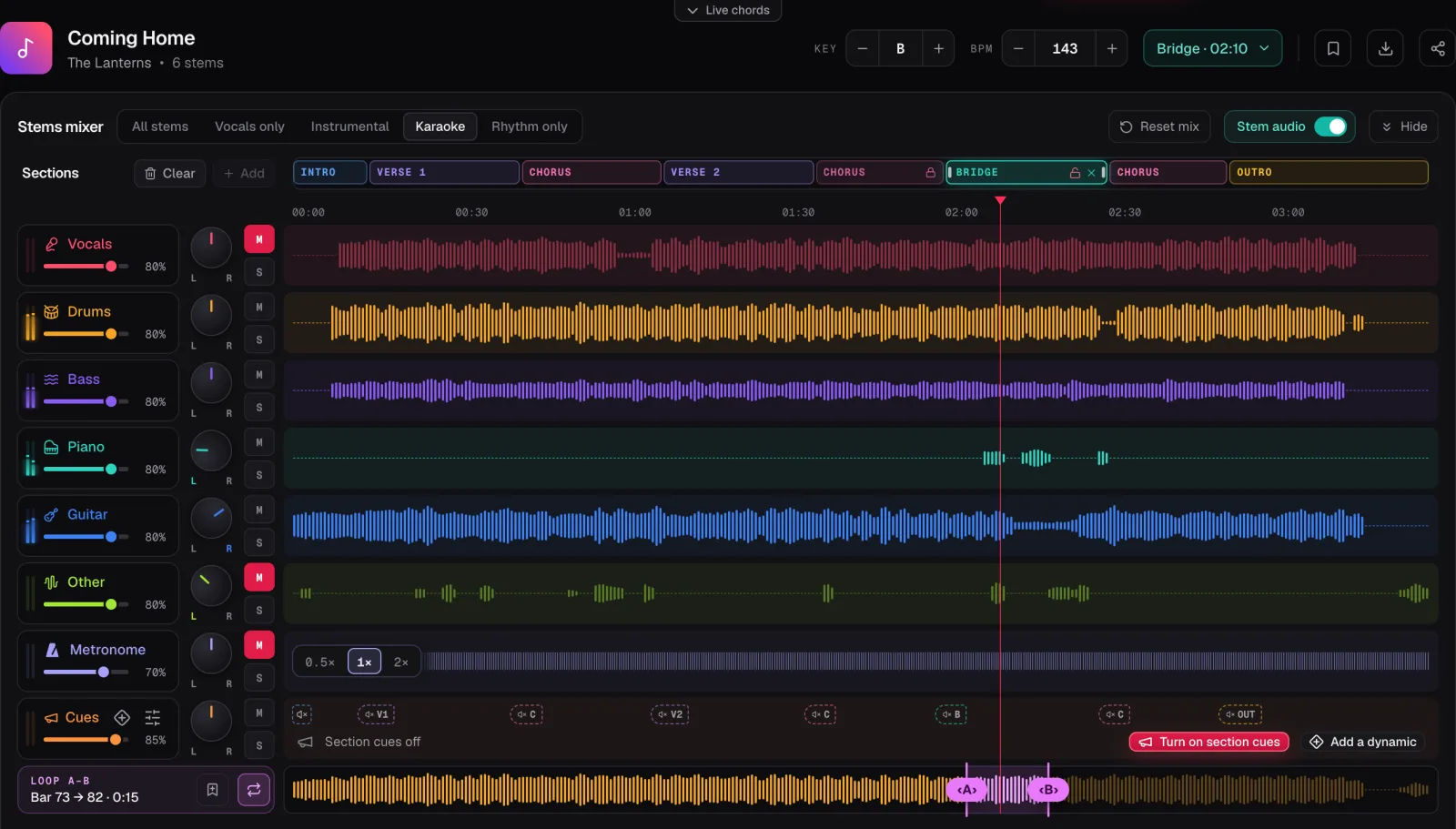
Chord Lens (ours) splits your own MP3, WAV or M4A file into six stems: vocals, drums, bass, guitar, piano and other. Karaoke takes out the vocals and Other, Instrumental takes out the lead vocal, and Vocals only keeps the voice. The split runs in your browser on a computer, in Chrome or Edge, with the chords and words in time above it. Free splits a 2-minute part you choose, 5 times a day, and plays it in Chord Lens; downloading the mix or the stems needs Premium (MP3) or Pro (MP3 and WAV).
Moises has a dedicated vocal remover that separates a song into 2, 4 or 5 tracks and can remove the lead vocal while keeping the background vocals. It takes a file from your library or a public URL, detects the beat and chords, and downloads tracks or a mix as MP3, WAV and other formats. It works on the web, desktop and phones. Free users can separate a limited number of tracks a month; its page doesn’t give the number.
LALAL.AI runs in your browser, with apps for Windows, macOS, Linux, iPhone, iPad and Android. It separates vocals and instrumental, drums, bass, guitars, piano and more, and can split lead from backing vocals. Its free Starter plan gives 10 minutes in the relaxed queue, with files up to 200 MB: you can preview the result, but downloading the full result needs a paid plan.
Ultimate Vocal Remover is free, open-source software (MIT licence) you install on Windows, macOS (Apple silicon and Intel builds) or Linux. It runs the separation models on your own computer, so speed depends on your hardware; its page names an Nvidia GTX 1060 6GB as the minimum for GPU conversions, and files other than WAV need FFmpeg.
Fadr can remove vocals and separate stems, and its free Basic plan gives vocals, melodies, drums and bass with MP3 downloads, which its page calls unlimited. It also detects the key, tempo and MIDI, and shows the chord name as the song plays. Fadr Plus adds more stems, including lead and background vocals and an instrumental, plus WAV downloads.
03 / 07 · CHOOSE
Pick by what you do with it.
Want a file you keep, for nothing? Ultimate Vocal Remover makes the files on your own computer if you are happy to install it, and Fadr’s Basic plan downloads MP3s in the browser. LALAL.AI’s free plan lets you hear the result but not download it.
Want the lead gone but the backing voices kept? Moises and LALAL.AI both say they separate lead from backing vocals; on Fadr that is part of Plus. Chord Lens keeps all the voices in one Vocals stem, though backing voices can land in Other.
Want to sing or play along to a song you have as a file? Upload it to Chord Lens, and the chords and words run in time over the band. That is what it is built for. It is for practising and studying a song yourself, and its Premium and Pro downloads are for your own study, not to share or publish.
On a phone? Moises and LALAL.AI have store apps. Chord Lens doesn’t split on phones: on a phone you get the chords and the words, and the split needs a computer.
Whichever you pick, a studio recording separates more cleanly than a live one. If the vocal leaves a ghost behind, try another upload of the same song before trying another tool.
04 / 07 · Who it’s for
Who each one is for.
Chord Lens
- You want to sing or play along to a song: upload your audio, press Karaoke, follow the words.
- You want the chords, the shape to play and the words in time over the band.
Moises
- You want the lead gone and the backing vocals kept, in one click.
- You want store apps and many export formats.
LALAL.AI
- You want to hear the result free before you pay, in the browser or an app.
- You need lead and backing vocals apart, or many instrument stems.
Ultimate Vocal Remover
- You want free files on your own computer and don’t mind installing software.
- You have a capable graphics card, or the patience to let a CPU run.
Fadr
- You want free MP3 stems with the vocal taken out.
- You make remixes and want MIDI and key and tempo in the same place.
05 / 07 · HOW WE CHECKED
How we checked.
We read each product’s own pages on 23 October 2026, signed out, and linked every one below. vocalremover.org, a popular free site, answered our requests with a browser check instead of its page, so we left it out rather than guess. Moises’s vocal remover page doesn’t say how many tracks a month the free plan gets, so neither do we.
We make Chord Lens. Every Chord Lens row comes from the Studio’s Upgrade page, the plan limits and the Studio itself the same day.
No test results, scores or rankings: we didn’t measure them. If a page changes, the date at the top tells you how old this is.
- Moises: Vocal Remover (free use, tracks, formats, platforms)
- Moises: home page (free tier, apps)
- LALAL.AI: home page (Starter plan, browser, apps, lead and backing vocals)
- LALAL.AI: pricing (Starter minutes, upload size, downloads)
- Ultimate Vocal Remover: official GitHub page (install, licence, requirements)
- Fadr: home page (Basic and Plus plans)
- Fadr: Stems Guide (remove vocals, chords, downloads)
- vocalremover.org (answered with a browser check, not read; checked 23 October 2026)
06 / 07 · Try it on your song
AI YouTube Vocal Remover
Take the vocals out of your own audio for karaoke, or keep only the voice. Free to try.
01What is the best free vocal remover?
We didn’t run a quality test, so we don’t name one. Pick by the job: free files on your computer (Ultimate Vocal Remover), free MP3s in the browser (Fadr), many tools with free limits (Moises, LALAL.AI), or singing along to a song with its chords and words (Chord Lens).
02Which vocal remover lets me download for free?
Ultimate Vocal Remover makes the files on your computer, and Fadr’s Basic plan downloads MP3s. LALAL.AI’s free plan gives previews only. Chord Lens plays the result free in the Studio; downloads come with Premium (MP3) and Pro (WAV).
03Can I remove vocals from a song with Chord Lens?
Yes. Upload your own MP3, WAV or M4A in the Studio on a computer, split it and press Karaoke or Instrumental. The others start from an audio file too; Moises also takes a public URL.
04Can I use Chord Lens on my own files, or only YouTube?
Both. The Chrome extension works right on the YouTube video you’re watching, listening to the song as it plays. To split stems, upload your own audio in the Studio (MP3, WAV or M4A, up to 50 MB). Premium exports stems as MP3 and Pro adds WAV, for your own study and practice.
05Can I keep the backing vocals and remove only the lead?
Moises and LALAL.AI say they can, and Fadr lists lead and background vocals on Plus. Chord Lens keeps every voice in one Vocals stem, though backing voices sometimes land in Other.
06Can I remove vocals on my phone?
Moises and LALAL.AI have phone apps. Chord Lens doesn’t split on phones, because phones don’t give a web page enough memory; on a phone you still get the chords and the words.
07Is it legal to remove vocals from a song?
Practising and studying a song yourself is broadly considered fair use under US copyright law, with similar rules elsewhere. Publishing a karaoke track or an acapella built on someone else’s recording needs a licence from the rights holder.