 Chord Lens
By instrument · 01 of 14
HOW TO LEARN GUITAR SONGS FROM YOUTUBE. the record is the teacher
The short answer
To learn a guitar song from YouTube, get the chords in time with the video first, then make them playable: set a capo so the shapes are ones you know, and switch on Simplify if the chart is full of sevenths. Solo the guitar to hear how it strums, slow the hard bars down, and play along.
01 / 09 · WHY
The song you want is already on YouTube.
Most guitar players learn their next song the same way: they hear it, find it on YouTube and try to play along. The video has everything you need, the right key, the right speed, the way this band plays it. What it doesn’t have is the chords, and a chord sheet found somewhere else may be for a different version, in a different key, or simply wrong.
Working from the recording itself fixes that. When the chords come from the audio you are listening to, they are in its key and they change when it changes. You don’t have to line a sheet up with the video in your head; you can look up at any moment and see the chord that is playing now and the ones coming next.
The rest of the job is guitar-specific. A chart that is right can still be hard to play: barre chords in B, a G♯m every other bar, a sus4 that changes nothing for a beginner. So the method below has two halves. First get the chords in time with the song. Then turn them into shapes your hands already know, with a capo and a simpler chart, and listen to the guitar on its own to hear how it is really played.
If you want to work the chords out yourself, by ear, our guide to finding the chords of a song covers that. This guide is the quicker route, for when you want to be playing the song tonight.
02 / 09 · METHOD
From YouTube video to playing along in six steps.
You need the song on YouTube, or as an audio file, and a guitar. On a computer, the Chord Lens Studio does all six steps; the Chrome extension shows the chords under the video on YouTube itself (see YouTube to Chords).
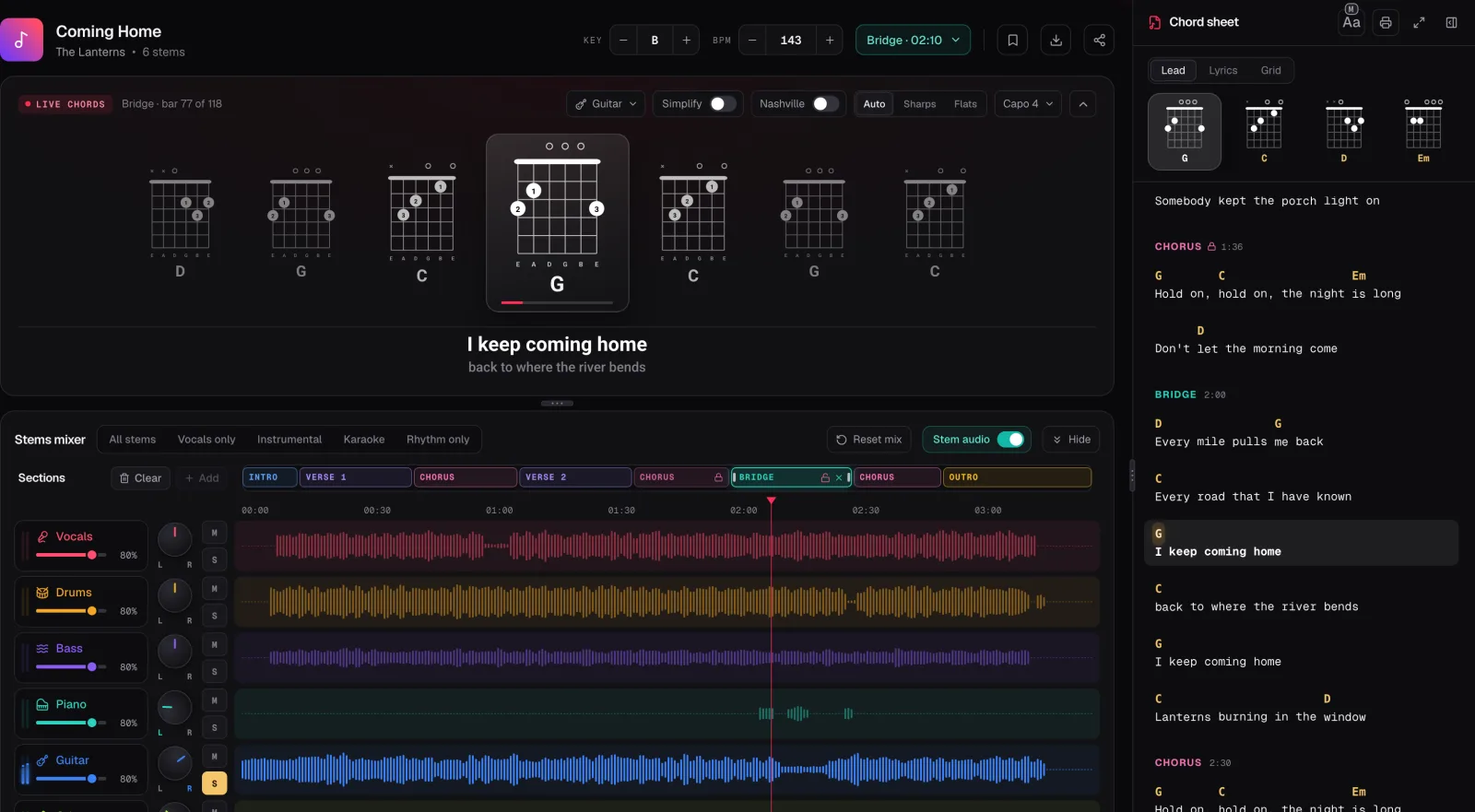
In the screenshot the demo song Coming Home, in the key of B, is open in the Studio with Live chords set to Guitar and Capo 4. The record still sounds in B, but every chord is drawn as an open shape: B becomes a G shape, E a C, F♯ a D and G♯m an Em. The chord sheet on the right shows the same shapes over the words, and the S on the Guitar row is lit, so only the guitar plays.
Open the song
Click Chords under the video with the Chrome extension, or upload an MP3, WAV or M4A file into the Chord Lens Studio.
Pick guitar
Set Live chords to Guitar. Each chord is drawn as a diagram, in time with the video, with the next ones lined up beside it.
Make the shapes easy
Set a capo until the chords turn into shapes you know, and switch on Simplify for plain major and minor chords.
Hear the guitar alone
Press Split stems, then S on the Guitar row, to hear how the part is strummed or picked.
Slow the hard bars
Step the BPM down and loop the bars you keep missing. The pitch stays where the record has it.
Play along
Bring the speed back up, unsolo the guitar, and play the whole song with the band, reading the chart as it scrolls.
03 / 09 · SHAPES
One diagram per chord, on the beat.
With Live chords on Guitar, the Studio draws each chord as a fretboard diagram: six strings, the dots where your fingers go, numbered with the finger to use, an × over a string you don’t play and an o over one that rings open. A barre is drawn as a bar across the strings, and a shape higher up the neck has its starting fret written beside it. The chord playing now is drawn large in the middle, with the ones before and after it beside it, so you can see the change coming.
Under the diagrams sit the words being sung, with the next line beneath. The chord sheet on the right has three views: Lead puts the chords over the lyrics, Lyrics shows the words alone, and Grid draws the song as bars of chords. Lead is the one to strum from. It scrolls with the song and lights the line being sung.
Real charts are full of chords a beginner doesn’t need. Switch on Simplify and every chord drops to its plain triad: G♯m7 becomes G♯m, Bsus4 becomes B, D/F♯ becomes D. The song still sounds right with you strumming the simple version, and you can turn Simplify off later to add the colours back one at a time. Our guide to chord symbols explains what each extra number means.
Learn the shapes before you try the changes. Play through the song’s chords in order, slowly, with no rhythm, and watch for the one change that trips you. In most songs it is a single move, often into or out of a barre chord. Practise that change on its own, back and forth, until you can make it without looking.
Most songs use only four to six chords, and they repeat. Learn the chorus first: it usually has the same chords as the verse in a different order, so you get two sections for the price of one.
04 / 09 · CAPO
Same song. Easier shapes.
Plenty of songs on YouTube sit in keys that are awkward on guitar. Coming Home is in B, and three of its four chords, B, F♯ and G♯m, are barre chords. Set Capo 4 and the Studio redraws the same song as G, C, D and Em, four of the first chords anyone learns. The record doesn’t move; your shapes do, and with the capo on the fourth fret they sound in B, right with the band.
The capo dropdown goes from 0 to 9, and every shape and every chord name on the sheet follows it at once, so the quickest way to choose is to try a few frets and stop at the one where the shapes look friendliest. Keys with open-chord friends are G, C, D, A and E. The capo chart lists the fret for every key if you’d rather look it up.
If the song is too high or too low to sing along with, change the key instead. The Key stepper moves the recording itself, up to 12 semitones either way in the Studio, and the chords move with it. You can use both: put the song in your voice’s key, then set the capo that gives easy shapes there. How the two work together is in our guide on how to use a capo.
05 / 09 · GUITAR STEM
The chords are half the song. The strum is the rest.
Knowing the chords gets you a long way. Sounding like the record needs the other half: how the guitarist strums, where they mute, whether they pick the strings one by one. In a full mix that is hard to hear, because the drums and the vocal sit on top of it. So take the guitar out of the mix and listen to it alone.
The Guitar Stem Splitter splits the song into six stems: vocals, drums, bass, guitar, piano and other. Press S on the Guitar row and only the guitar plays, with the chords still lit above it. Acoustic and electric guitars both land in the Guitar stem; a second guitar or a keyboard part can land in Other, so solo that too if something seems missing.
Listen for the pattern first, not the notes. Is it steady eighth notes, or a pattern with gaps? Are the strings choked short on the backbeat? Once you can hear it, tap it on your knee, then play it on one chord until it sits with the record. Our guide to figuring out a strumming pattern has the counting method, and if the song has a lead break, learning a guitar solo by ear takes it phrase by phrase.
When you can play the part, flip it round. Press M on the Guitar row instead and the band plays on without the guitar. Now you are the guitar player on the record, and any slip is easy to hear.
06 / 09 · PRACTISE
Slow down the bar you keep missing.
Every song has a hard bar: a fast change, a chord you haven’t learned yet, a push before the chorus. Don’t practise the whole song to get it right. Turn the loop on, drag its A and B handles around that bar and the one before it, and play just that until it is clean.
If it is still too fast, slow it. The BPM stepper takes the song from half its tempo to double, one BPM at a time, and the pitch never moves, so the chords stay in the key you are playing in. Start at about 0.75×, play the loop three times clean, then raise it a few BPM. Our guide to slowing down a song without changing the pitch has the full routine.
Save the loop when you have it. Free keeps 3 saved loops per song, which covers the hard bars in most songs, and they are one press away the next time you open it. Then play the whole song through with the video, reading the chart. Getting to the end without stopping, mistakes and all, is a different skill from playing each bar right, and it is the one that makes the song yours.
07 / 09 · GOOD TO KNOW
What you need, and what it costs.
The chords, the shapes and the lyrics a song already has are free on every plan, with no ads. The Studio asks you to sign in free with Google, and Free has a set number of new songs each month. In Chrome, the Chord Lens extension shows the chords under the YouTube video itself and needs no account; it moves the key up to 6 semitones either way.
Splitting runs in your browser on a computer, in Chrome or Edge, and the first split downloads the splitting engine once, about 140 MB. Free splits a 2-minute part of the song that you choose; Premium splits up to 8 minutes and Pro up to 12. On a phone you still get the chords and shapes.
Chord Lens gives you chords and shapes in time, not tab. For a riff or a solo that needs exact notes, the soloed, slowed guitar stem is where your ear does the rest.
08 / 09 · Do it in one click
AI YouTube to Chords
Paste a YouTube link and get the chords in time with the song, drawn as guitar shapes with a capo.
01How do I learn a guitar song from YouTube?
Open the video with the Chrome extension, or upload the song to the Chord Lens Studio, and set Live chords to Guitar. Set a capo for easy shapes, solo the guitar to hear the strum, slow the hard bars and play along.
02How do I get the chords of a YouTube video?
Click Chords under the video with the Chrome extension, which listens to the song as it plays, or upload the song to the Studio. The chords come from the recording and play in time with it.
03The chords are all barre chords. What can I do?
Set a capo. The dropdown goes from 0 to 9, and the diagrams change to the shapes to play with it, while the record stays in its key.
04What does Simplify do?
It plays each chord as its plain triad: G♯m7 becomes G♯m, Bsus4 becomes B, D/F♯ becomes D. The song still sounds right.
05Can I hear only the guitar?
Yes, on a computer. Split the song into stems and press S on the Guitar row. A second guitar can land in Other, so solo that too if needed.
06Does Chord Lens give me guitar tab?
No. It gives you the chords in time with shape diagrams, and the guitar on its own, slowed down if you want, so you can hear the rest.
07Is it free?
Chords, shapes and lyrics are free on every plan. Free splits a 2-minute part of a song, the part you choose; Premium splits up to 8 minutes and Pro up to 12.